Claude Code Skills vs Commands: 47 Prompts
I copy-pasted the same review prompt 47 times last month. PRs, internal scripts, the README of a side project I was supposed to ship in 2024. The prompt was fine. I was the problem. Claude Code has had a feature for this since late 2025, and I’d been ignoring it because the docs page had a name I didn’t understand: Skills.
I finally caved when a teammate asked me, “what’s the difference between your custom commands and skills?” and I realized I had no idea. So I read the docs, ported my entire .claude/commands/ directory over, and now my workflow is shorter, sharper, and 100% less copy-paste. Here’s what I learned.
The thirty-second version
A Skill is a SKILL.md file inside a directory, plus optional helper files. You drop it in .claude/skills/<name>/, and from then on /<name> runs that workflow. Same one-letter slash invocation as the old /commands style, but Skills carry more weight: they can ship templates, scripts, and examples in the same package, and Claude itself can decide when to invoke them based on the description.
If you’ve been using .claude/commands/<name>.md, your old files still work. Anthropic unified the two formats. A file at .claude/commands/review.md and a skill at .claude/skills/review/SKILL.md both produce /review. But new development has moved to skills, and the GitHub tracking issue for full deprecation of .claude/commands/ is open. The wind is blowing in one direction.
What changed and why I care
The conceptual jump is small. The practical jump is large.
Custom commands were a single Markdown file. SKILL.md is a Markdown file plus a directory. That directory can hold a template Claude is supposed to fill in, a scripts/ folder of executables Claude is allowed to run, and an examples/ folder of “this is what good output looks like.” Suddenly the workflow stops being a long instructions blob and starts being a tiny package. I can hand a teammate a directory and they get the whole workflow, not just my prompt.
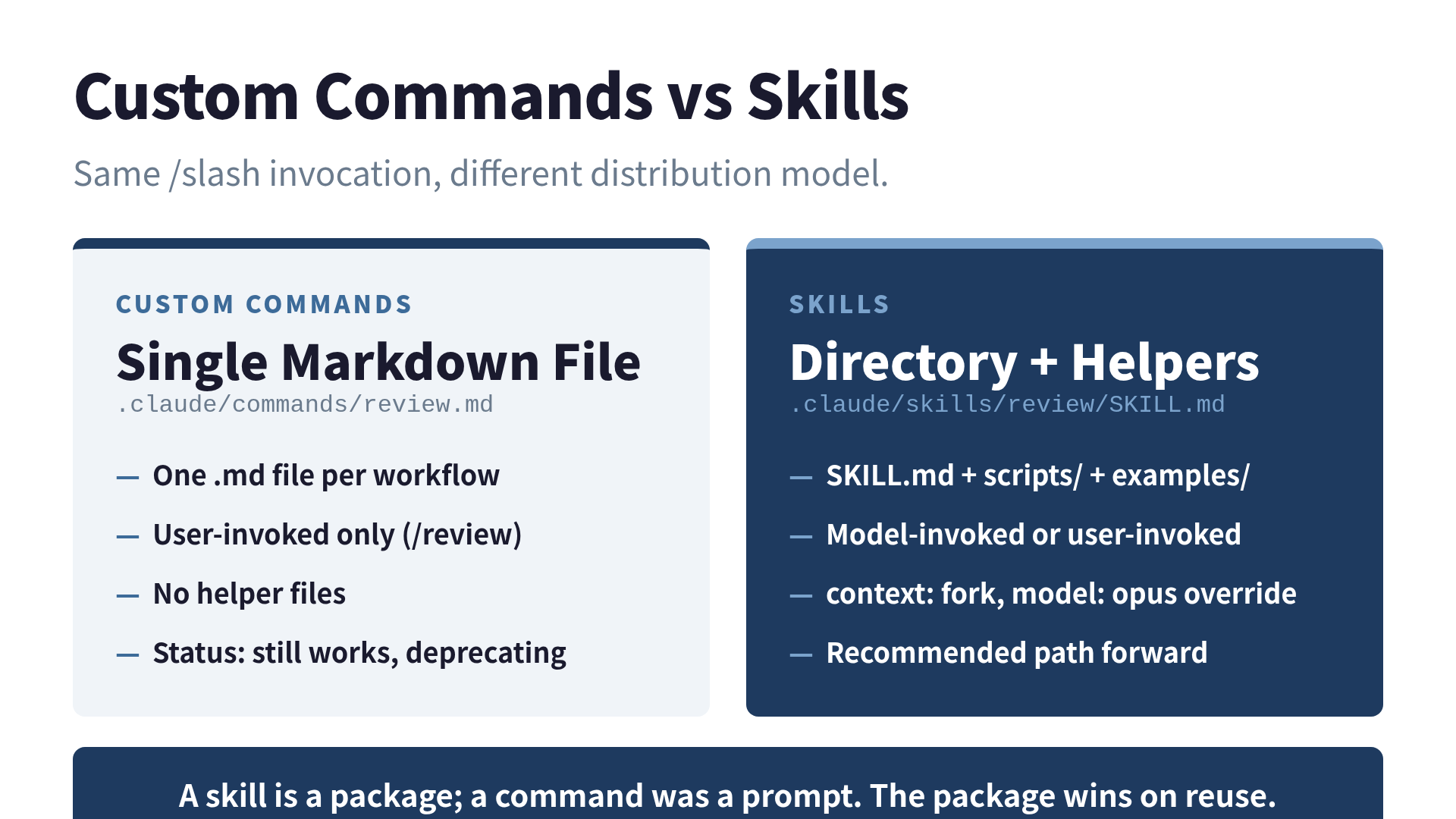
A Skill’s directory is the contract. Drop in helpers and they ship with the prompt.
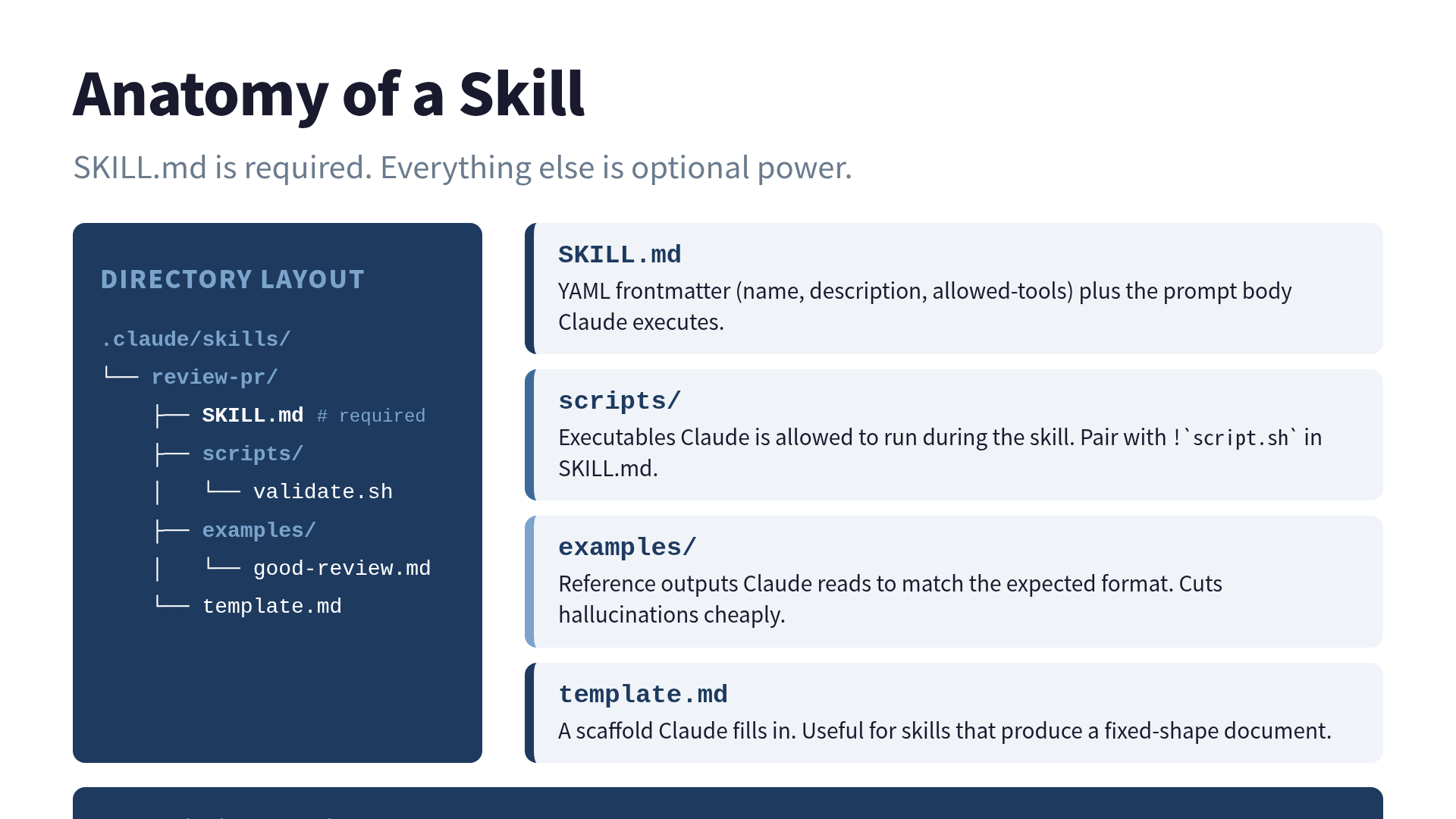
The other change is invocation. With custom commands, you typed /review and the file ran. With Skills, you can still do that, but Claude can also notice that your message looks like it needs the review skill and pull it in on its own. The description field in the frontmatter is what powers that decision. Claude reads every Skill’s description at session start and matches against your prompt.
That last bit took me a beat to appreciate. The first time Claude invoked a skill I hadn’t asked for, I assumed it had hallucinated a tool. It hadn’t. I had written a description that started with “review the current PR” and asked Claude to “review the diff,” so it pulled in review-pr automatically. That is the entire point.
The frontmatter, the only part you need to memorize
Everything important about a Skill happens in the YAML frontmatter at the top of SKILL.md. The body is just the prompt.
---
name: review-pr
description: Review the current pull request. Use when the user asks to review a PR, check a diff, or comment on changes.
allowed-tools: Bash(gh *) Read Grep Glob
---

## Steps

1. Run `gh pr diff` to read the diff.
2. Identify each changed file.
3. For each file, check:
   - Logic correctness
   - Edge cases
   - Test coverage
   - Security issues
4. Post the review as a PR comment.
A few things are worth knowing.
description is the decision interface. Claude uses this string to figure out whether to invoke your skill. Lead with the trigger keywords. Don’t write “This skill helps with…”; that wastes tokens that should be doing routing work. The description plus when_to_use together get capped at about 1,536 characters before truncation, so be brutal.
allowed-tools adds permissions, doesn’t restrict them. This is a footgun I walked into. I assumed allowed-tools: Read Grep meant “this skill can ONLY use Read and Grep.” It does not. It means “this skill is additionally allowed to use Read and Grep without prompting.” The user’s normal permission settings still apply. There’s also an open bug where allowed-tools isn’t always enforced. Useful context if you were planning to rely on it as a security boundary. (Don’t.)
disable-model-invocation: true for anything dangerous. If the Skill sends a Slack message, deploys a service, or files a refund, you do not want Claude deciding to run it. This flag means “user must invoke explicitly with /skill-name.” I set this on every Skill that touches a side effect.
context: fork runs the Skill in a sub-agent. The Skill executes in a separate context window and reports back. Your main conversation doesn’t get cluttered with the diff Claude just read. This is the single best feature for skills that grep through large codebases.
model: opus (or sonnet, or haiku) overrides the session model for this Skill. Cheap models for cheap work. I run a /lint-commit skill on Haiku because it’s a one-shot string check, and /architect-feature on Opus because it actually has to think. The cost difference adds up — my Skills bill is probably a third of what it would be with one model for everything.
My five workhorse Skills
Here’s what’s in my personal ~/.claude/skills/ directory, ordered by how much I’d cry if I lost them.
/review-pr — Reads the current diff via gh pr diff, comments inline. The Skill that started this whole thing for me.
/triage-issue $ARGUMENTS — Takes an issue number, reads the issue, classifies it (bug/feature/duplicate), labels it. Uses positional args: /triage-issue 123 becomes $ARGUMENTS = 123.
/architect-feature — Forks the context, reads the codebase, returns three implementation approaches with tradeoffs. model: opus, context: fork. This is the Skill I wrote a paragraph ago about offloading thinking-heavy work.
/release-notes — Looks at git log since last tag, drafts release notes. Has disable-model-invocation: true because I don’t want Claude generating release notes mid-conversation when I asked an unrelated question.
/lint-commit — Runs git diff --staged, checks for console.logs, debugger statements, .env values. Cheap, on Haiku.
The fifth one is the one I’d recommend you write first. Linters that catch the small embarrassing stuff before they ship are the kind of thing you’ll never miss until you turn them off.
The !\command“ trick that changed how I think about prompts
Buried halfway through the Anthropic docs is a piece of syntax that does more for prompt quality than any prompt-engineering technique I’ve tried. You can run shell commands inside a SKILL.md and have their output substituted into the prompt before Claude reads it.
---
name: pr-summary
description: Summarize the current PR
context: fork
---

## PR information

- Diff: !`gh pr diff`
- Comments: !`gh pr view --comments`
- Files changed: !`gh pr diff --name-only`

## Task
Summarize the PR using the data above.
When the Skill runs, the backtick-bang expressions get replaced with their command output. Claude never sees !\gh pr diff“. It sees the actual diff. This is huge: it means your Skill always operates on fresh, real data instead of whatever Claude scraped from the conversation. I started using this for everything that takes “the current state of X” as input, which turns out to be most of my Skills.
For multi-line commands, there’s a ! block syntax. You can grab node --version, npm --version, and git status in one go and dump them at the top of an “environment context” Skill.
Should you migrate from .claude/commands/?
Yes, but not in a panic. The custom commands directory still works, and there’s no announced sunset date. But:
- New Anthropic features (
context: fork, themodel:override, model-invoked descriptions) only land in Skills. - Anthropic’s official plugins themselves have started flagging custom-command usage as “should migrate.”
- The internal Claude Code source has a string
loadedFrom === "commands_DEPRECATED"floating around. That isn’t a public timeline, but it’s a signal.
My migration was fifteen minutes per file. The only gotcha is that custom commands lived in a flat directory (commands/review.md), and Skills live in a nested one (skills/review/SKILL.md). I wrote a one-liner shell script to move them and committed the result. If your custom commands didn’t have helper files, the migration is genuinely just: rename, wrap in a directory, add a richer description.
What I’d skip on a first pass
A few features in the Skills system look cool but I haven’t found a real use for yet, and they’re worth flagging so you don’t sink an afternoon into them.
The agent: field for picking which sub-agent runs the Skill. Claude Code ships several sub-agents (Explore, Plan, etc.). You can pin a Skill to one. I tried it; the autorouting Claude does on its own is good enough that explicit pinning rarely helped.
Plugin Skills via the marketplace. If you’re publishing Skills publicly, the namespacing (plugin-name:skill-name) is great. If you’re writing them for yourself or your team, just stick them in .claude/skills/ and commit. Don’t over-engineer the distribution.
Building “smart” skills that detect what to do. Tempting, but the LLM is already the smart part. Your Skill should be a procedure, not a flowchart. If you find yourself writing “if the diff is large, do X, else do Y” inside SKILL.md, you’re doing Claude’s job for it.
The closing self-own
My SKILL.md files are now collectively three lines longer than the actual code they orchestrate. I had to write a Skill called /list-my-skills to remember what they all do. There’s a real, measurable productivity gain here, and there’s also the recursive joy of automating the act of automating things until you’ve built a small bureaucracy of helpful clerks. Both can be true. I’m choosing to enjoy it.
If you’ve been using .claude/commands/ and never opened the Skills page, do this today: pick the one prompt you’ve copy-pasted most often this month, give it a name, and write twenty lines of YAML around it. Tomorrow’s you will type /<name> instead, and the day after you’ll wonder how you ever lived without it.
References
- Extend Claude with skills — Claude Code Docs
- Skill authoring best practices — Anthropic
- GitHub: anthropics/skills — Official skill examples
- Claude Code commands deprecated in favor of skills — Martin Emde
Related read: I broke down Claude Code vs ChatGPT Codex recently. Codex’s “custom instructions” sit in roughly the same conceptual slot as Skills, but the developer ergonomics are very different.
Want to go deeper?
This article touches a slice. The full Claude Code playbook — CLAUDE.md patterns from 2 lines to 100, Plan Mode workflow, team operations, non-coding applications — is in Practical Claude Code.
 Related book Practical Claude Code The field guide for engineers who use Claude Code every day — CLAUDE.md, Plan Mode, and team workflows from a year of real production use View the book page →
 Was this article helpful?