OSS · Chrome Extension + Web UI + Desktop · Node.js
claude-shift
One machine, many Claude Code accounts.
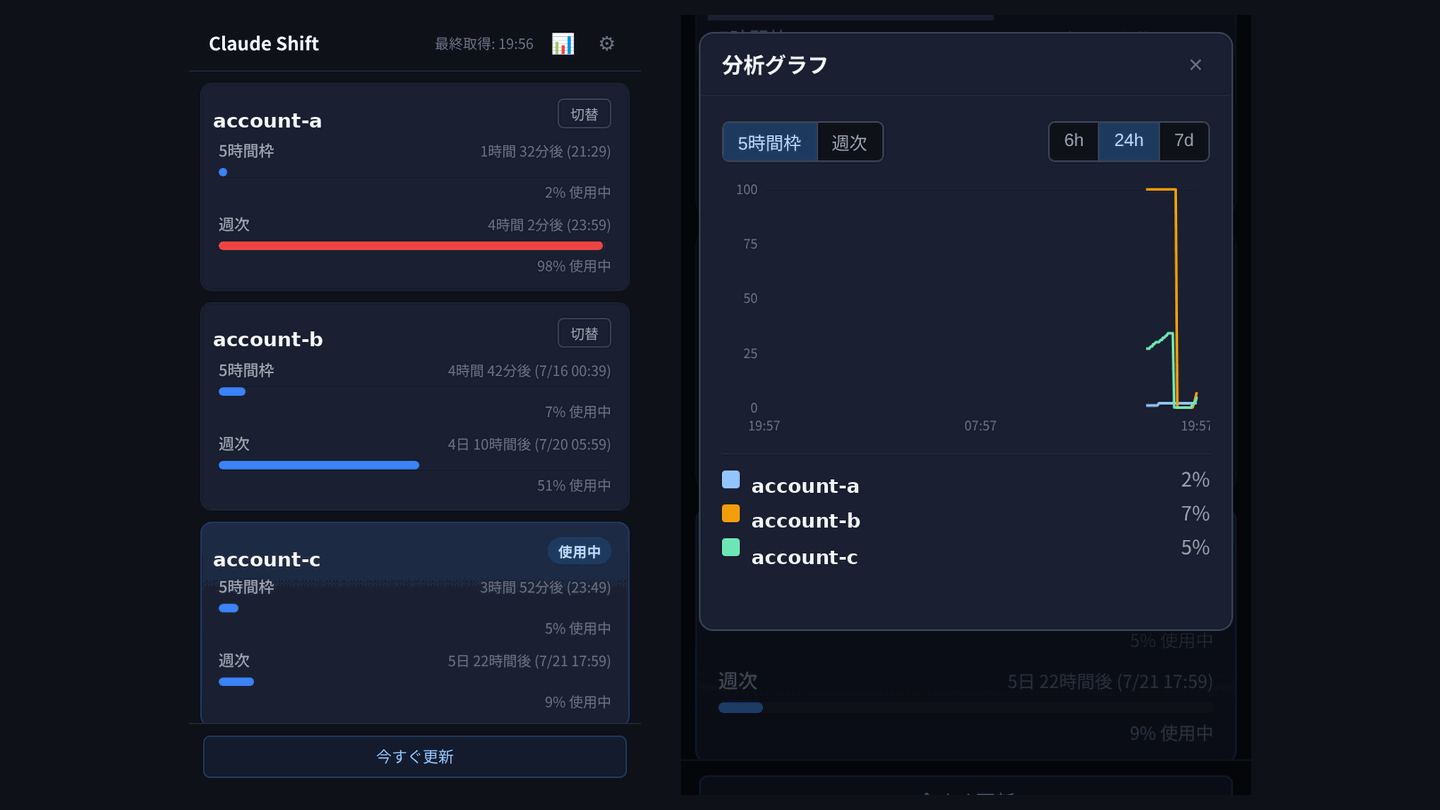
Manages multiple Claude Code logins on the same box. shift use swaps the active account by syncing the two files Claude Code actually reads (~/.claude/.credentials.json for tokens, ~/.claude.json for the oauthAccount /status displays). A local API server polls api.anthropic.com/api/oauth/usage and snapshots 5-hour and weekly utilization to SQLite. A Chrome popup shows every account with a cross-account SVG line chart — and lets you switch active from the popup, not just read. The same popup UI also runs in a browser tab (127.0.0.1:19867) and as a Tauri v2 desktop app: one UI file, four surfaces.
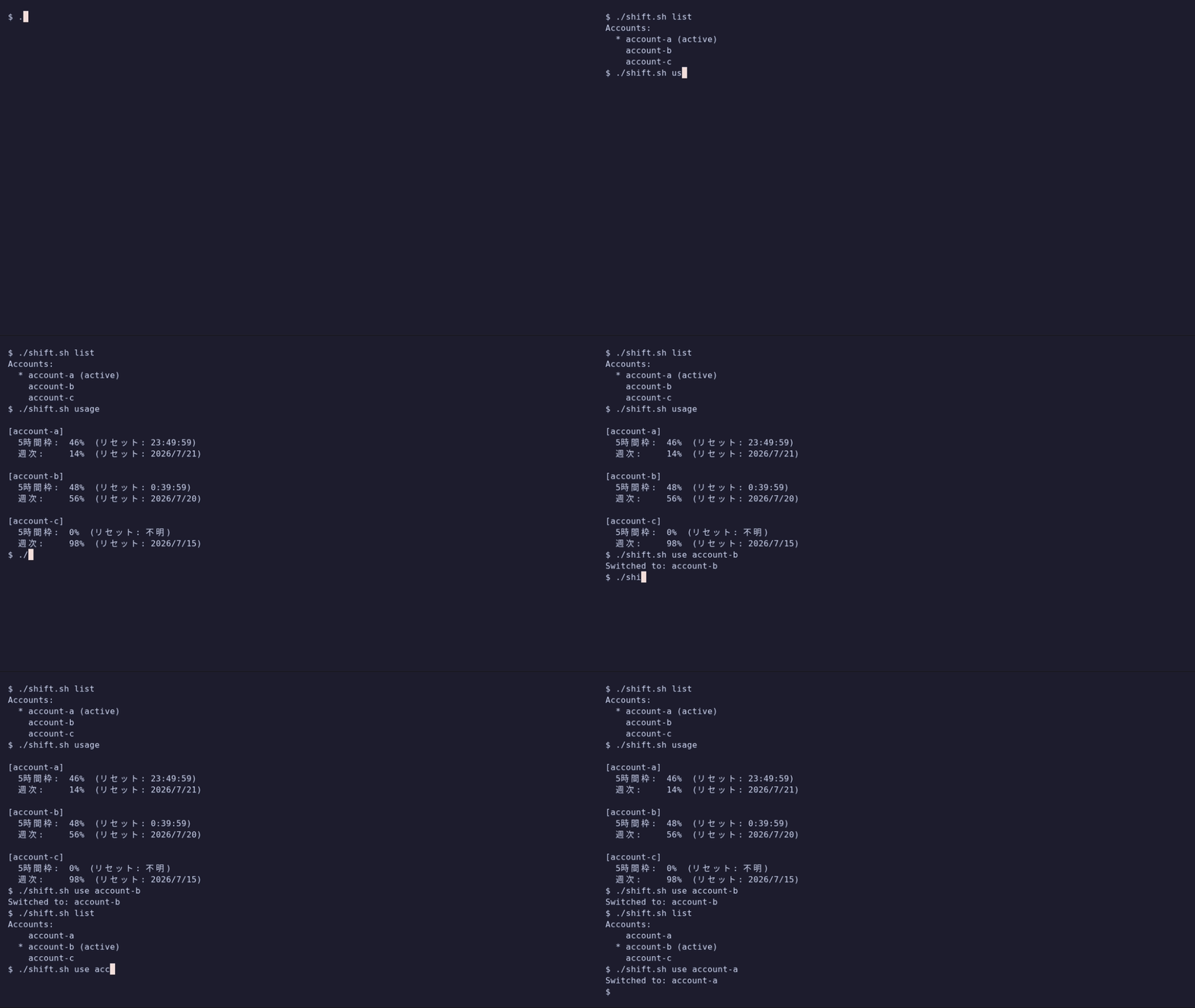
CLI commands
One shell script over Node helpers. Every command works standalone; server and popup are optional.
| Command | What it does |
|---|---|
shift list | List every registered account and mark the active one. |
shift use <name> | Swap the active account. Syncs back the refreshed token and updates oauthAccount in ~/.claude.json. |
shift usage | Print 5-hour and weekly percentages with reset times for every account. |
shift seed <name> | Start the 5-hour window with a minimal billed request. Useful right before a long session. |
shift add <name> | Register the current credentials.json as <name>. Duplicate tokens warn (-f to force). |
shift rm <name> | Delete the account registration. Removing the active one requires -f. |
shift server | Start the local API server on 127.0.0.1:19867. Polls usage on an interval and snapshots to SQLite. |
One UI, four surfaces
The popup talks to a local server on 127.0.0.1:19867 that polls the usage API on a configurable interval and snapshots results to SQLite. Every account gets a 5-hour and weekly bar; the analytics modal draws a cross-account SVG line chart over 6h / 24h / 7d. The active card carries a 使用中 badge; the others show a 切替 button that calls the same shift use pipeline underneath. The server also serves the same popup.html statically, so the identical UI opens in a browser tab at 127.0.0.1:19867 and inside a Tauri v2 desktop window (tray-resident; msi / dmg / deb built by CI). Fix a bug once, every surface updates.
Install
Clone the repo and register accounts one at a time. Each account is captured right after /login inside Claude Code.
# 1. Clone and install
git clone https://github.com/kenimo49/claude-shift
cd claude-shift
npm install
chmod +x shift.sh

# 2. Register accounts, one at a time
# Inside Claude Code, run /login for the account you want to register.
# Immediately after, register it:
./shift.sh add my-account-a

# Repeat /login + add for every account you want to manage.

# 3. Start the usage server (optional, needed for popup)
./shift.sh server --interval 5

# 4. Load the Chrome extension
# chrome://extensions → Developer mode → Load unpacked → extension/
Five things worth knowing
Each of these took a real incident to surface. Documented so the next reader skips them.
-
The account display is in ~/.claude.json, not the credentials file
Swapping only ~/.claude/.credentials.json leaves /status showing the previous account while the new token authenticates every request. The mismatch is silent and confusing. shift use fetches the profile from api.anthropic.com/api/oauth/profile with the new token and writes both files consistently.
-
Refresh tokens must be synced back before overwriting
The token file on disk is refreshed by Claude Code during a session. Overwriting it with the target account without syncing the current file back to its own account slot throws that refresh away and can require re-login. shift use sync-writes the current credentials into the previously active account slot before replacing them.
-
The 5-hour window starts on first use, not on the wall clock
Two Max/Team accounts started at 10:00 and 15:00 give you two independent 5-hour windows you can chain. shift seed forces a tiny billed request to start the window on demand, so you can position a fresh window right before a long session.
-
The popup polling interval is configurable, and persists
The server accepts --interval N (minutes) at start and a POST /config from the popup. The value is written to ~/.claude-shift/config.json and reloaded on the next tick. Default 10 minutes; the popup gear icon changes it live without restarting the server.
-
The desktop app is a Tauri shell with zero UI assets
The executable (~8 MB) only opens a WebView on 127.0.0.1:19867 and manages the server lifecycle: reuse a live server, spawn node cli/server.js if none, show an error page otherwise. Distributing to another machine needs Node 20+, the repo, and the CLAUDE_SHIFT_REPO env var (see docs/desktop-setup.md). Under WSL2 mirrored networking the Windows exe transparently reaches a server running inside WSL.
Related articles
Related developer tools
- hook-chain-lens A read-only CLI that reads every Claude Code hook scope (user, project, local, plugin) and prints what will actually fire in this cwd, in what order, from where.
- private-lint Git-hook gate that blocks personal and private names (family names, personal emails, client domains) before commit and push. Pure Bash; detection patterns stay machine-local, never in any repo, and a full-history audit covers the moment before you flip a repository public.
- quake-lens Earthquake statistics CLI + MCP server in pure-stdlib Python: Gutenberg-Richter b-value (Aki MLE) and Omori-Utsu aftershock decay (Ogata MLE) from public catalogs.
- rhythm-lens Measures the rhythm of Japanese, English and Portuguese Markdown (sentence-length burstiness, paragraph structure) against measured human/AI distributions from two published papers. A writing feedback instrument, not an AI detector.