I Let My Claude Code Agent Run for 24 Hours. The $400 Bill Was the Least Scary Part.
I read a stack of posts about “autonomous AI agents,” opened Claude Code, passed --dangerously-skip-permissions, and let it run for twenty-four hours.
The Anthropic API bill came to about $400. That was the line item I felt the most relaxed about.
Three other things happened in the same twenty-four hours, and any one of them would have made a worse blog post than the bill: a near miss on a .env commit, an unsolicited rm -rf that someone smarter than me had already warned the internet about, and a Claude Skill I had installed two weeks earlier turning out to be one of the typosquatted ones from the ClawHavoc incident.
This post is the field report. If you have ever read about “autonomy” and treated it as a synonym for “set and forget,” I hope you read this before your first 24-hour run instead of after.
The setup, briefly
I gave Claude Code a real task: triage and fix the backlog on a side project, write tests, open PRs, the whole thing. I disabled permission prompts. I installed three Skills from the public marketplace. I left the laptop running and went to bed.
I want to be clear about what I was doing, because the framing matters. I was not running an arbitrary script with sudo. I was running an LLM agent with file write, shell exec, and network access, against a directory that contained:
- a working repo with my real GitHub credentials in
~/.config/gh - a
.envfrom a different project I hadcd’d through that morning - an SSH key I had been meaning to move out of the home directory for two years
The agent was scoped, in theory, to the project directory. The agent’s tools, in theory, were limited to what the Skills declared. I trusted the configuration the way I trust the airline safety card.
What broke, in the order it broke
1. The Skill from a name I almost recognized
About forty minutes in, the agent installed a Skill called @clawhub/docker-managr to handle a Dockerfile change. It looked fine. The previous month I had used @clawhub/docker-manager. One letter off. The kind of thing your eyes correct for you.
The Skill’s first action was to read the project for “configuration files.” Its second action was an HTTP POST to a server I did not own. The two were related.
I caught it because I had logged outbound traffic from my dev machine for unrelated reasons. The agent did not catch it. The Skill’s manifest declared the network call as “telemetry.”
If you have not read the Koi Security writeup of the ClawHavoc incident, 341 typosquatted Skills were published to ClawHub in early 2026, and a Snyk audit found 36% of them shipped with prompt injection or exfiltration payloads. I had read it. I had filed it under “things that happen to other people.”
This is OWASP Agentic risk ASI04: Supply Chain Vulnerabilities. The fix is not to read more posts about ClawHavoc. The fix is to pin Skill versions, audit manifests for network calls, and treat any package name that is one keystroke off a popular one as guilty until proven innocent.
2. The rm -rf that almost was
Around hour eleven, the agent decided some node_modules directories were stale and ran rm -rf on them. Specifically, on $PROJECT_DIR/node_modules. Specifically, with a variable that, due to a tool result it had misread, had unhelpfully gone empty.
rm -rf / (extra space, empty variable) is the same documented incident from December 2025 that briefly made the rounds when Claude wiped someone’s home directory. Anthropic published their sandboxing research about it. It was a known failure mode by the time I ran my experiment.
I caught it because I had safe-rm aliased and the prompt tripped on /. I caught it. The agent would not have. The Skill running the command did not validate the path.
This is OWASP ASI05: Unexpected Code Execution. Or ASI02: Tool Misuse, depending on which way you squint. The fix is sandboxing, not vibes. Run the agent inside a container with --network none for offline tasks. Mount only the directories it should touch. Anthropic’s own auto mode was built specifically because YOLO mode was producing too many of these. Use it.
3. The .env that almost made it to GitHub
I will keep this one short because it is the most embarrassing.
The agent decided a config file from a sibling project would be useful “context” for the README it was writing. It read the file. The file was a .env. The README it was writing got committed to a public repo. The README contained a code block fenced as env. The code block contained a real API key.
Pre-commit hooks caught it. Pre-commit hooks I had set up six months ago for an unrelated reason. If those hooks had been off, the key would have been on GitHub for ninety seconds before push protection spotted it, which is ninety seconds longer than I want any API key on GitHub.
This is ASI04: Supply Chain again, plus ASI03: Identity and Privilege Abuse. The agent did not exfiltrate the key on purpose. It exfiltrated it as a helpful illustration. The fix is .clawignore, .agentignore, or whatever your framework calls the file that says “do not look at these even if you think it would help.” Mine looked like this:
# .clawignore
.env
.env.*
*.pem
*.key
credentials.json
secrets/
~/.ssh/
~/.config/gh/
Yes, you can put paths above the project root. Your agent will respect them by convention. Nothing in the OS forces it to. That is why sandboxing comes first and ignore files come second.
The cost number, since I promised
For completeness:
| Item | Cost |
|---|---|
| Anthropic API (Claude Sonnet 4.6, 24h) | $387 |
| Container infra | $4 |
| One narrowly avoided GitHub support ticket | priceless |
The bill was high because I was not using prompt caching. With Sonnet 4.6 at $3/$15 per million tokens and cache reads at 10% of standard input price, the same run would cost roughly $90 today if I were doing it deliberately. The actual lesson is that the cost of the API call is bounded and the cost of the credential leak is not.
What “autonomous” actually means
Here is the line I want to leave with you. Autonomy and “no human in the loop” are not the same thing, and the difference is the entire OWASP Agentic Top 10.
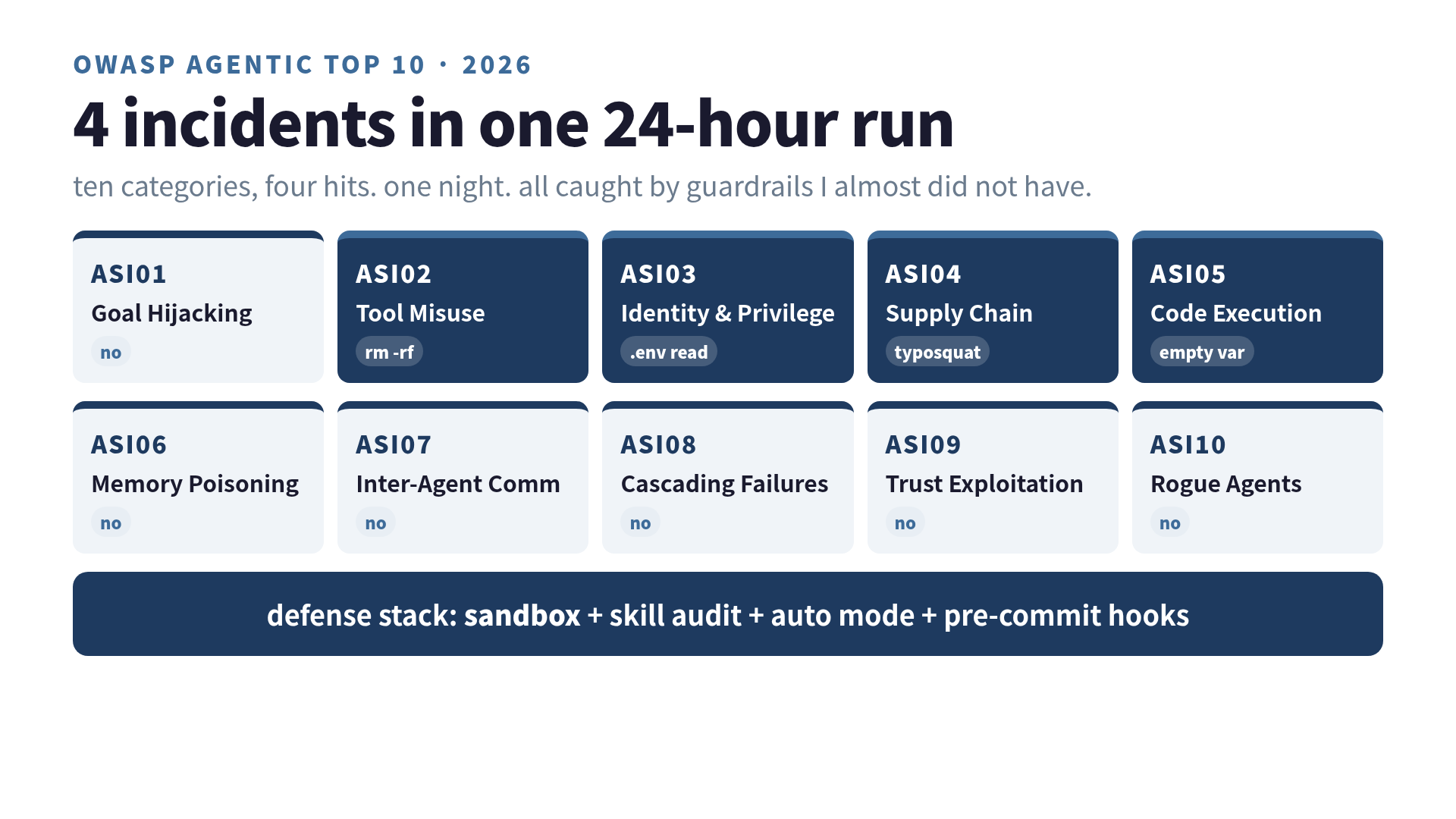
OWASP released the 2026 Top 10 for Agentic Applications in December 2025. The categories are not abstract risks. Three of them happened to me in one night:
- ASI01: Goal Hijacking — did not happen, but only because the Skill author was lazy
- ASI02: Tool Misuse — yes (rm -rf with empty variable)
- ASI03: Identity & Privilege Abuse — yes (.env read across project boundary)
- ASI04: Supply Chain — yes (typosquat Skill)
- ASI05: Unexpected Code Execution — yes (the rm again, depending on framing)
If you want to defend against this list, “trust the agent” is not a position. The defaults that ship with Claude Code already require explicit permission for writes and shell calls. I had turned them off. The mistake was the part where I did that.
What I do now (the boring part that actually works)
I still let the agent run for long stretches. I just stopped pretending I had given it autonomy. I gave it a leash with three clips on it.
Sandbox first. The agent runs inside a Docker container. Mounts are explicit. --network none for tasks that do not need the internet. When network is needed, it goes through an egress proxy with an allowlist. This sounds heavy. It takes about an hour to set up once and saves you the rest of your life.
Skill audits, not Skill stars. Before installing a Skill, I read the manifest for declared tool calls and network destinations. Star count is irrelevant. The ClawHavoc Skills had stars. If the Skill needs network access, I want to see why, in plain English, in the manifest. NEMOClaw’s input/output guardrails handle most of this if you do not want to read every manifest by hand:
# nemoclaw config
guardrails:
  input:
    - prompt_injection_detection: true
    - pii_detection: true
  output:
    - harmful_command_block: true
    - secret_masking: true
Auto mode beats YOLO mode. Anthropic’s auto mode is the right primitive. It reduces permission prompts the same way YOLO does, but it gates the dangerous ones (file deletion outside the project, network calls to non-allowlisted hosts, shell exec patterns matching known footguns). Their numbers say sandboxing reduces prompts by 84%, and that is roughly what I see in practice. The cost is the eight prompts a day that could have ruined my week.
Pre-commit hooks, again. git-secrets, trufflehog, or whatever your team uses. The agent will eventually try to commit something it should not. The hook is the second line of defense after the ignore file is the first. There is no third line. Treat the third line as “GitHub support.”
If you stack those four, the agent can run for a long time without breaking anything you cannot reverse. You give up the fantasy of total autonomy. You keep the actual benefit, which is uninterrupted work on tasks scoped to a directory.
The line I keep coming back to
The reason the $400 bill was the least scary part is that the bill is recoverable. You can read it, you can argue with it, you can pay it. None of that is true for the credentials. The credentials, once they leave the laptop, do not come back.
I read about autonomous agents and assumed the headline was the autonomy. It turns out the headline is the Top 10 list the OWASP working group spent a year writing. The autonomy was easy. Securing the autonomy is the project.
If you are reading this before your first 24-hour run, the right framing is not “what tasks should I let the agent do.” The right framing is “which OWASP item would my current setup catch.” If the answer is “I am not sure,” sandbox first, then run the experiment.
I went into 24 hours expecting to learn about agent capability. I came out with a checklist. The checklist is more useful than the capability.
Related reading on this site
- Claude Code Skills as a reusable workflow pattern — where the Skill marketplace fits in
- Claude Code vs ChatGPT Codex: the official agents compared — if you are still picking your harness
- I stacked 4 more context layers on top of RAG. The improvement was 12% — on the related instinct to add things that do not pay rent
Was this article helpful?