I Caught Claude Hiding My Bug 3 Times in a Row. Then I Turned 10 Debugging Habits Into Prompts.
I asked Claude to fix a 500 error from one of my API endpoints. First attempt: it wrapped the call in try-catch and logged the error. Second attempt: it added a default return value so the caller would not blow up. Third attempt: it added a retry with exponential backoff.
The 500 stopped. I shipped the third “fix” with full confidence. Two hours later, prod woke up the on-call. The same incident had moved to a different endpoint that shared the same database client. The actual cause was connection pool exhaustion. Claude was not fixing the bug. It was hiding it three different ways.
This is the story of how I turned 10 debugging habits into prompt templates so Claude cannot pull that on me anymore. There are also two file types you can hand it once and never touch again: a CLAUDE.md block and two hook configs.
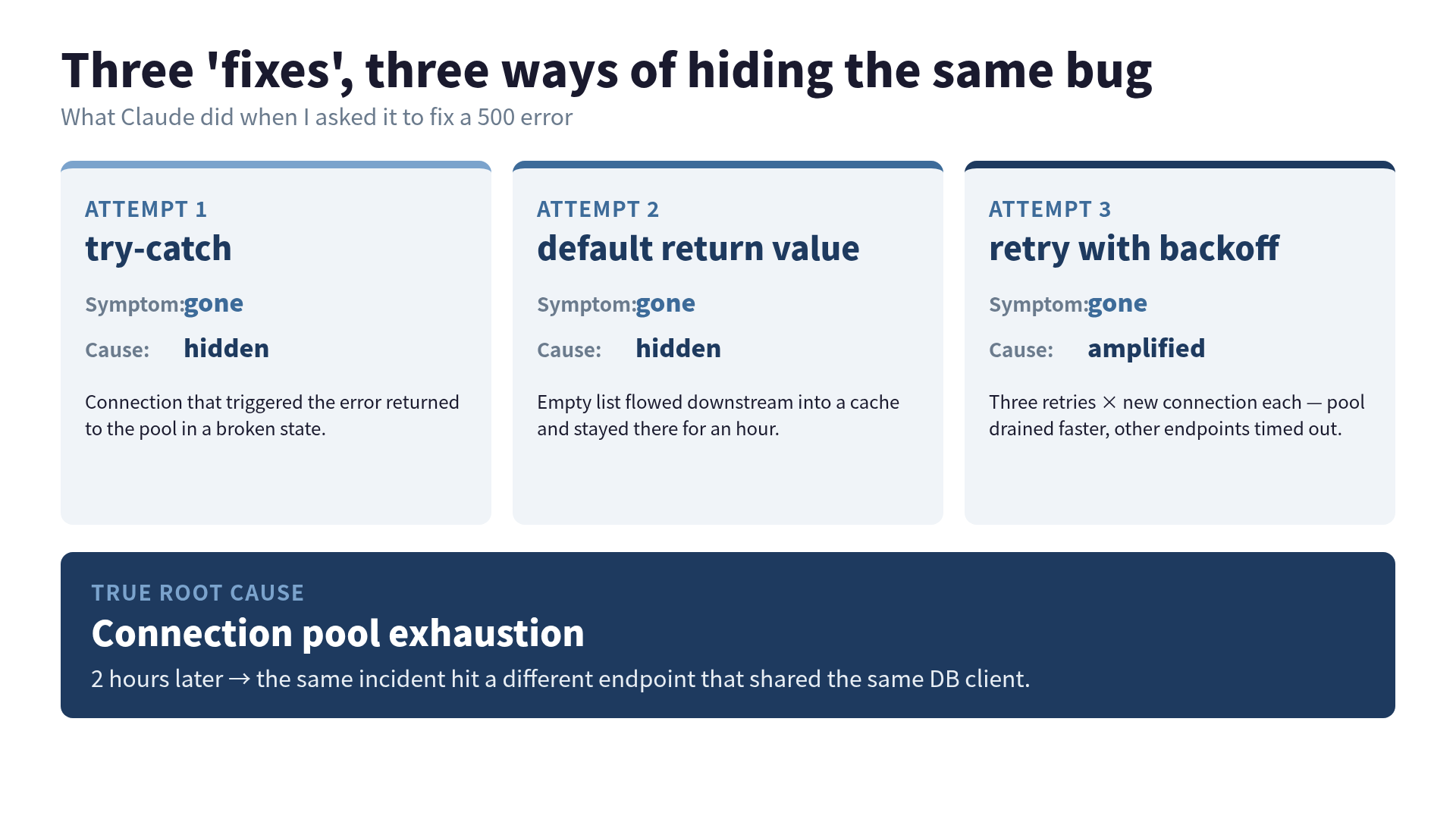
The 3 “fixes” that almost shipped
Each of the three attempts looked correct in isolation.
Attempt 1 — try-catch. The handler now caught the exception, logged it, and returned a 500 to the user. From the API’s point of view, this was an improvement. From the bug’s point of view, the connection that triggered the error was still leaked back into the pool in a broken state.
Attempt 2 — default return value. The function now returned an empty list instead of raising. The 500 was gone from this endpoint. The data inconsistency that the empty list created flowed downstream into a cache and stayed there for an hour.
Attempt 3 — retry with exponential backoff. Three retries, each opening a new connection. The pool got drained faster. The 500 disappeared on this endpoint because the user-facing call now succeeded on attempt 2 or 3. Other endpoints, sharing the same pool, started timing out instead.
In all three cases, the symptom went away on the endpoint I asked about. The cause moved. I had asked Claude to debug, but I had given it no rule against suppressing the symptom, so it suppressed the symptom, because that is what the next-token prediction wants to do.
For a more cheerful version of how this kind of thing also breaks the infrastructure around your AI agent (not the agent’s output, the bus and the dispatcher), see my earlier post on 9 bugs in my AI pipeline. That post was about the plumbing around the model. This one is about the model writing the plumbing.
Why AI defaults to symptom suppression
The 2025 Stack Overflow Developer Survey reported that around 80% of professional developers were using or planning to use AI tools, and the share who actually trusted those tools’ output had dropped year over year. The follow-up coverage I’ve read since then keeps coming back to the same complaint: AI-generated code clusters bugs around logic errors and I/O handling, at a rate that is meaningfully higher than human-written code at the same level of seniority. The figure I’ve seen cited most often is roughly 1.7x bug density, though different studies measure it differently and you should check your own commit history before quoting any single number.
The mechanism is not mysterious. A large language model predicts the next most plausible token given the context. “Error handling pattern” is one of the most over-represented things in its training data. Try-catch, null-check, default return, retry: these are statistically the kinds of edits that appear when someone says “fix this error” in a public repo. The model is doing exactly what it was trained to do.
What is missing is a different kind of token. “I do not yet know the root cause. Continue investigation.” That sentence is rare in training data because humans rarely commit it. We commit the fix, not the not-yet-found-it. So the model never learned to default to “keep looking.”
You have to put that token in for it. That is what the next section is for.
10 debugging habits → 10 prompt templates
Each of these maps to a classic debugging habit. Each one is a sentence I now paste into the prompt or the CLAUDE.md, depending on how permanent I want it.
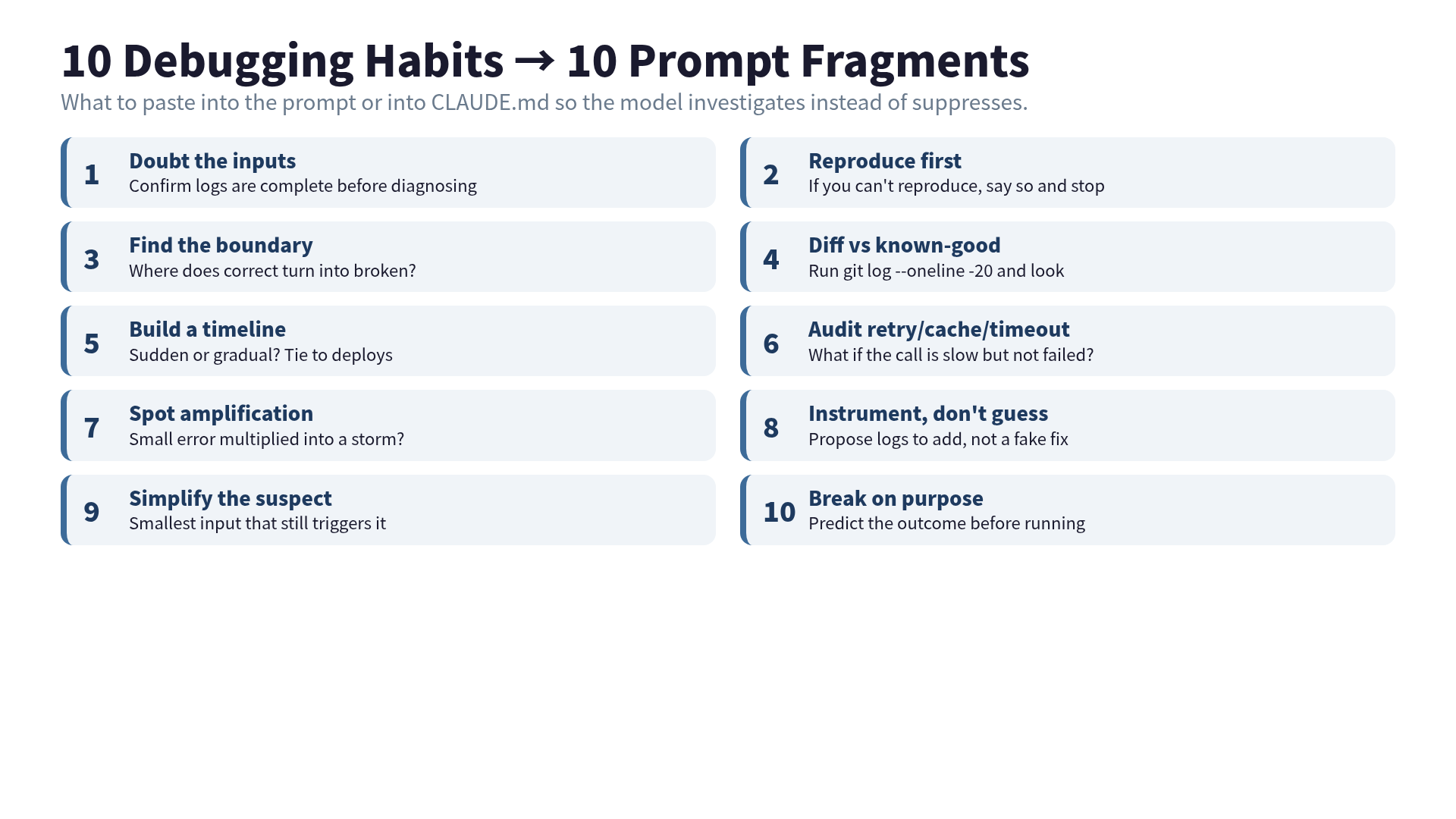
1. Doubt the inputs. “Before proposing a fix, confirm the logs you’re reading are complete and the monitoring you’re trusting actually reports the state you think it reports.” This is the one Claude skips most. It will happily diagnose from a log file that is half-rotated.
2. Reproduce before fixing. “Reproduce the bug locally and show me the minimum steps. If you cannot reproduce it, say so explicitly and stop.” The “stop” is doing the work. It shuts the door on guessing.
3. Find the boundary. “Identify the boundary between working and broken behavior. Which component is the last one that returns correct data?” This pushes the model away from line-by-line guesses and toward layer-by-layer narrowing.
4. Diff against a known-good state. “Compare the current code to the last known working state. Run git log --oneline -20 and identify any change that could plausibly correlate with the failure window.” This is the prompt that surfaces the commit no one remembered making.
5. Build a timeline. “When did this start failing? Is it sudden or gradual? Map error rate against deploy times, traffic spikes, and config changes.” Sudden + correlated to deploy is one bug. Gradual + uncorrelated is a different bug entirely. Conflating them is how three “fixes” stack.
6. Audit retries, caches, and timeouts. “List every retry, cache, and timeout on the path. For each one, describe what happens when the underlying call is slow but not failed.” This is the one that would have caught my pool exhaustion on the first pass.
7. Watch for amplification. “Is there a path where a small error gets multiplied? A failed call that triggers three retries, each opening a new connection, each adding latency to the next?” If your retry storm hides inside an autoscaler, you also get an instance storm.
8. Add instrumentation, don’t guess. “If you don’t have enough observation to identify the cause, propose the specific log lines or traces to add. Do not propose a fix yet.” This converts “I don’t know” into “here is what to measure,” which is a much more useful answer than a fake fix.
9. Simplify the suspect. “Remove non-essential components from the failing path until the bug is reproducible in the simplest possible form. What is the smallest input that still triggers it?” Most of the bug usually wasn’t in the part you were staring at.
10. Break things on purpose. “To verify a hypothesis, propose an intentional change that should make the bug worse or better. Predict the outcome before running it.” This is the one that flips debugging from observation to experiment. It also catches lies your monitoring is telling you.
The whole set, including the rationale and the original-language formulations, comes from the Debugging Engineering book. That’s where the 10 habits started, and where the chapter on translating them into prompts lives.
Persist the rules in CLAUDE.md
Pasting 10 sentences into every prompt does not scale. CLAUDE.md is where the rules go to live.
The Anthropic guidance I keep coming back to is to hold CLAUDE.md under roughly 100-150 lines so it can actually fit in context for every turn. Spending 12 of those lines on debugging is a good trade.
## Debugging Rules

- Do not write fix code until you have identified the root cause.
- Suppress nothing. If the symptom is gone but the cause is unknown, that is not a fix.
- Before fixing, write a failing test that reproduces the bug.
- After fixing, run the full test suite and report any newly failing tests.
- If three attempts fail in a row on the same bug, stop. Summarize what you tried, what you ruled out, and what hypothesis is left, and ask for human input.

## Debugging Workflow

1. Root Cause Investigation: read logs, traces, and the code path.
2. Pattern Analysis: search for the same anti-pattern elsewhere in the codebase.
3. Hypothesis Testing: write a test that would fail iff the hypothesis is correct.
4. Implementation: only after steps 1-3 succeed.
The thing to notice is that these are constraints, not instructions. “Do not write fix code until…” is more useful than “investigate first.” The constraint format is what stops the next-token machine from cheerfully skipping ahead.
Automate behavior with hooks
CLAUDE.md is the brain. Hooks are the reflexes. Two of them matter for debugging.
PreToolUse: block destructive commands. Halfway through debugging, the model occasionally suggests something like rm -rf node_modules or, on a worse day, a raw DROP TABLE. A PreToolUse hook intercepts the Bash tool call, greps the command string for a small denylist, and exits 2 to block. Claude Code treats exit code 2 from a PreToolUse hook as “this tool call is denied, tell the model why.”
{
  "hooks": {
    "PreToolUse": [
      {
        "matcher": "Bash",
        "hooks": [{
          "type": "command",
          "command": "if echo \"$TOOL_INPUT\" | grep -qE 'rm\\s+-rf|DROP\\s+TABLE'; then echo 'BLOCK: destructive command' >&2; exit 2; fi"
        }]
      }
    ]
  }
}
PostToolUse: run tests after edits. Matcher Edit|Write, command runs your test suite or at least a fast subset. The model now sees the test failure on the next turn and reacts to it the same turn it created it, instead of remembering 30 messages later. The official Claude Code hooks reference covers the matchers and exit-code conventions in full. Worth reading once before you write your own.
Together CLAUDE.md, PreToolUse, and PostToolUse form the equipment layer for an AI debugger. It is the same equipment-layer pattern I used when splitting one big agent into Observer, Strategist, and Marketer: constraints in the prompt, behavior in the hooks, information in the MCP layer. This is debugging week of that same series.
When 3 hidden fixes in a row mean stop
The single most useful rule, the one that would have saved my on-call:
If three attempts in a row fail to fix the same bug, stop and escalate.
Three is not magic. It is the point where the cost of one more guess exceeds the cost of admitting the bug is structural. By the third attempt, the model is usually pattern-matching on top of pattern-matching, and a human eye is cheaper than a fourth retry.
“Let Claude debug it” is half true. It is fast. It just defaults to fast at hiding the problem unless you arm it differently. The 10 prompts arm it. The CLAUDE.md remembers them for you. The hooks catch what slips through. None of these is expensive. The on-call page at 11pm is.
The full chapter on translating the 10 habits into prompts, plus the Claude Code weapons chapter on CLAUDE.md, hooks, and MCP layering, is in Debugging Engineering.
Sources:
Was this article helpful?