
The 300ms Threshold
Why Talking to AI Feels Wrong
Voice AI latency design | Pipecat · LiveKit · Deepgram — break the 525ms barrier
30+ technical books across 4 languages · Sold on Kindle in 6 countries · From a year of real production use

📖 Read for free
Read three full chapters right here before you buy. Liked it? Continue on Kindle.
01 Preface: The 300-Millisecond Wall
Preface: The 300-Millisecond Wall
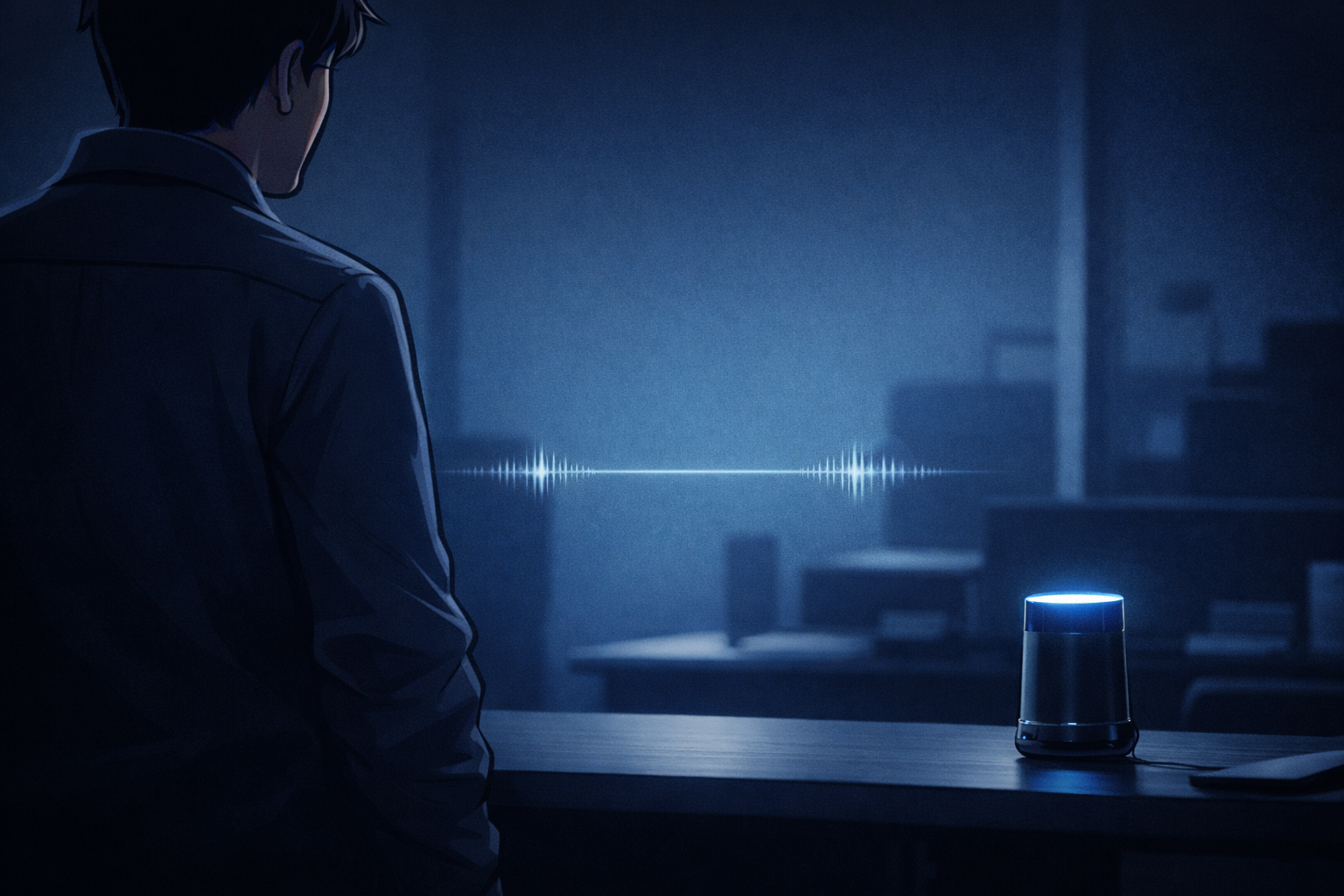
“Hello.”
Yu tried to sound as natural as possible. It was the first demo of their voice AI product. After six months of development, the day had finally come to present it to investors.
Silence.
One second. Two seconds.
“Did it freeze?”
Yu will never forget the moment the investor’s expression changed.
The AI did respond. “Hello, how can I help you?” The speech synthesis sounded natural. The content of the response was flawless. But it was too late.
That night, Yu sat alone in the office, staring at the MacBook screen. Google Sheets displayed the measurement results.
1.8 seconds. 2.1 seconds. 1.9 seconds.
Every single test case exceeded 1.5 seconds.
“This is not a conversation.”
The words echoed through the quiet office.
That moment marked the beginning of Yu’s quest for 300ms.
This book is the story of Yu, a voice AI engineer, and Misaki, a UX designer, and their battle to make human-like conversation a reality. The problem they faced was simple on the surface but deeply rooted.
The technical insights throughout this book draw on my years of experience building real-time communication products with WebRTC, as well as firsthand lessons from designing and developing conversational AI products. The technical details and vendor comparisons reflect the state of the art as of March 2026, covering the rapidly evolving ecosystem of voice AI: OpenAI Realtime API, Gemini Live API, Pipecat, LiveKit, and more.
In human conversation, the silence between one person finishing and the other starting to speak averages just 200 milliseconds. Current voice AI agents, on the other hand, insert 700 to 1,000 milliseconds of silence — three to five times longer. That gap is the source of the uncanny feeling.
This book follows Yu and Misaki’s journey while weaving in practical experience and the latest technical developments to provide a systematic treatment of latency in voice AI:
- How fast does human conversation actually move? (Chapter 1)
- At what point does the experience fall apart? (Chapters 2-4)
- Where does the delay come from? (Chapters 5-6)
- How do you make it faster? (Chapter 7)
- When you can’t make it faster, how do you fake it? (Chapter 8)
- How do you balance “don’t interrupt” with “don’t be late”? (Chapter 9)
- What can we learn from existing voice assistants? (Chapter 10)
- How does edge AI break through the 300ms wall? (Chapter 11)
Here are the key numbers that appear throughout this book:
| Threshold | Meaning |
|---|---|
| 200ms | Average silence between turns in human conversation |
| 300ms | Upper limit for “natural conversation” in voice AI |
| 400ms | Doherty threshold: the limit where action and response feel continuous |
| 500ms | The point where users start talking over the AI |
| 800ms | The point where conversation breaks down |
| 1.5s | The point where experience quality drops sharply |
| 4s | The point where the entire experience collapses |
0.3 seconds. That tiny sliver of time is the dividing line between “talking with” an AI and “operating” one.
Yu and Misaki’s story is both a technical challenge and a journey to redefine what it means to feel human.
I hope this book helps you break through that wall. And above all, I hope it saves those of you venturing into voice AI from taking the same detours we did.
Continue this chapter on Kindle →02 Chapter 1: Human Conversation Runs on a 200ms Clock
Chapter 1: Human Conversation Runs on a 200ms Clock
The sound of Misaki setting down her coffee cup broke the silence in the office.
“Yu, I have a suggestion.”
She couldn’t stand watching Yu still reeling from yesterday’s failed demo, so she spoke up.
“Why don’t we record and analyze a real human conversation? Let’s see exactly what’s different from the AI, in numbers.”
“We can’t start without data. Let me record our conversations today.”
A Universal Rhythm
Human conversation follows a rhythm that is nearly universal across the world.
In 2009, a research team at the Max Planck Institute for Psycholinguistics studied turn-taking (speaker switching) timing across 10 languages: English, Japanese, Danish, Dutch, Italian, Korean, Lao, Tzeltal, Yucatec, and ǂĀkhoe Haiǁom.
The result was clear. Across all languages, the average silence during speaker transitions is approximately 200 milliseconds.
200ms. 0.2 seconds. Shorter than a blink.
That evening, when Yu analyzed their own conversations, the reality hit hard. “It really is 200ms. Our AI takes 2 seconds. Ten times slower.”
What this research shows is that turn-taking timing is not something that varies dramatically across cultures. It is a universal pattern rooted in human cognitive processing capacity.
What 200ms Means
The average human reaction time is about 220ms. In other words, conversational turn-taking happens at nearly the limit of human reaction speed.
But here is the puzzling part. To begin responding within 200ms of the other person finishing, you have to start preparing your response before they finish speaking.
And that is exactly what the researchers concluded. During conversation, humans process the other person’s speech while simultaneously preparing their next utterance. They listen and think at the same time — parallel processing. This is also the inspiration behind the streaming architecture discussed in Chapter 7.
“So humans run parallel processing,” Yu muttered. “Our AI runs sequential: listen, think, speak, one at a time. No wonder it’s slow.”
This is a critical insight for voice AI design. Human conversation is not serial processing (listen, then think, then speak). It is pipeline processing.
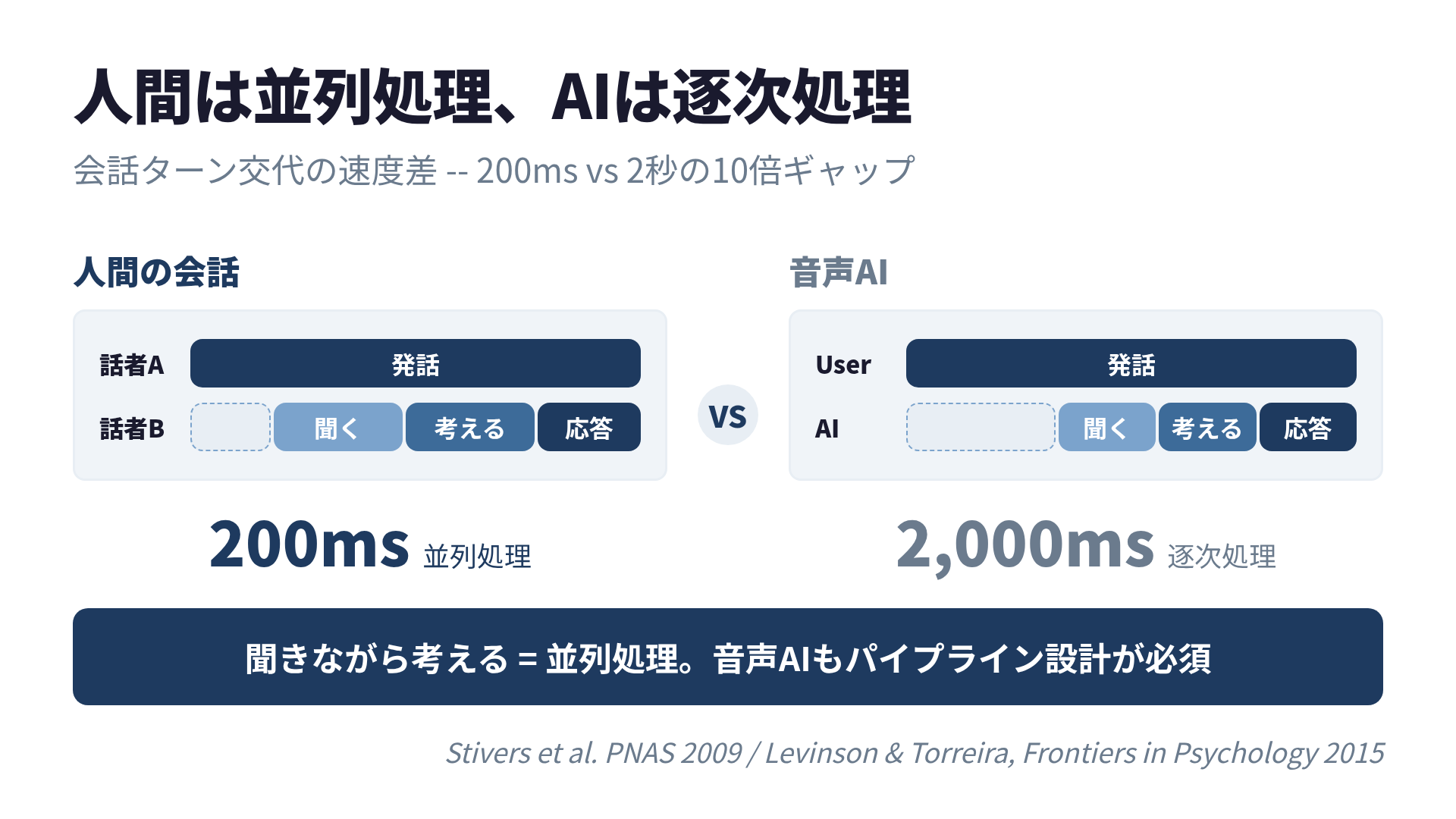 Humans achieve 200ms through “listen while thinking” parallel processing. AI takes 2 seconds with “wait until done, then think” sequential processing.
The 600ms “Thinking” Impression
200ms is the average, but not every turn transition happens at that speed.
Research from Speechmatics shows that a typical pause in human conversation is about 600 milliseconds. A silence of this length conveys “thinking” or “choosing words carefully,” giving an impression that is actually polite and thoughtful.
When the silence stretches well beyond 600ms, however, the listener starts to feel uneasy. “Did they hear me?” “Did they not understand?”
| Silence Duration | Listener’s Impression |
|---|---|
| 0-200ms | Instant response. Natural |
| 200-600ms | Thinking. Polite |
| 600ms-1s | Slightly long pause. Still acceptable |
| 1-1.5s | Slow. Feels off |
| 1.5s+ | Broken? Frozen? |
Implications for Voice AI
From this research, voice AI designers need to know three things:
1. 200ms is a biological baseline
The rhythm of human conversation is universal, grounded in cognitive processing capacity. If voice AI aims for “natural conversation,” it needs to get close to 200ms.
2. Listen-while-thinking design is essential
Just as humans do in conversation, voice AI needs pipeline design that processes the user’s speech while preparing a response. Sequential processing that waits until the user finishes speaking before starting to think will never keep up.
3. Up to 600ms can be used as “human-like” behavior
Even if you cannot respond in 200ms, up to 600ms reads as “thinking.” Filling this time with fillers (“Well…” “Let me see…”) can make the AI feel more human.
The next morning, Misaki dropped a thick stack of papers on Yu’s desk. “I found Jakob Nielsen’s paper. You need to read this.”
Continue this chapter on Kindle →References
- Stivers, T. et al. “Universals and cultural variation in turn-taking in conversation.” PNAS, 2009.
- Speechmatics. “Your AI Assistant Keeps Cutting You Off. I’m Fixing That.” 2025.
03 Chapter 2: Translating Nielsen's Three Thresholds to Voice UI
Chapter 2: Translating Nielsen’s Three Thresholds to Voice UI
9 AM in the meeting room. Misaki had a thick paper spread out on the table.
“Yu, have you heard of Jakob Nielsen? He’s one of the biggest names in UX. This paper is from 1993, and it still holds up.”
Yu was still rattled by yesterday’s 200ms shock. Misaki put a table of numbers in front of him.
“There are three walls: 100ms, 1 second, and 10 seconds. We’re already past the 1-second mark, so we’re in the ‘experience breaks’ zone.”
Yu squinted. “Does this apply to voice UI too?”
“That’s what I want to find out.”
Applying a GUI Classic to Voice
In 1993, Jakob Nielsen defined three response-time thresholds for UI in “Usability Engineering.” More than 30 years later, these thresholds are still widely referenced as a foundation of UX design.
| Threshold | Meaning in GUI |
|---|---|
| 0.1s (100ms) | The feeling that the action happened instantly. A sense of direct manipulation |
| 1s | The limit at which the user’s thought flow is maintained. Delay is noticeable but focus is not broken |
| 10s | The user’s attention completely drifts away. Risk of task abandonment |
These numbers are based on human cognitive characteristics, not computer performance. That is why the numbers have stayed the same across researchers: Miller in 1968, Card in 1991, Nielsen in 1993.
In Voice UI, the Thresholds Shrink
In GUI, a 1-second delay is tolerable. The user can see a loading indicator on screen while they wait.
Voice UI is different.
Voice has no “rewind.”
In a text chat, even if you wait 1 second, the screen shows a “typing…” indicator, and you can re-read previous messages in the meantime. Voice has no such visual feedback. Silence is just silence.
“Right,” Yu nodded. “No screen, no cues. An audio-only world is brutal.”
As a result, each threshold contracts for voice UI:
| GUI | Voice UI | Reason |
|---|---|---|
| 0.1s | Unchanged | The cognitive limit is the same |
| 1s | 300-500ms | Without visual feedback, silence feels longer |
| 10s | 4s | In voice, there is “nothing to do” while waiting, so attention drifts sooner |
Research from ACM CUI 2025 experimentally confirmed that latency beyond 4 seconds severely degrades the quality of experience. The 10-second threshold from GUI shrinks to 4 seconds in voice.
Misaki wrote the numbers on the whiteboard. “Now we can see the target,” Yu said quietly. “Between 300ms and 500ms, we need to return some kind of response. That’s the lifeline for voice UI.”
The Doherty Threshold — Another Baseline
In 1982, IBM’s Walter Doherty and Ahrvind Thadani reported that when a computer responds within 0.4 seconds, user productivity increases dramatically. This is known as the “Doherty threshold.”
With a response under 400ms, users perceive the action and the response as a single continuous event. The conscious awareness of “waiting” never forms. The psychological underpinnings of this threshold are explored further in Chapter 3.
In the context of voice AI, 400ms can be thought of as the upper limit for ASR (automatic speech recognition) processing time. If any kind of response — even a filler — comes back within 400ms of the user finishing their sentence, it conveys a reassuring sense of “I heard you.”
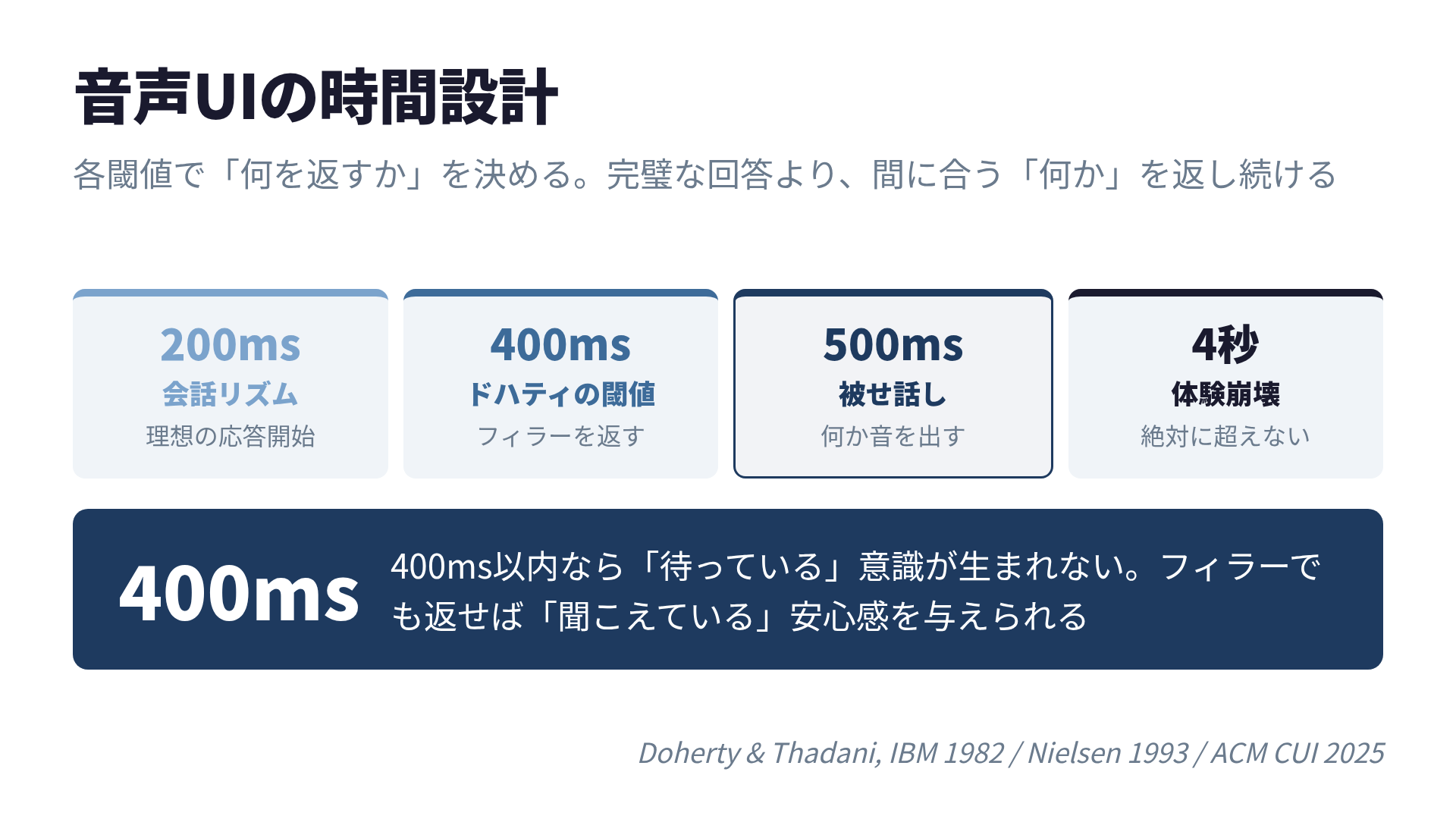 If some response comes back within 400ms, the conscious awareness of “waiting” never forms. The full picture of voice AI time design.
Summary: Time Design for Voice UI
| Threshold | Meaning in Voice AI | Design Guideline |
|---|---|---|
| 100ms | Instant reaction | Acknowledge voice input receipt (beep, etc.) |
| 200ms | Human conversation rhythm | Ideal response start timing |
| 400ms | Doherty threshold | Return a filler or the first audio |
| 500ms | Overlap-speech threshold | Produce some sound before this point |
| 1s | Flow maintenance limit | If exceeded, an explanation is needed |
| 4s | Experience collapse | Must never be exceeded |
Time design for voice AI means deciding “at each threshold, what do we return?” while keeping all of these in mind. A design that waits for the perfect answer and delivers it all at once will almost certainly exceed 1 second.
The key insight: it is not about returning a perfect answer quickly. It is about returning “something” in time for each threshold.
“But theory alone isn’t enough.” Misaki put down her pen. “We need to test how users actually feel. Let’s run an experiment.”
Continue this chapter on Kindle →References
- Nielsen, J. “Response Times: The 3 Important Limits.” Nielsen Norman Group, 1993/2024.
- Doherty, W. J. and Thadani, A. J. “The Economic Value of Rapid Response Time.” IBM Systems Journal, 1982.
- ACM CUI 2025. “Mitigating Response Delays in Free-Form Conversations with LLM-powered IVAs.”
Overview
Voice AI experience is 90% latency. Humans take turns at 200ms; past 300ms it feels off, past 800ms it collapses. Breaking the 525ms cascade with Pipecat.
What you will be able to do
- Translate Nielsen's response time thresholds into voice UX design decisions
- Decompose cascade pipeline (STT → LLM → TTS) and identify each ms
- Combine Pipecat / LiveKit / Deepgram for sub-300ms responses
- Use streaming TTS and perceptual hacks (filler words) to boost felt speed
- Eliminate cloud round-trips with edge AI (Whisper Tiny / quantized LLMs)
Who is this book for
- [Voice AI Developer] Stuck on cascade pipeline latency
- [WebRTC Engineer] Want to apply VoIP knowledge to AI voice
- [UX Designer] Need to quantify conversational naturalness
- [Startup CTO] Want speed as a competitive moat for voice AI products
- [Researcher] Looking to fuse Nielsen thresholds, conversation analysis, and psychoacoustics
Problems this book solves
- Implemented voice AI but the conversational rhythm feels broken
- Measured TTFB but can't pinpoint the bottleneck
- Stuck choosing between Pipecat, LiveKit, and Deepgram
- TTS latency dominates and ruins the whole pipeline
- Want edge AI for voice but no clear architecture
- Users say it feels 'robotic' — no clear path to fix it
Where this book stands
- Implementation-focused (concrete Pipecat / LiveKit / Deepgram stacks)
- Voice-specific (not chatbot — real-time spoken AI only)
- Intermediate level (WebRTC / TTS basics assumed)
- Cross-disciplinary (psychology + UX + implementation + edge AI in one book)
Why this book
- Quantifies 3 cliffs (300ms / 500ms / 800ms) using Nielsen's response time thresholds
- First book comparing Pipecat / LiveKit / Deepgram side by side
- Only resource covering streaming design + perceptual hacks together
- Includes edge AI chapter (Whisper Tiny, quantized LLMs) for cloud-zero designs
How this differs from other AI books
| Compared to | This book's difference |
|---|---|
| Generic AI implementation books | Voice-specific. Tackles a different latency layer than text chatbots. |
| WebRTC / SIP guides | Not protocol-only. End-to-end latency including AI inference. |
| Vendor docs (Pipecat / LiveKit / etc.) | Multi-vendor comparison and combination, not single-stack guidance. |
Table of contents
- Preface Free preview
- 01 Why 300ms — Nielsen's Response Time Thresholds Free preview
- 1-1 A Universal Rhythm
- 1-2 What 200ms Means
- 1-3 The 600ms "Thinking" Impression
- 1-4 Implications for Voice AI
- 02 Three Cliffs — 300ms / 500ms / 800ms Free preview
- 2-1 Applying a GUI Classic to Voice
- 2-2 In Voice UI, the Thresholds Shrink
- 2-3 The Doherty Threshold — Another Baseline
- 03 Cascade Pipeline Decomposition — STT / LLM / TTS
- 04 Implementation with Pipecat
- 05 Implementation with LiveKit
- 06 Deepgram + Streaming
- 07 Turn-taking Detection
- 08 Filler Words and Perceptual Hacks
- 09 Streaming TTS
- 10 Edge AI to Reduce TTFB
- 11 Acoustic Synchronization and Psychology
- 12 Benchmark Design
- 13 Production Patterns
- 14 The Future
- Afterword
- References
When a person pauses half a second too long, you notice. With AI, you notice more sharply.
Human turn-taking happens at 200ms. Past 300ms, the UX feels off. Past 800ms, the conversation collapses. This book grounds those numbers in Nielsen’s response time thresholds, then walks through the latest stacks (Pipecat, LiveKit, Deepgram) with concrete designs for streaming, perceptual hacks, and edge AI.
“Speed isn’t a feature. It’s a precondition.”
Related books

FAQ
- Why is 300ms the threshold for voice AI?
- Human turn-taking happens at about 200ms. Past 300ms a response starts to feel wrong, and past 800ms the conversation collapses. The book builds voice UX design around these measured thresholds.
- Which tools does the book use?
- Pipecat, LiveKit, and Deepgram to decompose the 525ms cascade pipeline (STT to LLM to TTS), plus streaming TTS, perceptual hacks, and edge inference to get under 300ms.
- Where can I buy it?
- The English edition is on Amazon Kindle. A Japanese edition is also available.
Read on Kindle
Included in Kindle Unlimited
Read on Kindle