How to build a JavaScript SDK: 5 real teardowns
Fetch and read the actual CDN-delivered bundles of YouTube, Safie, Vimeo, Mux Player, and Video.js. Reading five different SDKs side by side reveals the design axes — loader/body split, iframe isolation, postMessage contract, version pinning — that every embeddable JS SDK has to answer.
What you can do after reading
- Compare five shipped SDKs on the same axes, and tell the decisions all five agree on apart from the ones that split them
- Read YouTube's 993-byte loader end to end and carry its seven patterns into your own SDK
Series chapters2 chapters
- 0 How to build a JavaScript SDK: 5 real teardowns Pillar (you are here)
- 1 YouTube iframe API: what 993 bytes actually ship YouTube's iframe API ships a 993-byte loader that fetches a 26.8 KB body. Reading it line by line surfaces seven patterns every embeddable SDK reuses.
Paste one script tag on a page and something loads. Behind that one line is a choice between five different architectures, and the choice you make there constrains everything else — how you version, how you isolate, how you handshake, whether the customer’s CSP will let you run.
This series reads five real production SDKs — the bundles you actually download when a <script src="…"> fires — and pulls out the design axes they disagree on. It’s teardown-first: fetch the file, read the code, measure the response. The goal is that by the end you could ship your own.
When a script tag is the only option
Some products have to run inside someone else’s website: video players, camera feeds, chat widgets, payment forms, maps. Ship them as an npm package and you’ve limited your customers to teams that can build. Ship them as a CDN URL plus one <script> tag and they run anywhere HTML can be pasted, including CMS installs and non-engineer customers. In markets where “trivial to install” is a hard requirement, no other distribution shape competes.
The CDN part is easy: low-latency edges (servers the CDN places physically close to end users worldwide), cacheable responses, versionable URLs. The harder part is that the code you shipped now runs inside the customer’s page with the same privileges as the customer’s own code. That’s where the interesting design starts.
Why iframe
If you inject your script directly into the customer’s page, their CSS overrides yours, their JS can rewrite yours, and you’re sharing their cookie jar. Your button colors drift, your internal state leaks, your auth tokens mingle with theirs.
Rendering inside an <iframe> under your own origin (player.vimeo.com, www.youtube.com/embed/...) isolates all four at once: CSS is scoped to the frame, JS is separated by the same-origin policy, cookies bind to your origin, and you set your own CSP inside. It’s the cheapest way to draw a boundary the browser enforces for you.
The cost is two things. The iframe adds a request, and every method call has to go through postMessage RPC. “Play the video” becomes an async round trip.
| On the customer’s page | Injected into the DOM | Isolated in an iframe |
|---|---|---|
| CSS | their stylesheet overrides yours | scoped to the frame |
| JS | their code can rewrite yours | separated by the same-origin policy |
| Cookies | you share their jar | bound to your own origin |
| CSP | you live under theirs | you set your own inside the frame |
| What it costs | nothing | one extra request, and postMessage RPC for every call |
What a script tag hands to the customer
The moment the customer writes <script src="…">, your script has XSS-equivalent power on their page: read the whole DOM, read cookies, intercept forms, fire requests behind their back. Even if you write it honestly, a CDN takeover or dependency compromise ships straight to their users.
Iframe isolation reduces this structurally. Whatever runs inside the frame can’t touch the parent’s DOM or cookies. But if you skip event.origin checks on postMessage or send with *, an attacker frame can drive your API from the outside. Isolation without protocol discipline reopens the same hole.
| What the script tag grants | Stopped by iframe isolation? |
|---|---|
| Read the entire host DOM | ✅ it can’t reach the parent DOM |
| Read cookies | ✅ bound to your own origin |
| Intercept forms | ✅ the parent’s forms aren’t visible |
| Fire requests in the background | ❌ code inside the frame still can |
Skip event.origin checks on postMessage | ❌ a protocol-layer hole; isolation is irrelevant |
Both of the ones that survive live outside the frame. The browser has no reason to block a request leaving code you loaded, and whether you check origin is a design decision in a protocol you write yourself.
DOM-direct SDKs (Mux Player, Video.js) give up isolation because being in the customer’s DOM is a feature: inherit their CSS as a Web Component, expose a build-your-own UI. They assume the customer trusts their script.
Five products, five compromises
Distribution ease (<script> in one line), isolation (iframe vs direct injection), and protocol-layer security pull in different directions. No solution maximizes all three, so the five products in this series draw the line in different places. Safie runs surveillance cameras, so they pay for iframe plus protocol encryption. Video.js is a library, so security is the customer’s job. Mux takes the “Web Component with everything included” position and swallows the trade-off whole. Reading how each of them drew the line is the interesting part; the teardowns follow.
The five under the microscope
| Product | Loader URL | Loader (raw / gzip) | Body | Version-pinnable? |
|---|---|---|---|---|
| Safie | safie.link/sdk/js/api/v1/latest/ | 160 KB / 37 KB | iframe, 2.61 MB | ❌ (latest in URL) |
| YouTube | youtube.com/iframe_api | 993 B / 572 B | www-widgetapi.js 26.8 KB | via hash-URL body only |
| Vimeo | player.vimeo.com/api/player.js | 24.4 KB / 7.9 KB | single file | ❌ (unversioned) |
| Mux Player | cdn.jsdelivr.net/npm/@mux/mux-player | 1.06 MB / 292 KB | single file | ✅ (npm semver) |
| Video.js | vjs.zencdn.net/8.23.4/video.min.js | 690 KB / 201 KB | single file | ✅ (required — /8/ returns 403) |
Measured 2026-08-08. Sizes are the actual HTTP body; gzip is the on-the-wire cost. All bundles were fetched with plain curl, no auth.
The two axes that everything hangs off
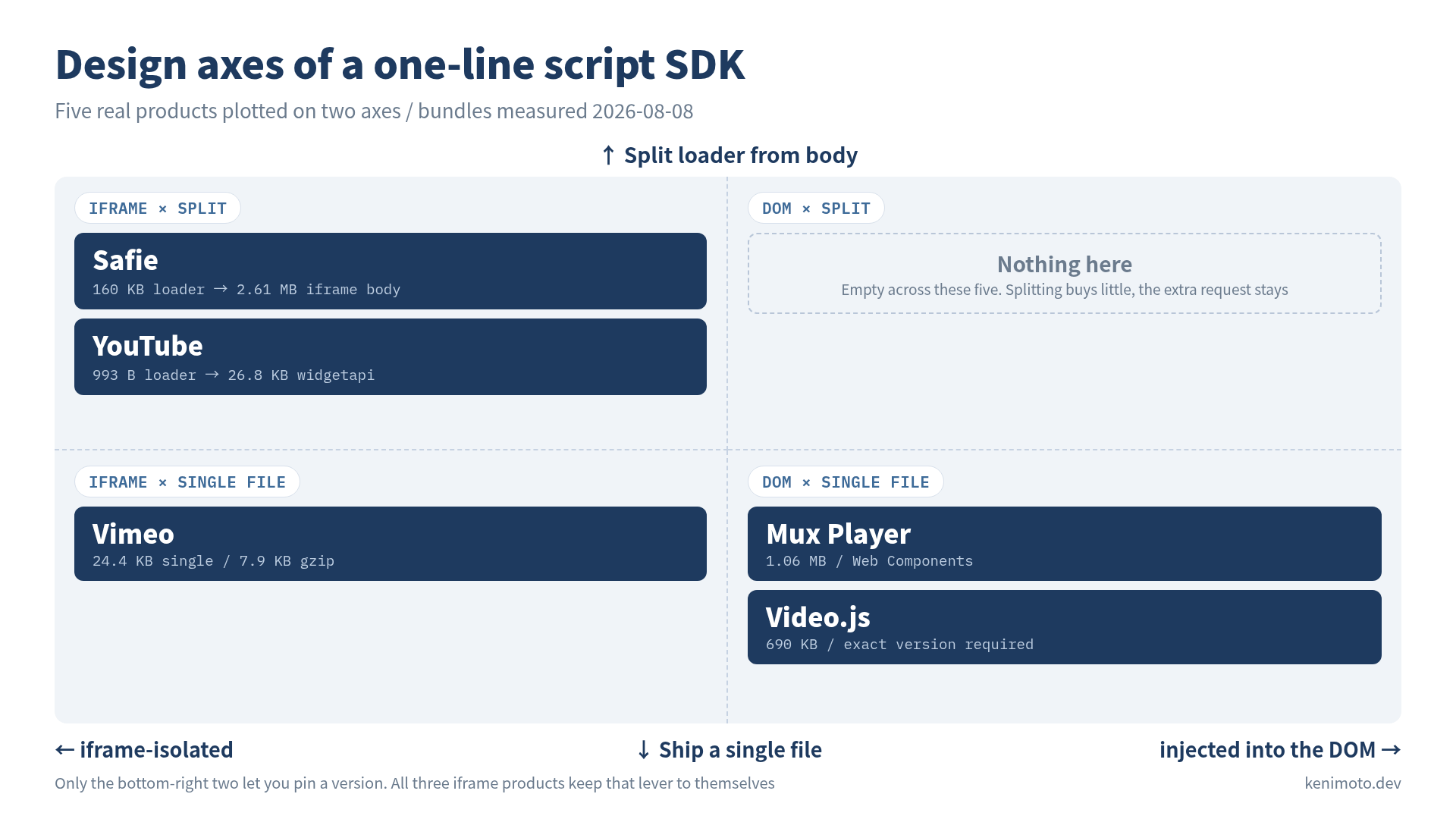
Iframe vs DOM-direct. Safie, YouTube, and Vimeo (in embed mode) render inside an <iframe> under their own origin. Mux Player and Video.js render into the customer’s DOM as Web Components / regular elements. Iframe isolation gives you free CSS containment, a self-served CSP, and cross-origin script boundaries. It costs you a postMessage RPC layer for every method call.
Loader/body split vs single file. Safie’s loader is 160 KB and the real code is a 2.61 MB iframe body. YouTube’s loader is 993 B and the body is 27 KB. Video.js and Mux ship one file with no split.
These two decisions map together but not perfectly. If you go iframe, you almost certainly split (the customer’s script needs the postMessage shim; the iframe body needs the UI code). If you go DOM-direct, splitting buys you less and costs you an extra request. But the version-pinning behaviour follows the iframe/DOM axis strictly: every iframe-based product in this sample refuses to let customers pin a version. The reason is not laziness — it’s that iframe SDKs have to keep parent/child protocol versions in sync, and forcing customers off the treadmill of upgrades would fracture that.
Reading order
The series is six spokes plus this pillar. Read in order for the argument; jump to a spoke when you have the specific question:
- Part 1: 993 bytes, byte by byte — YouTube’s loader is small enough to read end to end. Seven patterns any script-tag SDK reuses.
- Part 2: iframe isolation (upcoming) — how Safie moves 2.6 MB of Angular into an iframe from a 160 KB parent, with its own CSP.
- Part 3: postMessage contracts (upcoming) — origin handshakes, JSON Schema vs
.d.ts, and when you actually need AES-encrypted messages. - Part 4: versioning and cache-control (upcoming) — the iframe/DOM split shows up starkly here.
- Part 5: initialization styles and double-load survival (upcoming) — imperative,
data-attributes, custom elements. All five have been double-loaded in the wild. - Part 6: build your own (upcoming) — a minimal embeddable SDK end to end, with the six decisions from the teardowns made explicit.
What this series is not
It’s not a rank-order of which SDK is “best”. Each of the five is calibrated for a different set of constraints — Safie needs authenticated real-time video with per-user rotating keys; Video.js is a library for people who want to write their own player; Mux ships a batteries-included Web Component. The interesting object of study is the design axes themselves, not the point on each axis that any one product chose.
It’s also not a walk through public docs. Everything measured here was pulled from the actual response bodies. Docs describe the API surface; the bundle describes what you get when you make one HTTP request. Those are different documents and they disagree in interesting places.
Measurements as of 2026-08-08. Build IDs and exact byte counts will drift; the shape of the design space will not.
Was this article helpful?