The 7-Step Test That Told Me When to Switch From RAG to GraphRAG
Vector RAG in production can be duct-taped for months. Every time it fails, the reflex is to add a reranker, tune the top-k, split the chunks smaller. The failure kept coming back on the same shape of question. It took me about ten weeks longer than it should have to notice the shape was the same.
The shape is this: whenever the answer requires two hops between documents, the pipeline confidently returns the wrong thing. Not a “no result.” A wrong, plausible, well-formatted answer. The kind that makes a stakeholder trust the system for exactly one week.
This post is a seven-step check to run before writing any embeddings code, to decide whether the workload actually needs a graph or if I am about to spend a quarter engineering my way around a mismatch. The test came out of me being wrong for three months. Presented as a clean sequence, it looks planned. In practice it is assembled from failures.
Where Vector RAG actually stops working
Three shapes of query break a vector pipeline. Keeping them in a file like rag-failures.md and testing any new corpus against them is cheaper than committing to an architecture first.
Query shape 1: “How does A affect B?” — The answer sits in the join between two documents that never mention each other by name. Doc A talks about a config change. Doc B talks about a latency spike. The causal chain lives in a third artifact (a Slack thread, a runbook, a customer’s ticket) that mentions both. Vector search finds the docs that talk about “latency spike” and the docs that talk about “config change” and hands the LLM two separate piles. The LLM has to guess a bridge that isn’t in the context.
Query shape 2: “Who are all the people connected to X, and how?” — The answer is a list of edges. A Vector store returns documents, not edges. In the worst version of this, the correct answer is a dozen-plus entities spread across dozens of documents; the pipeline returned the 5 most similar docs and the LLM enumerated maybe 6 of the 14, confidently. Nobody could tell it was wrong without running the ground truth by hand.
Query shape 3: “What’s the overall theme of this corpus?” — This one is the classic Microsoft GraphRAG example. Vector search cannot answer “summarize this whole dataset” because there is no chunk that says “the theme is X.” The theme is a structural property that emerges from clustering the entities, not from matching a query string. Tuning the summarization prompt does not fix it, because the failure is in retrieval.
If your product’s core queries fall into any of these three shapes, no amount of reranker tuning will fix you. This is the failure mode that months of reranker tuning does not resolve.
What “just add a graph” doesn’t buy you
Before the seven-step test, one warning worth taking early: adding a graph does not mean adding a Neo4j instance next to your pgvector table. It means paying a real construction cost every time your corpus changes.
Microsoft GraphRAG on a 500-page corpus costs somewhere between $50 and $200 to index. Standard vector RAG on the same corpus is under $5. That is a 10–40× indexing cost multiplier, and it compounds with corpus size. At 100k documents, this is a real line item. At 1M, it needs executive sign-off. Entity extraction alone burns about 58% of your indexing tokens.
If your team’s answer to “what happens when the corpus doubles” is a shrug, do the seven-step test first. Otherwise you will build a beautiful GraphRAG demo that becomes an unmaintained ETL job by month four.
The 7-step switch test
Here is the actual test. Each step is a yes/no. Count yesses.
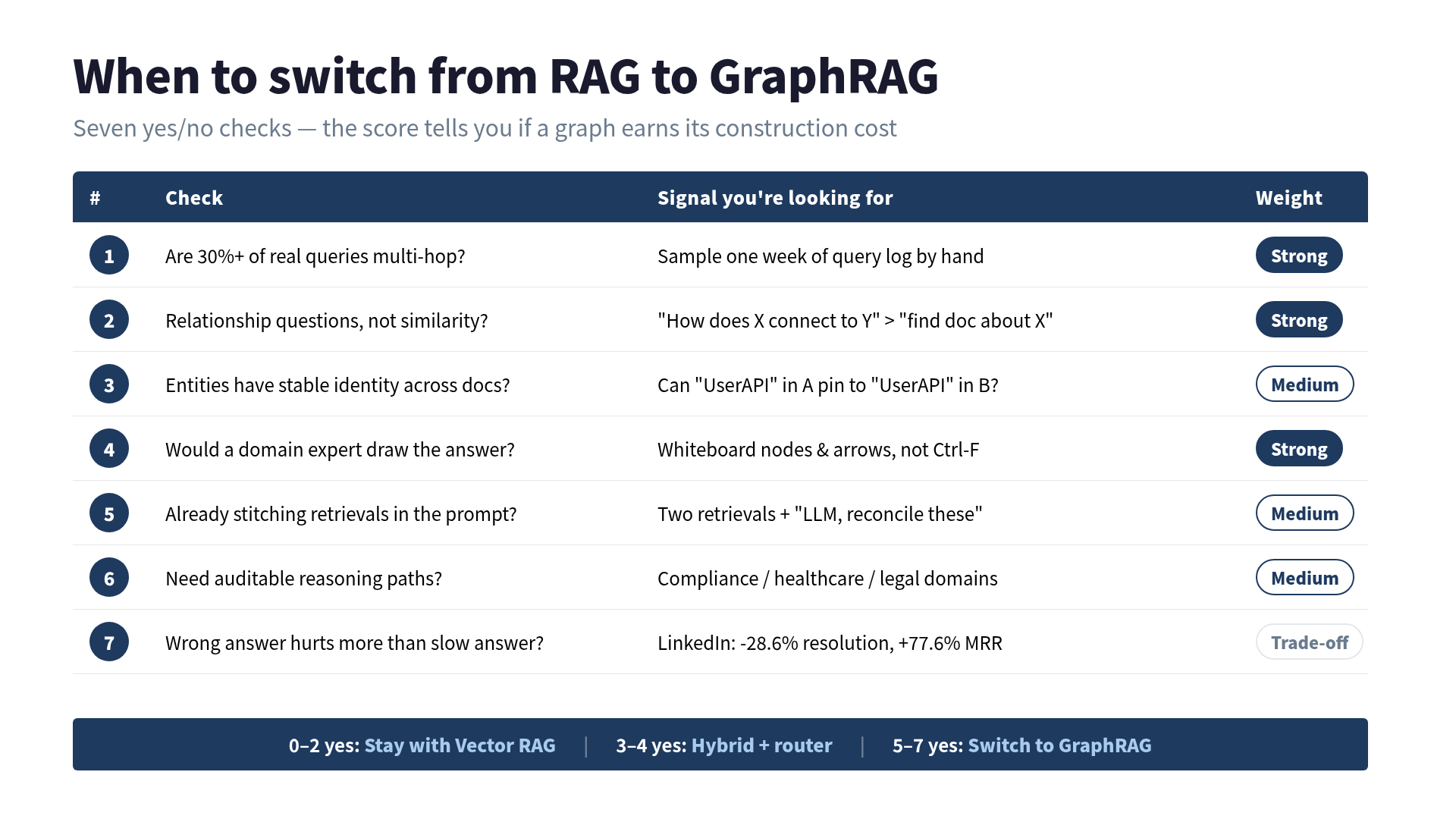
Step 1 — Are 30%+ of your real queries multi-hop? Multi-hop means the answer requires stitching facts from two or more sources that don’t reference each other by name. Sample your production query log for one week. Read them by hand. If fewer than three in ten are actually asking about a relationship, you probably don’t need a graph. If a majority are, you almost certainly do.
Step 2 — Do your users ask relationship questions, not similarity questions? “Find me a document about X” is similarity. “How does X connect to Y” is a relationship. Vector RAG is architecturally optimized for the first. It is architecturally handicapped for the second.
Step 3 — Do your entities have stable identity across documents? GraphRAG assumes you can pin “UserAPI” in doc A and “UserAPI” in doc B to the same node. If your entities are fuzzy (customer names with typos, product versions with drift, three names for the same team), you will spend weeks on entity resolution before the graph earns its keep.
Step 4 — Would a domain expert draw the answer as a diagram? This one sounds soft, but it is the most reliable signal available. Ask your subject-matter expert to solve a hard query in front of you. If they reach for a whiteboard and start drawing nodes and arrows, your workload is graph-shaped. If they pull up Confluence and Ctrl-F, it’s document-shaped.
Step 5 — Are you already stitching multiple retrievals in the prompt? If your current pipeline does two retrievals per query and asks the LLM to reconcile them (“here are the config docs, and separately, here are the alert docs, figure it out”), you are hand-rolling a graph query in the prompt. Doing it properly in graph land is often cheaper and more accurate.
Step 6 — Do you need auditable reasoning paths? Compliance, healthcare, and legal domains often need the answer to come with the chain of evidence: “we concluded X because of edges A→B→C.” Vector RAG gives you top-k documents, not a traversal path. GraphRAG gives you a subgraph, which reads as a reasoning trace almost for free.
Step 7 — Is the pain of a wrong answer higher than the pain of a slow answer? This is where the LinkedIn case earns its way in. The LinkedIn customer support paper (SIGIR ‘24) reports a 28.6% cut in median per-issue resolution time and +77.6% MRR after switching to a KG-augmented pipeline. That is the GraphRAG trade: slower to index, more work up front, higher-quality answers on the shapes that matter.
Now count.
- 0–2 yesses: Stay with Vector RAG. Add a reranker, add hybrid keyword search, tune your chunking. You will get more value out of retrieval-quality work than out of switching architectures.
- 3–4 yesses: Consider a hybrid. Route queries with a small classifier: relationship-flavored questions go to GraphRAG, similarity-flavored ones stay with vectors. This is where most of the recent architecture-decision writeups are converging as a default.
- 5–7 yesses: You have a graph workload. Own the construction cost. The alternative is that you will spend the same money in reranker experiments and prompt hacks, and end up with a slower, more expensive, less accurate system.
The multi-hop numbers, since you asked
Microsoft’s GraphRAG paper (arXiv:2404.16130) reports on HotpotQA: 55.2 EM / 68.6 F1 in local mode. That’s competitive but not blowing baselines away on the easy multi-hop dataset. Where GraphRAG opens the gap is MuSiQue and 2WikiMultiHopQA, the harder datasets, and specifically on dataset-wide questions (“summarize the corpus”) where standard RAG is architecturally unable to answer. On multi-hop retrieval, graph-based retrieval hits around 86% while pure Vector RAG sits in the low 30s in recent benchmarks; on single-hop, the two are roughly tied. That gap is the whole switch decision, expressed in one number.
Jumping to GraphRAG on the vibe of “multi-hop = big number” is common, and construction cost is what gets underestimated. One of them shipped it anyway and it works. One of them silently reverted to Vector RAG plus a good reranker and ships fine. Both were correct decisions. The difference was whether their actual query traffic matched the shape the graph is good at.
The stack question, briefly
If you get to 5+ yesses, the stack question is not the hard part. Neo4j is the enterprise default with the mature Cypher ecosystem. Kuzu is the embedded option, great when you want the graph to live next to the app. Memgraph is the real-time-analytics slot. For most teams the honest answer is Neo4j until you outgrow it, and you don’t outgrow it in the first year. Pick one, get to your first working query, then re-evaluate.
What to check before switching anything
One thing less prescriptive than the seven-step test.
The more useful move is to stop asking “which architecture is better” and start asking “what’s the shape of the questions users are actually paying for answers to.” Read the query log honestly and a good share of the top queries turn out to be shape 1 or 2 above. Vector RAG was never going to answer those cleanly. The iteration was on a system built for a different job.
If you are three months into fighting your retrieval quality: read the query log. Not sample it. Read it. Print it. Highlight the multi-hops. That takes about an afternoon. Then run the seven-step test. It will either tell you to stop pretending you need a graph, or to stop pretending you don’t.
Classifying the query shapes first removes that detour. Presented as a framework, it is meant to remove that detour for the next person.
If you want the full construction playbook (ontology design, the seven-step KG build sequence, Cypher patterns for the three query shapes above, and the GraphRAG evaluation harness), that’s what I wrote The Practical Knowledge Graph Guide for. This post is the “should you” question; the book is the “how” one.
 Related book The Practical Knowledge Graph Guide Why RAG alone won't make your AI smart — GraphRAG, Neo4j, and Property Graphs explained with working code, not abstractions View the book page →
 Was this article helpful?