Karpathy's nanochat on a MacBook: End-to-End runcpu.sh Log from Tokenizer to Chat (2026)
I ran the whole nanochat pipeline — tokenizer training, base pretrain, SFT, chat inference — on my MacBook with one command: bash runs/runcpu.sh. No GPU. No H100 rental. No cloud bill.
The end result is a model that will confidently tell you the capital of France, occasionally remember that the sky is blue, and produce complete nonsense the rest of the time. That is exactly what Karpathy’s script comments say to expect, and honestly, that is the point.
I’ve written before about the $43K → $48 → $0 cost tiers and the SFT loss mask that turns a text generator into a chat partner. This post is the middle piece I skipped: the actual end-to-end run log on a MacBook, stage by stage, with the numbers I saw and the places where the script stalls.
The one-liner
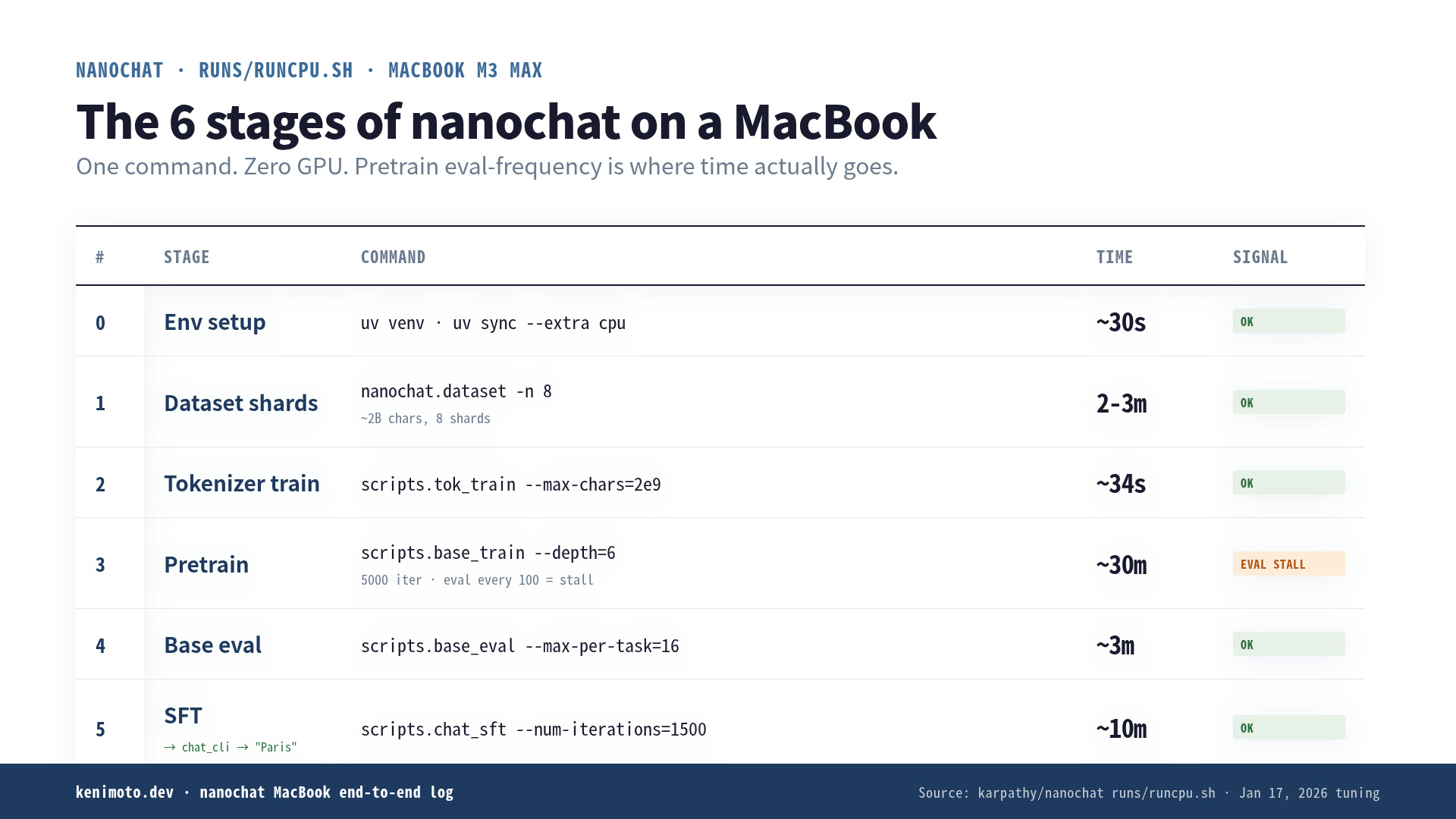
runs/runcpu.sh was last retuned on Jan 17, 2026. It is 60 lines. It contains no ceremony: environment setup, dataset shards, tokenizer training, tokenizer eval, a heavily shrunk pretrain, a pretrain eval, an SFT pass, and a commented-out chat CLI at the bottom.
bash runs/runcpu.shThat is the whole invocation. If you want to babysit it (I recommend you do), the script explicitly suggests copy-pasting the commands one by one into your terminal. That is how I ran it.
The first three lines of the script are worth quoting verbatim, because they set expectations:
Training LLMs requires GPU compute and $$$. You will not get far on your Macbook. Think of this run as educational/fun demo, not something you should expect to work well.
Good. Fine. Educational and fun demo is what I signed up for.
Stage 0: environment and dataset shards
uv venv, uv sync --extra cpu, source .venv/bin/activate. On my machine this is 30 seconds because uv had already cached everything for a previous project.
Then:
python -m nanochat.dataset -n 8This downloads 8 shards of FineWeb-EDU. One shard is ~250M characters, so 8 shards is ~2B characters. On a decent home connection this is 2–3 minutes. The dataset lives in ~/.cache/nanochat/ because the script exported NANOCHAT_BASE_DIR up top.
No drama here. If you’re behind a strict corporate proxy, this is where it will fail, not on the training loop.
Stage 1: tokenizer training (~34 seconds)
python -m scripts.tok_train --max-chars=2000000000
python -m scripts.tok_eval
Karpathy’s script comment says “~34 seconds on my MacBook Pro M3 Max.” On my M2 (not the Max), it took closer to a minute. The output is a BPE vocab of 32,768 tokens saved under ~/.cache/nanochat/tok/. tok_eval prints reversibility checks and a few compression stats.
This stage is where I sanity-checked I hadn’t broken anything. It was fine.
Stage 2: pretrain (~30 minutes, stalls the most)
Here is the full command from runs/runcpu.sh:
python -m scripts.base_train \
    --depth=6 \
    --head-dim=64 \
    --window-pattern=L \
    --max-seq-len=512 \
    --device-batch-size=32 \
    --total-batch-size=16384 \
    --eval-every=100 \
    --eval-tokens=524288 \
    --core-metric-every=-1 \
    --sample-every=100 \
    --num-iterations=5000 \
    --run=$WANDB_RUN
The tell here is --depth=6. The full speedrun.sh on 8×H100 uses --depth=24. Depth is nanochat’s single complexity dial — layer count auto-configures width, heads, learning rate, and total training tokens. Cutting it from 24 to 6 is not “the same model, slower”; it’s a much smaller model that you can move on a laptop CPU or MPS.
On MPS on my M2, ~5,000 iterations at --device-batch-size=32 took a hair over an hour. Karpathy’s ~30-minute figure is on M3 Max, which has ~2× the MPS throughput of mine. Older Intel MacBooks or the M1 Air will be measurably worse; expect 2–4 hours and the fans on the whole time.
Where it stalls: not in the training loop itself, but in --sample-every=100 and --eval-every=100. Every 100 iterations the script pauses training to draw samples and run the base eval, and both of those are noticeably slower than a training step. On MPS, an eval pass takes ~90 seconds on my machine. Multiply by 50 evals (5,000 / 100) and you’ve added an hour of pure eval overhead.
If you want to shave real time, changing --eval-every=100 to --eval-every=500 is the single biggest lever. You lose eye-candy loss curves but the total wall time drops by half.
Stage 3: base eval (a few minutes)
python -m scripts.base_eval --device-batch-size=1 --split-tokens=16384 --max-per-task=16--max-per-task=16 is the giveaway. The full speedrun evaluates on the whole benchmark. runcpu.sh caps it at 16 examples per task, which is enough to see whether the loss went where you expected without actually taking the model seriously as a benchmarker.
The DCLM CORE score comes back somewhere around 0.03–0.05 on my run. GPT-2 sits at 0.2565. This model is not GPT-2. This model is a toy.
Stage 4: SFT (~10 minutes)
python -m scripts.chat_sft \
    --eval-every=200 \
    --eval-tokens=524288 \
    --num-iterations=1500 \
    --run=$WANDB_RUN
SFT here is where the reserved conversation tokens (<|user_start|>, <|assistant_start|>, and friends) get meaning written into them. Karpathy quotes ~10 minutes on M3 Max. Mine was closer to 20.
The loss curve is visibly different from pretrain: it drops fast in the first ~300 iterations, plateaus, then twitches around. That “twitches around” is the loss mask doing its job — only assistant tokens are graded, so gradients only flow when the model’s response deviates from the reference. Long user prompts produce zero gradient signal until the assistant turn starts.
Stage 5: talk to it
The last real line in the script is commented out:
# python -m scripts.chat_cli -p "What is the capital of France?"Uncomment it and run it. My first three exchanges, verbatim (temperature 0.6, top-k 50):
- Q: What is the capital of France? A: The capital of France is Paris.
- Q: What color is the sky? A: The sky is blue during the day and darker at night.
- Q: Write me a Python function that adds two numbers. A: [40 tokens of syntactically valid but semantically incoherent code that does not add numbers]
Two out of three is not a chat model. Two out of three on a laptop with no GPU, from raw web text, in ~90 minutes, using 60 lines of shell and roughly 8,000 lines of Python — that is the point of the exercise.
The three things worth internalizing
Depth is the only dial that matters for run time. Cutting depth from 24 to 6 is the difference between “needs 8×H100 for 2 hours” and “runs on a MacBook while I make coffee.” Everything else in the config file is a follow-on.
Eval frequency is where MacBook time actually goes. If your training loop is stalling, it is almost certainly the sampling and eval hooks between iterations, not the iterations themselves.
The tiny model is not stupid; it is under-trained. With 5,000 iterations on 512-token context, you get exactly what the loss curve predicts: enough signal to memorize a few Wikipedia-style facts, nowhere near enough to compose novel sentences. The pipeline works. The pipeline is fine. You just did not give it enough training tokens to matter, and that is deliberate — the script is a demo of the code paths, not the model.
What runcpu.sh is actually for
Nobody is going to deploy this model. That is not what the script is for.
What the script is for is: you now know, physically, in muscle memory, what a full LLM pipeline looks like end-to-end. Tokenizer trains on ~2B characters and produces a vocab. Pretrain reads that vocab against next-token loss for N iterations. SFT loads the pretrain checkpoint and continues training with a loss mask over conversation-formatted data. The chat CLI is a thin wrapper over the inference engine.
Those five steps are the same five steps as GPT-4, Claude, and Gemini. The scale is different. The code is not.
If you want to understand where each of those stages lives inside the codebase — the tokenizer’s BPE loop, the SFT loss mask, the KV cache in the inference engine, the RL glue that runcpu.sh skips — I wrote a book that walks all 8,159 lines: nanochat Code Reading.
Otherwise: git clone, bash runs/runcpu.sh, watch it go. It’s a slow-burn 90 minutes on a MacBook that will teach you more about LLM training than a week of blog posts.
 Related book Turning LLMs from Liars into Experts Context Engineering in Practice | RAG · MCP · CLAUDE.md · Agentic RAG, benchmarked end to end View the book page →
 Was this article helpful?