Claude setup-token: 1-Year Silent Override
claude setup-token generates a credential that Claude Code reads from CLAUDE_CODE_OAUTH_TOKEN, and that environment variable silently overrides whatever claude login wrote to credentials.json. I stumbled onto this two-layer model running two Claude Code sessions on the same machine—one on a Max subscription, one a secondary account I used for lighter tasks—and watching the UI say one thing while claude did another.
Then I noticed the active account highlighted in the UI was not matching what claude was actually using. The secondary account’s token was in the environment. The Max account was shown as “login active.” They were pointing at different identities. Both were “active” in different senses of the word.
That is when I realized Claude Code’s authentication is not one thing—it is two separate layers that can move independently.
Layer 1: credentials.json
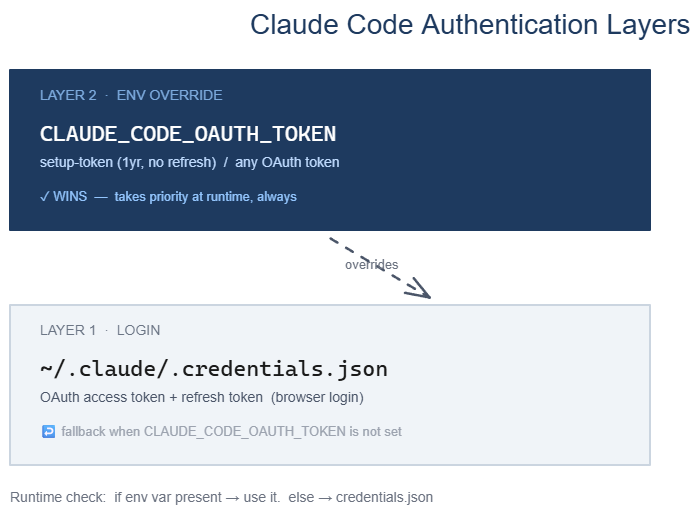
The first layer is ~/.claude/.credentials.json. This is what claude login writes when you authenticate through the browser. It holds your OAuth token and refresh token. When the access token expires, the refresh token fetches a new one automatically.
This is the layer most users know. You log in once, the credentials file is written, and Claude Code uses it on every launch. The file is tied to a single Anthropic account.
When you run multiple accounts from the same machine, tools like claude-shift swap the contents of this file to switch which account is active. The pattern is straightforward: write a different credentials file, and the next claude invocation uses that account.
Layer 2: CLAUDE_CODE_OAUTH_TOKEN
The second layer is an environment variable: CLAUDE_CODE_OAUTH_TOKEN. When this variable is set in the shell environment that launches claude, it overrides Layer 1. Completely.
The runtime check is simple: if CLAUDE_CODE_OAUTH_TOKEN is present in the environment, use it. If not, fall back to credentials.json. The environment variable wins every time.
This means your “login” account (Layer 1) and your “running” account (Layer 2) can be two different identities at the same time. If you are not aware this variable exists, and something sets it for you (a startup script, an account manager, a previous session), you will see exactly what I saw: the UI highlighting one account while claude actually runs as another.
What setup-token actually is
claude setup-token generates a long-lived credential for a specific use case: running Claude Code non-interactively, on machines where browser-based OAuth is inconvenient or impossible. CI environments. Remote machines. Headless servers.
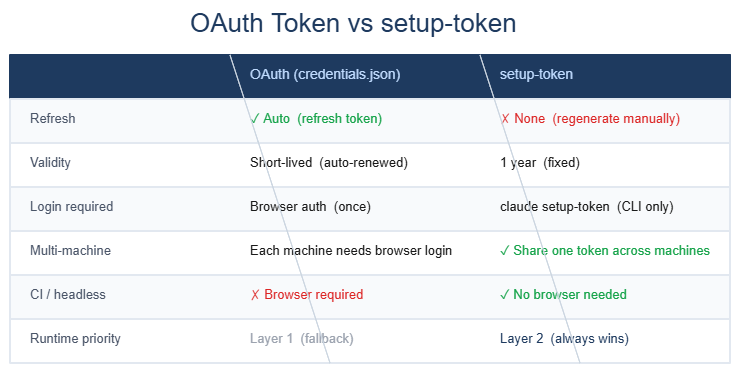
The token this command generates is different from the OAuth tokens in credentials.json in one important way: it has no refresh token.
A normal OAuth flow issues an access token (short-lived) plus a refresh token (long-lived). When the access token expires, the refresh token fetches a new one invisibly. This works well when you are logged in interactively and the token lifecycle can be managed in the background.
A setup token is issued as a single credential with a one-year validity window. There is no separate refresh token. When it expires, you generate a new one. In exchange, it is stable: the same token string works across machines, can be stored in secrets managers, and does not require browser interaction to renew.
When you set CLAUDE_CODE_OAUTH_TOKEN to a setup token value, Claude Code uses it as the runtime identity. The setup token takes the place of both the access token and the refresh process.
Why two layers exist
The design makes sense when you consider the different deployment scenarios Claude Code needs to support.
Interactive, single-machine use: One developer, one machine, one account. claude login once, credentials.json handles everything, automatic refresh works. Layer 2 is irrelevant.
Interactive use, multiple accounts on one machine: Swap credentials.json to switch accounts. Layer 2 can be used to “pin” one account for automation while Layer 1 handles interactive sessions. The two layers serve different roles simultaneously.
Non-interactive, remote or CI use: Browser login is impossible. claude setup-token generates a stable credential. Set CLAUDE_CODE_OAUTH_TOKEN in the environment. Claude Code runs without any OAuth ceremony. Layer 1 is irrelevant.
Multi-machine use: One account spread across several machines, each running different workloads. The setup token can be provisioned to each machine through a secrets manager without requiring individual browser logins.
The two-layer design is not redundancy—it is a way to make the same tool work across a wide range of deployment contexts without forcing every context to support the interactive OAuth flow.
The split problem
When you run a tool that manages both layers independently, it is possible for them to diverge. Layer 1 might point to Account A (because you last used claude login for Account A). Layer 2 might point to Account B (because a setup token for Account B is set in the environment). This is what I was running into.
Depending on which account you actually want Claude to use, one of these is correct and the other is stale state. The problem is that neither the CLI nor the UI gives you a clear signal that the two layers are pointing at different places—unless your tooling explicitly checks for this.
The pattern I now use: when checking which account is “active,” check both. If they match, everything is clean. If they diverge, decide intentionally which one should win, and clear the other.
Practical implications
If you use Claude Code on a single machine under a single account, none of this is relevant. The default OAuth flow handles everything.
If you run multiple accounts, or if you use setup-token for automation, it is worth understanding these three facts:
CLAUDE_CODE_OAUTH_TOKENalways wins overcredentials.json. If the variable is set, that is the account running.claude loginwrites tocredentials.jsonbut does not touchCLAUDE_CODE_OAUTH_TOKEN. Logging in interactively will not clear a token pin that is already set.- A setup token does not rotate automatically. Put a reminder to regenerate it before the one-year mark.
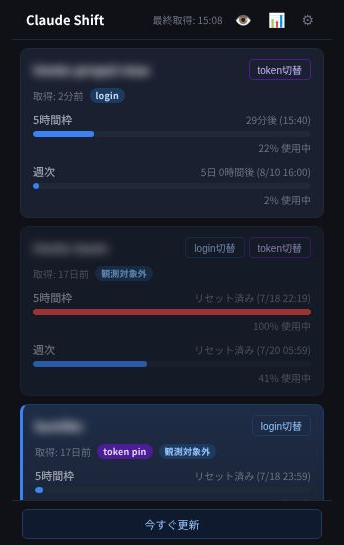
Tools like claude-shift surface both layers in a single UI: a login-switch button for Layer 1 and a token-switch button for Layer 2, with the active card highlighted in blue. When the two layers diverge, a split warning banner appears at the top.
For the hands-on mechanics—how to generate a setup token, how to switch accounts, and how to recover when the two layers diverge—see the companion Qiita article (link to follow once published).
The two-layer design is not complicated once you know it is there. The difficulty is that almost nothing in the official documentation tells you it exists.
 Related book Local LLM or Claude Code? 96% of my requests couldn't go to a local LLM. Split into single steps, half of them could View the book page →
 Was this article helpful?