cache-control and version pinning: 5 SDKs split two ways
postMessage contracts: Vimeo, YouTube, Safie compared covered the protocol contract. Once the protocol is fixed, the next question is which version you let customers run.
Here are the five products side by side. The iframe SDKs and the DOM SDKs split cleanly down the middle.
Measured cache-control matrix
Headers taken with curl -I on 2026-08-08.
| Product | URL | cache-control |
|---|---|---|
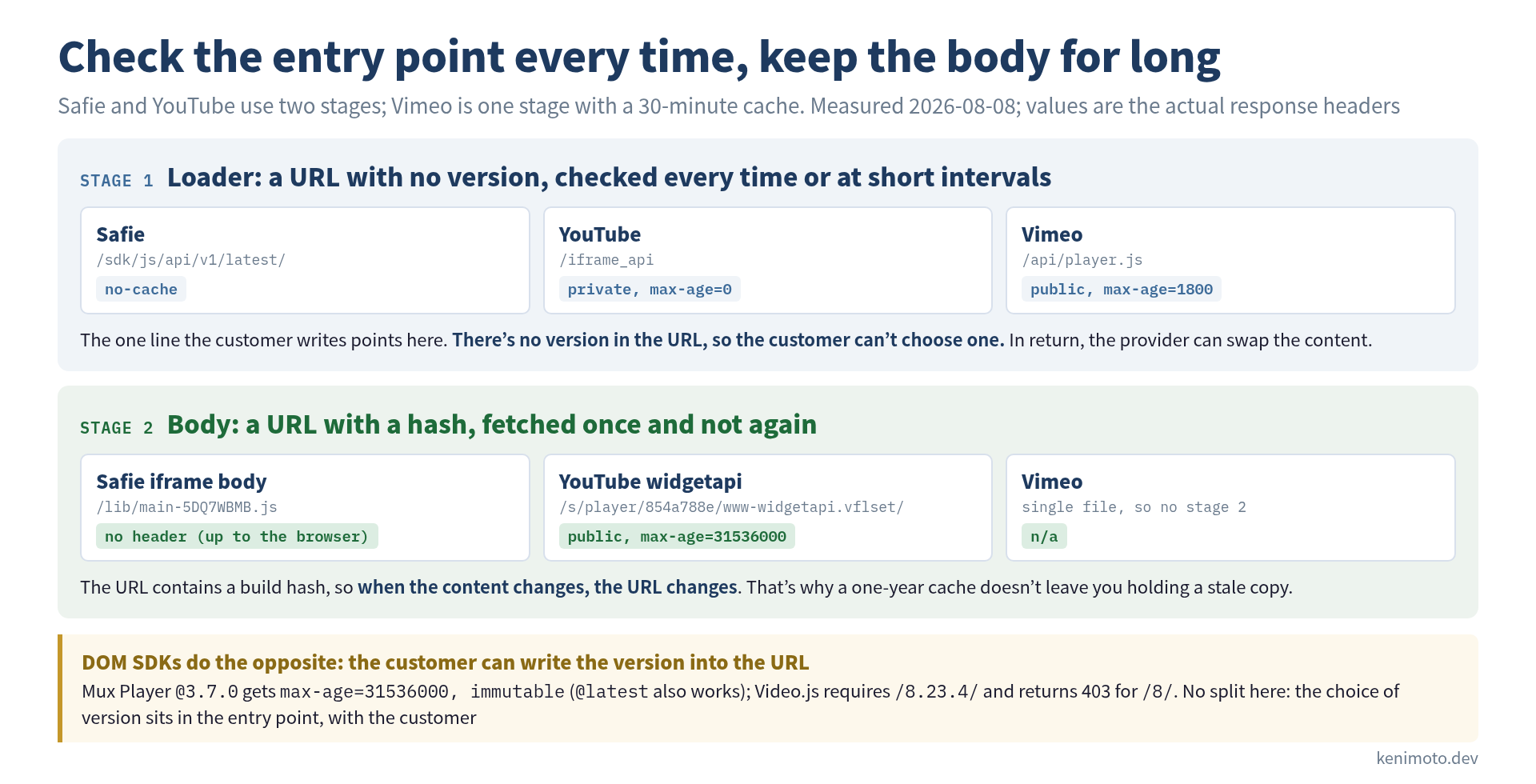
| Safie loader | safie.link/sdk/js/api/v1/latest/ | no-cache |
| Safie iframe body | .../lib/main-5DQ7WBMB.js (hash URL) | (none = up to the browser) |
| YouTube loader | youtube.com/iframe_api | private, max-age=0 |
| YouTube widgetapi body | .../s/player/854a788e/www-widgetapi.vflset/... | public, max-age=31536000 |
| Vimeo | player.vimeo.com/api/player.js | public, max-age=1800 |
Mux Player @latest | cdn.jsdelivr.net/npm/@mux/mux-player@latest | public, max-age=604800, s-maxage=43200 |
Mux Player @3.7.0 | .../mux-player@3.7.0 | public, max-age=31536000, immutable |
Video.js /8.23.4/ | vjs.zencdn.net/8.23.4/video.min.js | (none = up to the browser) |
Video.js /8/ | vjs.zencdn.net/8/video.min.js | 403 Forbidden |
The “none” rows return no Cache-Control at all. In that case the browser estimates a freshness lifetime on its own, from things like how long ago Last-Modified was (heuristic freshness, RFC 9111 §4.2.2), so how long the file stays cached depends on the browser. It is not forever.
Safie’s body sits at a hash URL, so even then the risk of holding on to a stale copy stays small.
Reading the two axes
Axis 1: can the customer choose the version?
- Yes: Mux Player (write
@3.7.0and it’s pinned;@latestalso works), Video.js (/8.23.4/required,/8/returns 403) - No: Safie (
/latest/), YouTube (no version in/iframe_api), Vimeo (no version in/api/player.js)
Axis 2: where is the version pinned?
- In the URL: Video.js (
/8.23.4/), Mux Player (@3.7.0) - Not in the URL, but hashed internally: YouTube (the loader emits a build-hash URL containing
854a788e) - No version in the URL, and the content moves: Safie loader (
/latest/), Vimeo (/player.js)
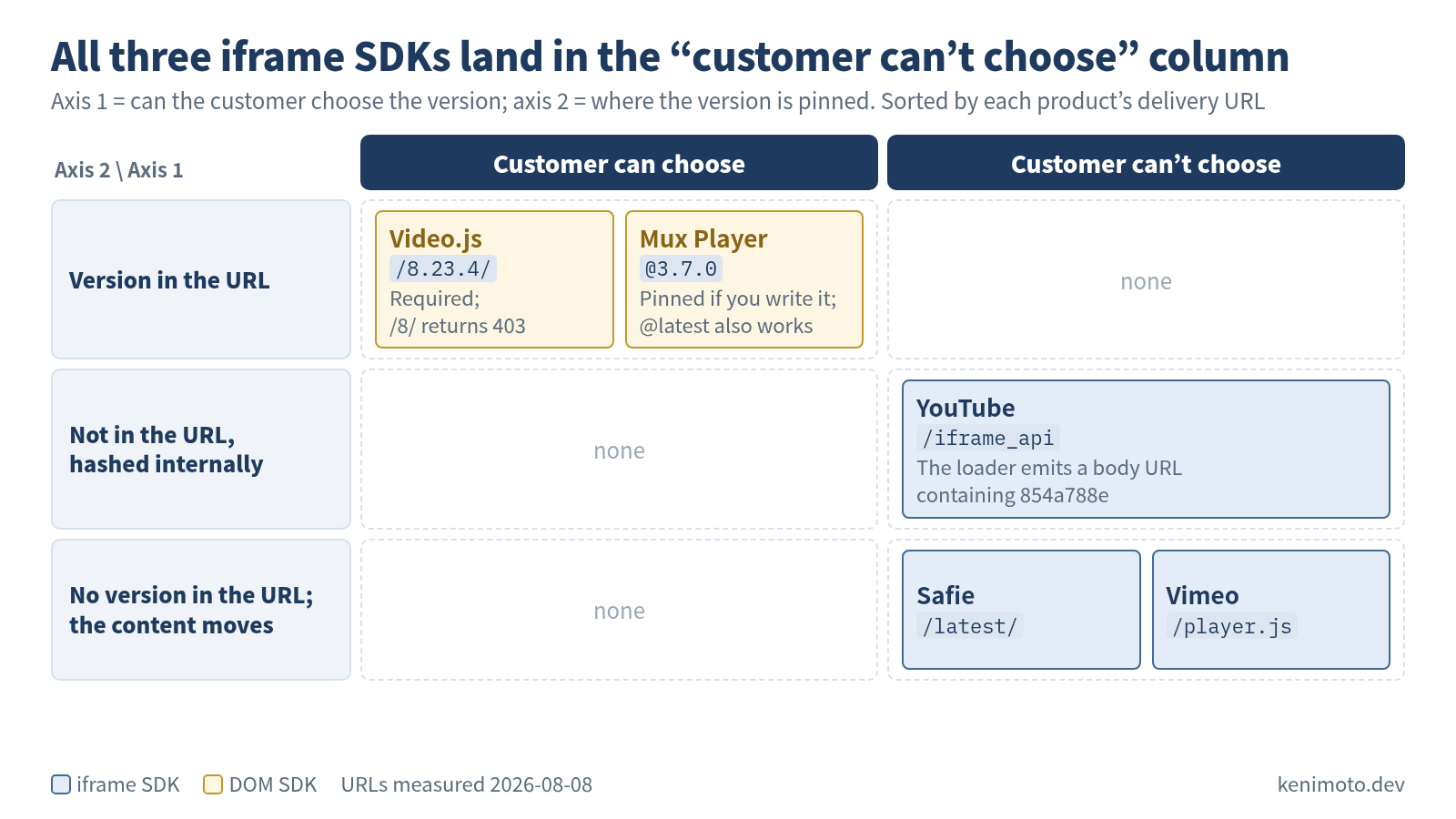
The three iframe products all agree on “don’t let the customer pick a version”, and the two DOM products both “let the customer pick”. Mux Player also answers @latest; only Video.js requires an exact version. I’ve only looked at five products, so I can’t call it a rule, but I think there’s a technical explanation for why the split falls where it does.
Why iframe SDKs don’t let you pin a version
An iframe SDK is split into a parent (the loader on the customer’s site) and a child (the iframe body running on your own domain), and the two talk over postMessage. The protocol grows over time: more methods, more fields, a better handshake. When parent and child drift apart in version, the conversation breaks.
That’s why you can’t let customers pin the loader’s version.
Hold back the new protocol for the sake of customers who pasted an old loader, and new features stop. Drop the old loader instead, and customers have to edit their HTML, which is a serious problem on the sales side. The only way to avoid getting caught between the two from the start is “the loader URL stays fixed, and you swap what’s behind it”.
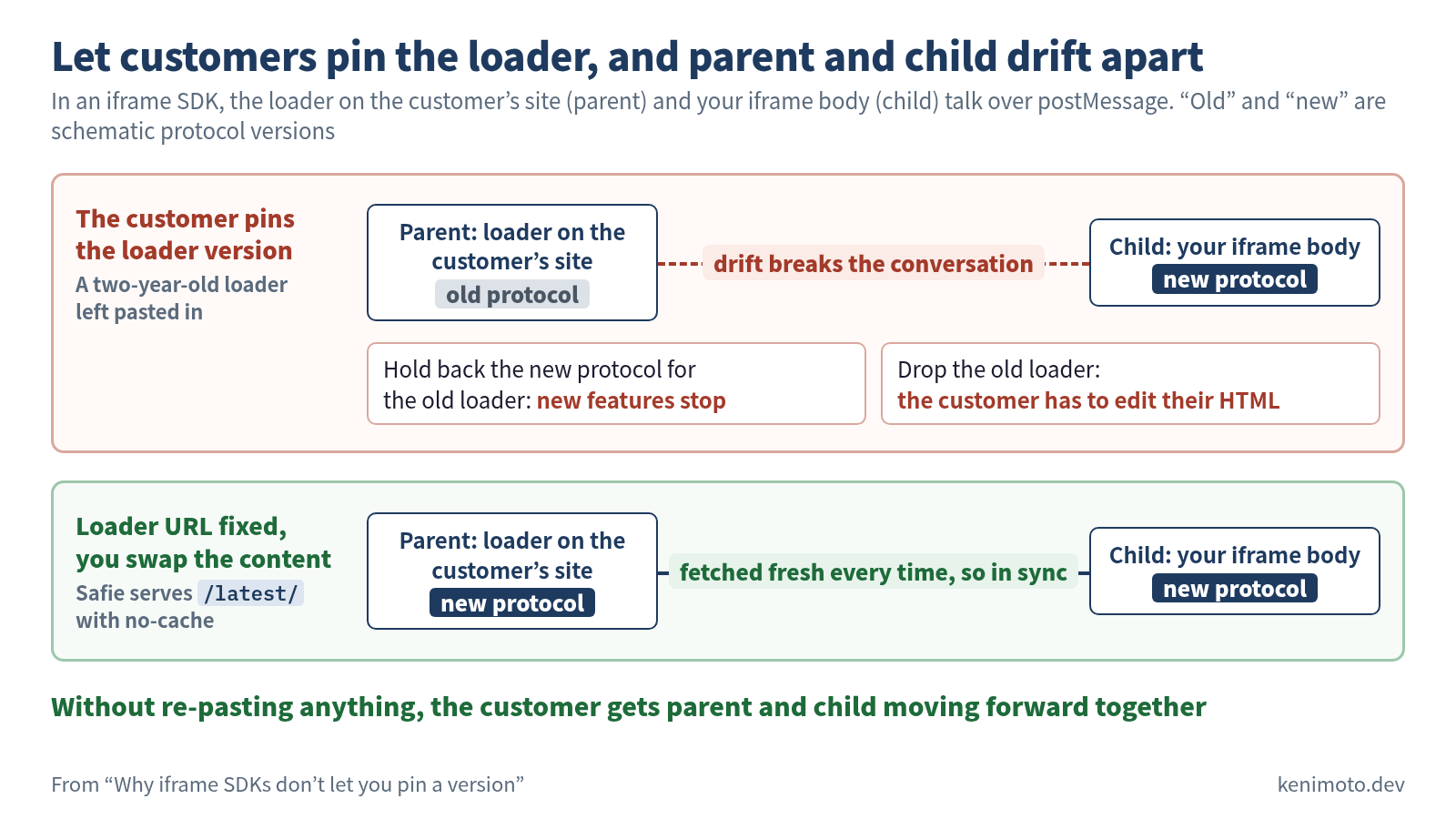
Safie is the textbook case: it serves safie.link/sdk/js/api/v1/latest/ with no-cache so it is fetched fresh every time. When the content is updated, the customer’s JS behavior moves forward automatically.
YouTube is a little different. The loader (iframe_api) is also fetched fresh every time, but that loader emits a URL carrying a build hash like 854a788e. When the build hash changes, the new version is pulled in regardless of what’s in the browser cache. Because of that double indirection, a new version arrives through the body’s hash URL changing, and since the loader carries private, it isn’t stored in shared caches such as corporate proxies at all.
Vimeo is the middle ground. It serves /api/player.js with max-age=1800 (30 minutes). After a protocol change ships, the old version can keep running for up to 30 minutes as a grace period, and then it switches over automatically. My reading of why Vimeo doesn’t spell out latest even though it’s an iframe SDK: Vimeo’s protocol is documented on its own as the Vimeo Player SDK, on the assumption that outside developers can write their own clients.
Why DOM SDKs let customers pick the version
Mux Player and Video.js are built straight into the customer’s DOM. There is no protocol. They only talk to their own servers directly over HTTP or WebSocket. Structurally there’s no parent/child handshake to keep in step, so the bind the iframe SDKs are caught in doesn’t exist here.
They have a different problem instead: API changes in the SDK bundle. If the options format of videojs(id, options) changes, or the plugin API gets rewritten, the JS the customer wrote themselves breaks. By serving URLs that can carry a version, the SDK lets customers choose when they upgrade. How much of the version they must write differs by product.
- Mux Player is an npm package, so a semver version like
@3.7.0is the natural fit. jsdelivr’s CDN caches@3.7.0asimmutablefor a year. Write@latestinstead and you follow new releases (up to 12 hours late at the CDN, up to 7 days in the browser). Whether to pin is left to the customer. - Video.js requires
vjs.zencdn.net/8.23.4/and refuses/8/with a 403. You can’t “write just the major version and get minor upgrades for free”.
The DOM SDKs give customers freedom and, in exchange, put the responsibility for upgrading on the customer. It’s the opposite philosophy to the iframe SDKs.
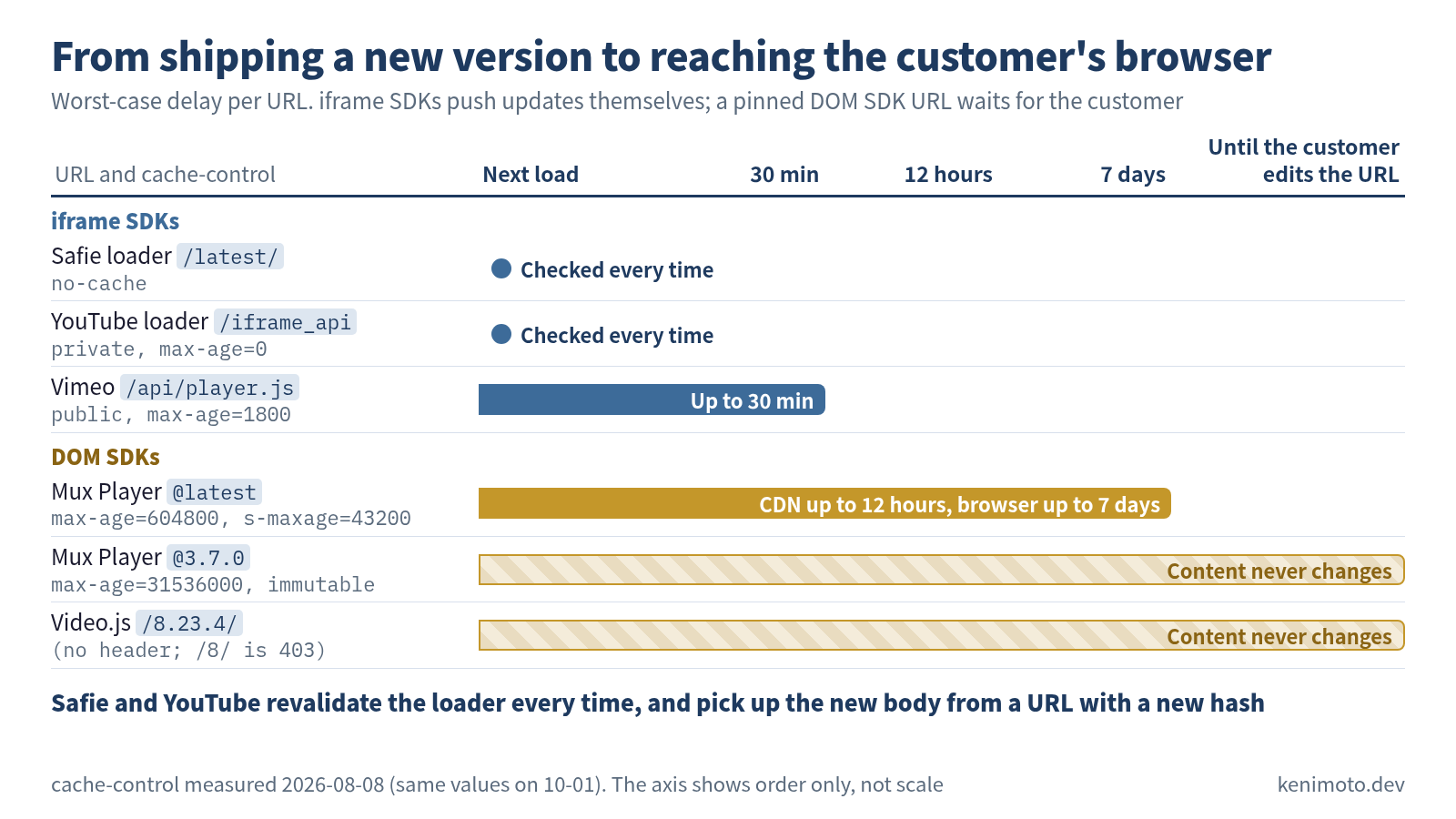
The question isn’t which one is right. It’s more accurate to read it as the iframe SDKs selling “the freedom to force change” and the DOM SDKs selling “the freedom to make change opt-in”.
The fine difference between no-cache and max-age=0
Safie’s loader is no-cache; YouTube’s loader is private, max-age=0. They behave almost the same, with a small difference.
no-cache: you may store it, but you must revalidate with the server before every use (aiming for a 304 viaIf-None-Match)max-age=0: the freshness lifetime is zero, so it needs revalidating before every use. YouTube also addsprivate, so it isn’t stored in shared caches like CDNs or corporate proxies
It’s less a difference in implementation than in how the intent is expressed. Both declare “never let the loader be frozen in a cache”.
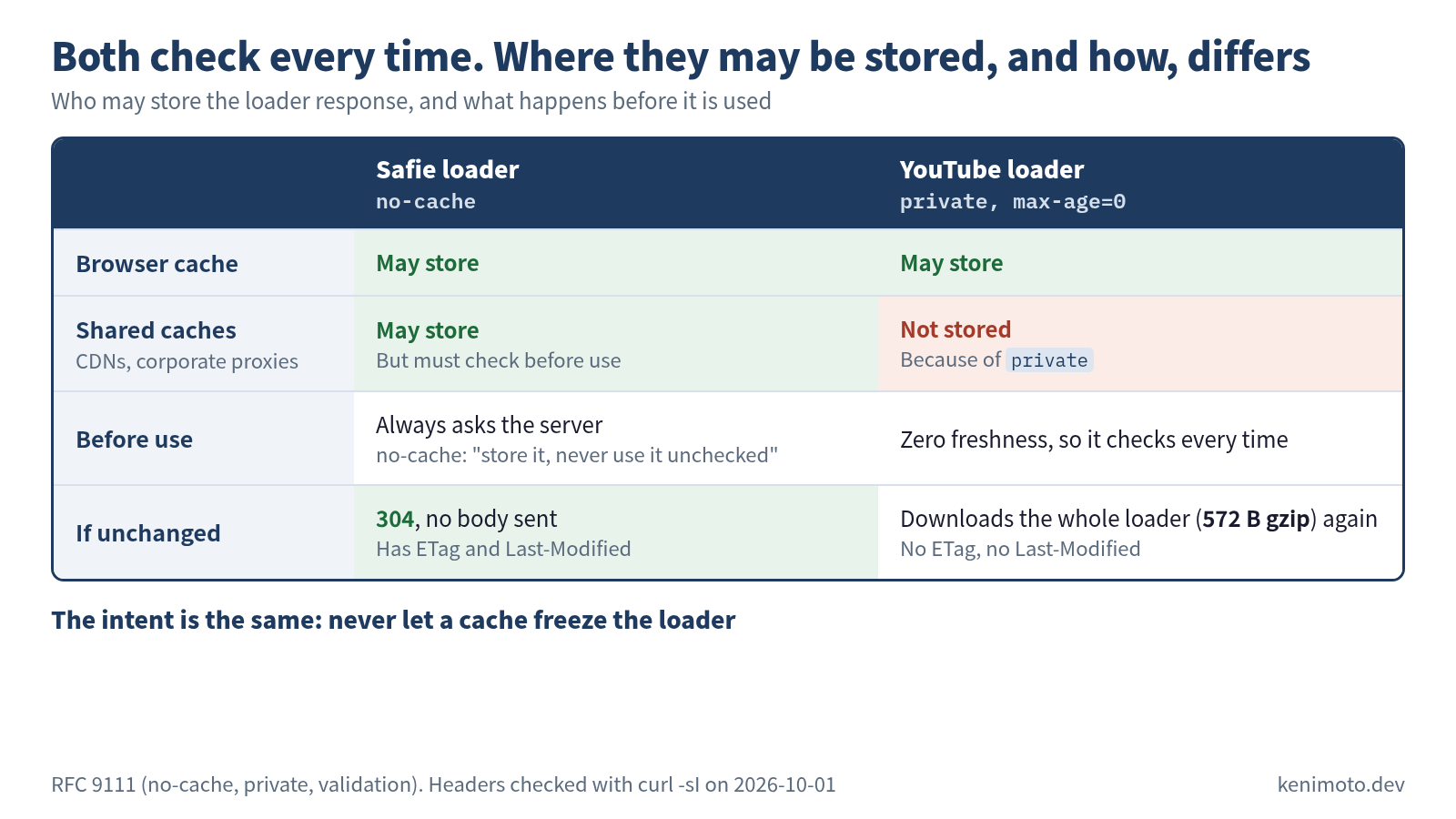
The loader of an iframe SDK is the versioning contract itself. Cache it, and the contract stops in the past.
Choosing when you build your own
| Building an iframe SDK | Building a DOM SDK | |
|---|---|---|
| URL the customer pastes | Fixed /latest/, no-cache | Version can be written (required by Video.js); exact versions get a long-lived immutable cache |
| Switching versions | Handled entirely on your side; customers don’t re-paste | Customers upgrade explicitly |
| Protocol compatibility | Nothing to worry about (always in sync) | Nothing to worry about (there is no protocol) |
| Cost of breaking changes | You absorb it (including supporting old customers) | Customers absorb it (they can refuse to upgrade) |
| What you tell customers | ”Paste one script line; updates are automatic" | "Upgrade explicitly, following semver” |
There are exceptions: hybrids that look like DOM SDKs but carry one iframe, and iframe-looking SDKs that allow version pinning internally. But the five products I measured divide cleanly in two. It’s reasonable to treat the cache-control strategy as half decided the moment you pick the SDK’s embedding shape.
Next: initialization styles and double-load resilience
With versioning settled, the next piece is the entry point: how customers call the SDK. There are three kinds, imperative (new YT.Player(...)), data attributes (<video data-setup="...">) and Web Components (<mux-player>), and the five products split across all three. The next part also covers the double-load problem, which YouTube, Vimeo, Mux Player and Video.js all guard against in the JavaScript they ship.
Measured 2026-08-08. cache-control values stay stable for years. Build IDs change daily.
Was this article helpful?