Web Components vs data attributes: 3 SDK init styles
I took apart the five products’ split strategy in YouTube iframe API: what 993 bytes actually ship, the protocol contract in postMessage contracts: Vimeo, YouTube, Safie compared, and version management in cache-control and version pinning: 5 SDKs split two ways. This part covers the outermost layer the customer touches: the API design for how they call the SDK. Line the five products up and they fall into three styles.
How the three styles are implemented
These are the initialization patterns I extracted from each bundle as of 2026-08-08.
| Product | Style | Code the customer writes |
|---|---|---|
| YouTube | Imperative (callback) | <div id="player"></div> + window.onYouTubeIframeAPIReady = () => new YT.Player("player", {...}) |
| Vimeo | Imperative (constructor) | <div id="p"></div> + new Vimeo.Player("p", { id: 123 }) |
| Safie | Imperative (namespace) | new Safie.Player.StreamingPlayer(element, options) |
| Video.js | Data attribute (auto-scan) | <video data-setup='{"controls": true}'> (detected automatically) |
| Mux Player | Web Components | <mux-player playback-id="..."></mux-player> |
Three imperative, one data attribute, one Web Components. Each assumes a different customer workflow.
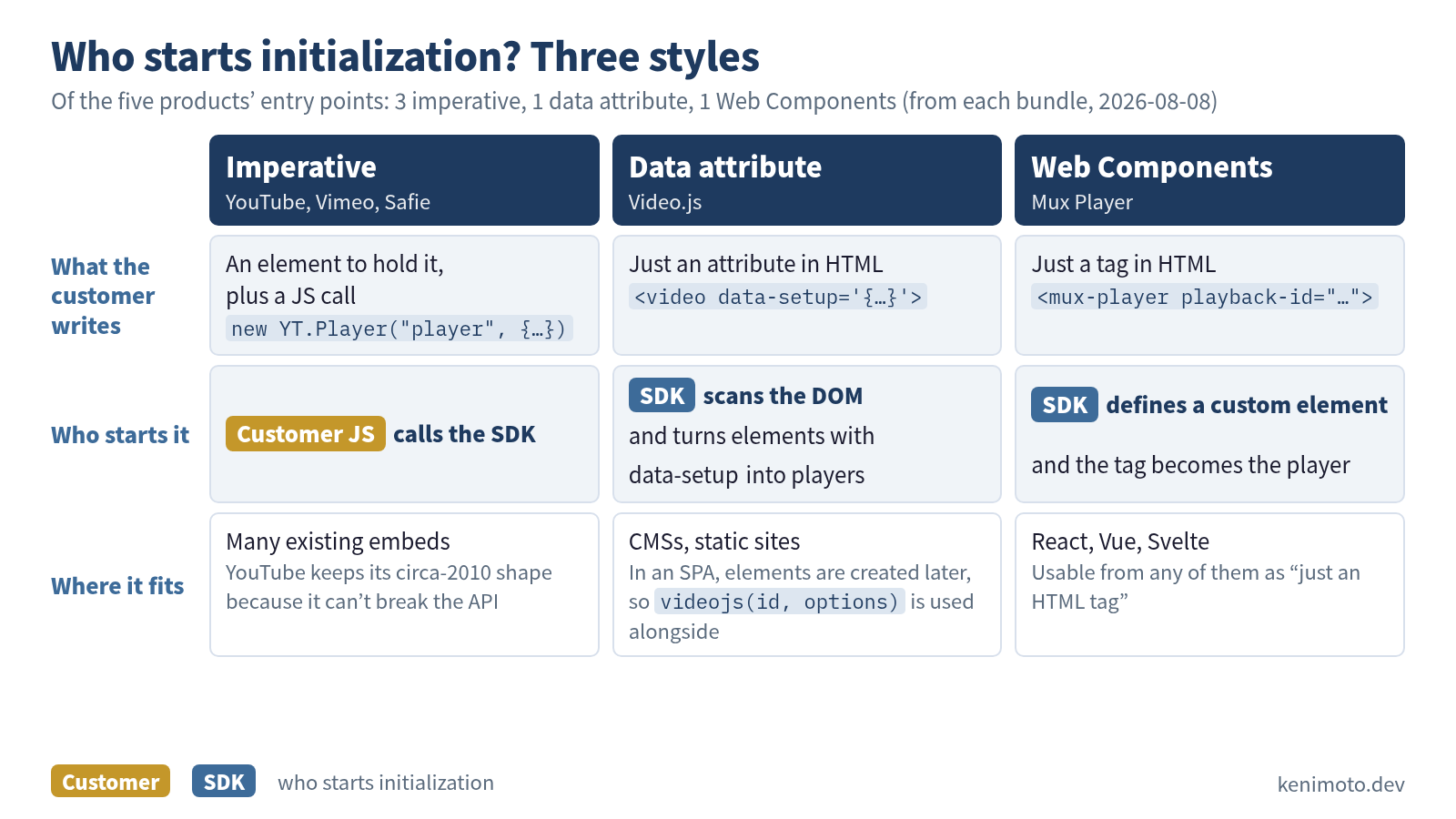
Let’s go through them in order.
Imperative API: the YouTube style
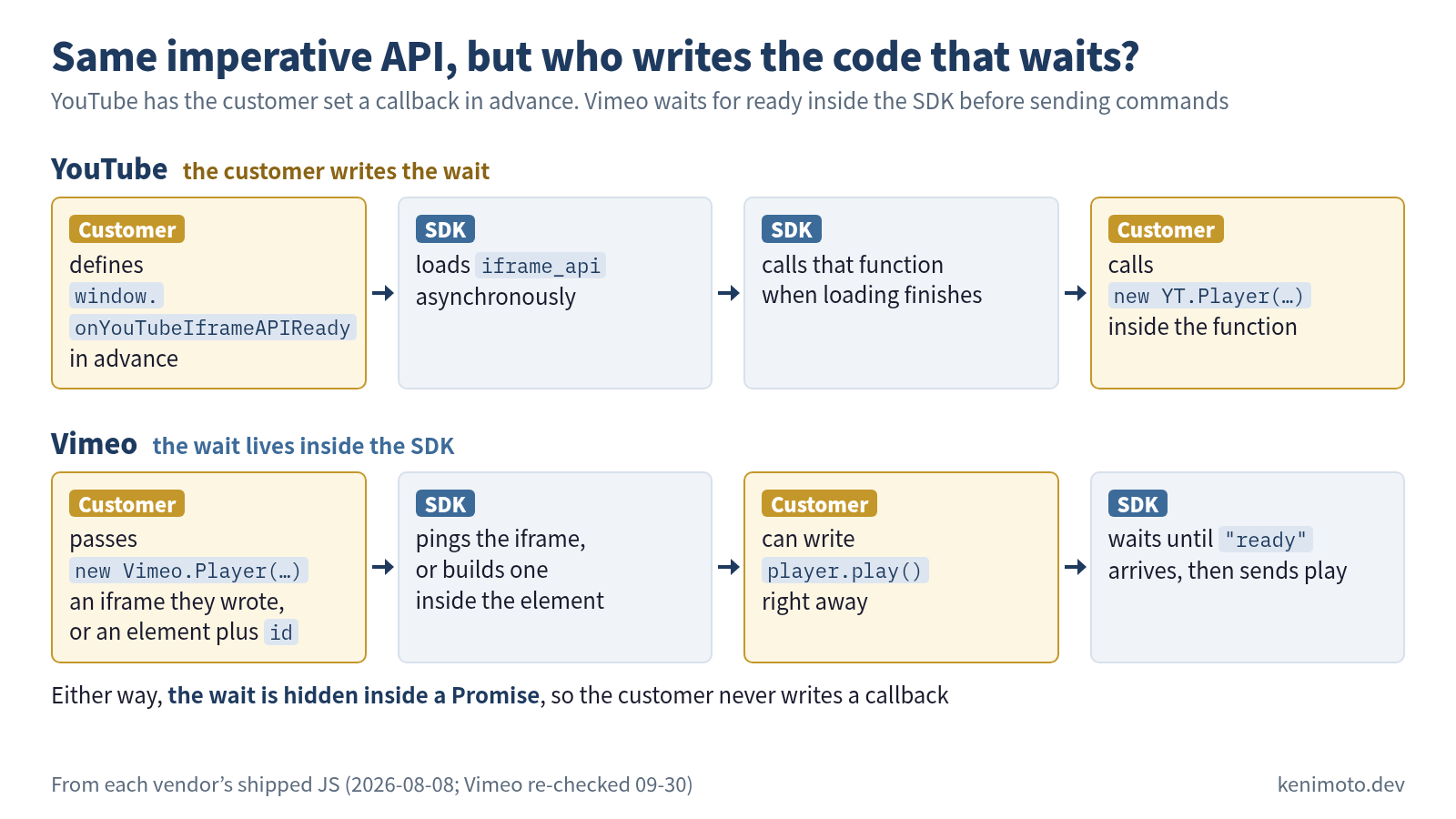
Paste <script src="https://www.youtube.com/iframe_api"></script> and a YT namespace appears on window, which you call as new YT.Player(id, config). But the SDK loads asynchronously, so you have to define a global callback on window called onYouTubeIframeAPIReady ahead of time.
<div id="player"></div>
<script>
  window.onYouTubeIframeAPIReady = function() {
    new YT.Player("player", {
      videoId: "M7lc1UVf-VE",
      events: { onReady: onPlayerReady }
    });
  };
</script>
<script src="https://www.youtube.com/iframe_api"></script>
This design carries the way web APIs were written around 2010 straight into 2026. If you were writing it today, you wouldn’t use window.onYouTubeIframeAPIReady; Promise plus type definitions would be the natural fit. But YouTube already carries an enormous number of existing embeds and can’t ship an API break.
Vimeo is imperative too, but you call the constructor directly, and the customer doesn’t write a ready callback.
<iframe id="v" src="https://player.vimeo.com/video/76979871"></iframe>
<script>
  const player = new Vimeo.Player("v");
  player.play();
</script>
Vimeo’s constructor accepts two shapes. The customer can write the iframe themselves and attach new Vimeo.Player(iframe) to it afterwards, as above, or pass an empty element plus { id: 123 }, as in the table, and let the SDK build the iframe (it fetches the embed HTML through oEmbed and inserts it into the element; player.js as of 2026-09-30). Either way the wait lives inside the SDK: given an iframe, the constructor sends it a ping, and calls like play() are held inside the SDK until "ready" comes back. Because the wait is hidden inside a Promise, the customer doesn’t need a callback.
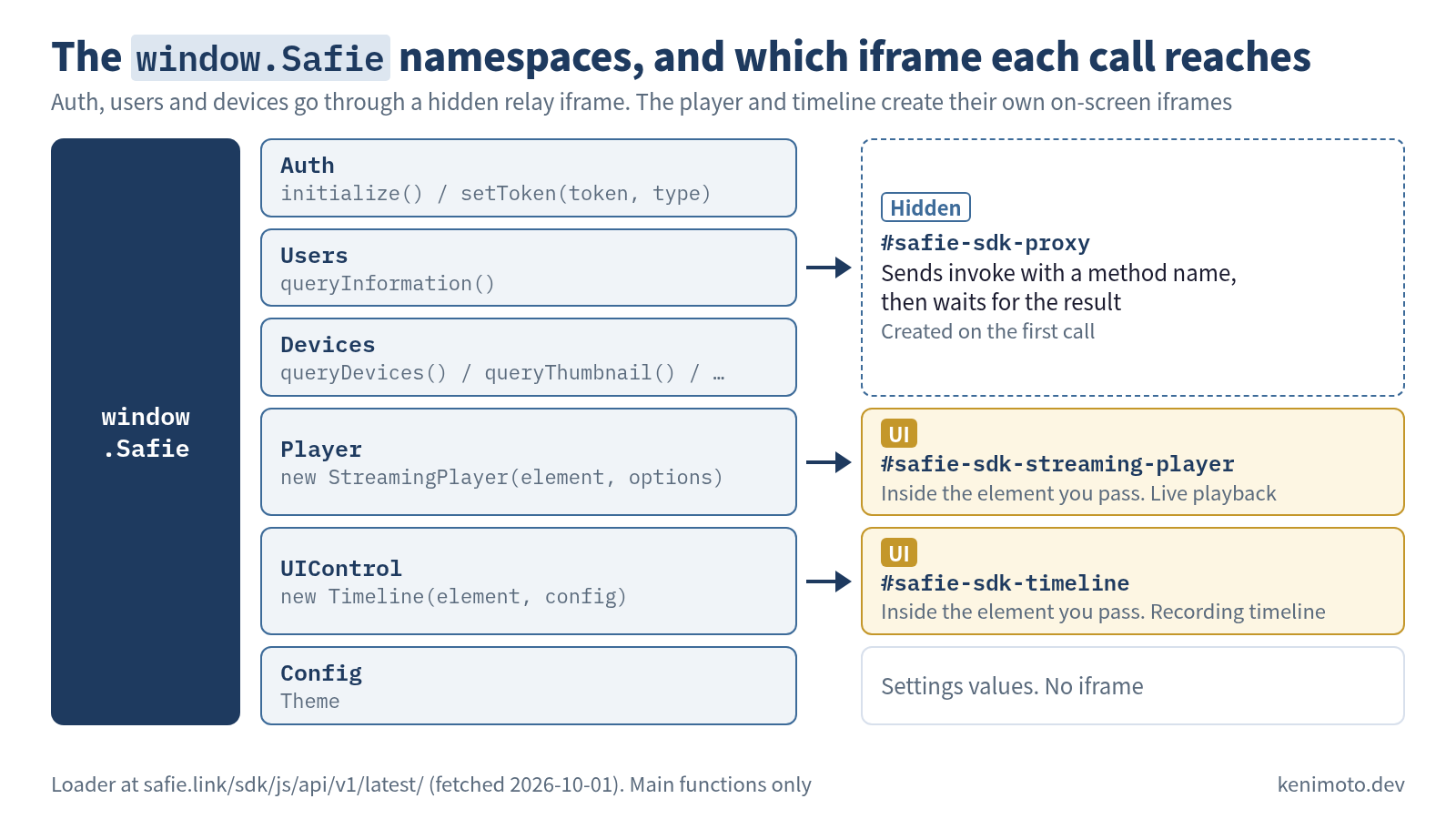
Safie uses a namespace pattern: the loader puts window.Safie = { Auth, Users, Devices, Player, UIControl, Config } in place. In the implementation:
window.Safie = { Auth: wn, Users: Dn, Devices: _n, Player: xn, UIControl: zn, Config: Qn }It’s a multi-step structure along the lines of Safie.Auth.initialize() → new Safie.Player.StreamingPlayer(element, ...) (in the loader as re-fetched on 2026-10-01), a namespace split that matches how broad the SDK’s feature areas are (authentication, device management, playback, UI control, configuration).
Data attributes: the Video.js style
With Video.js, you only write a data attribute in the HTML and it turns into a player automatically.
<video data-setup='{"controls": true, "autoplay": false}'>
  <source src="movie.mp4" type="video/mp4">
</video>
<script src="https://vjs.zencdn.net/8.23.4/video.min.js"></script>
The bundle side of it:
autoSetup) {
  var e = Array.prototype.slice.call(document.getElementsByTagName("video"));
  // scan video elements that have data-setup and turn them into players
}
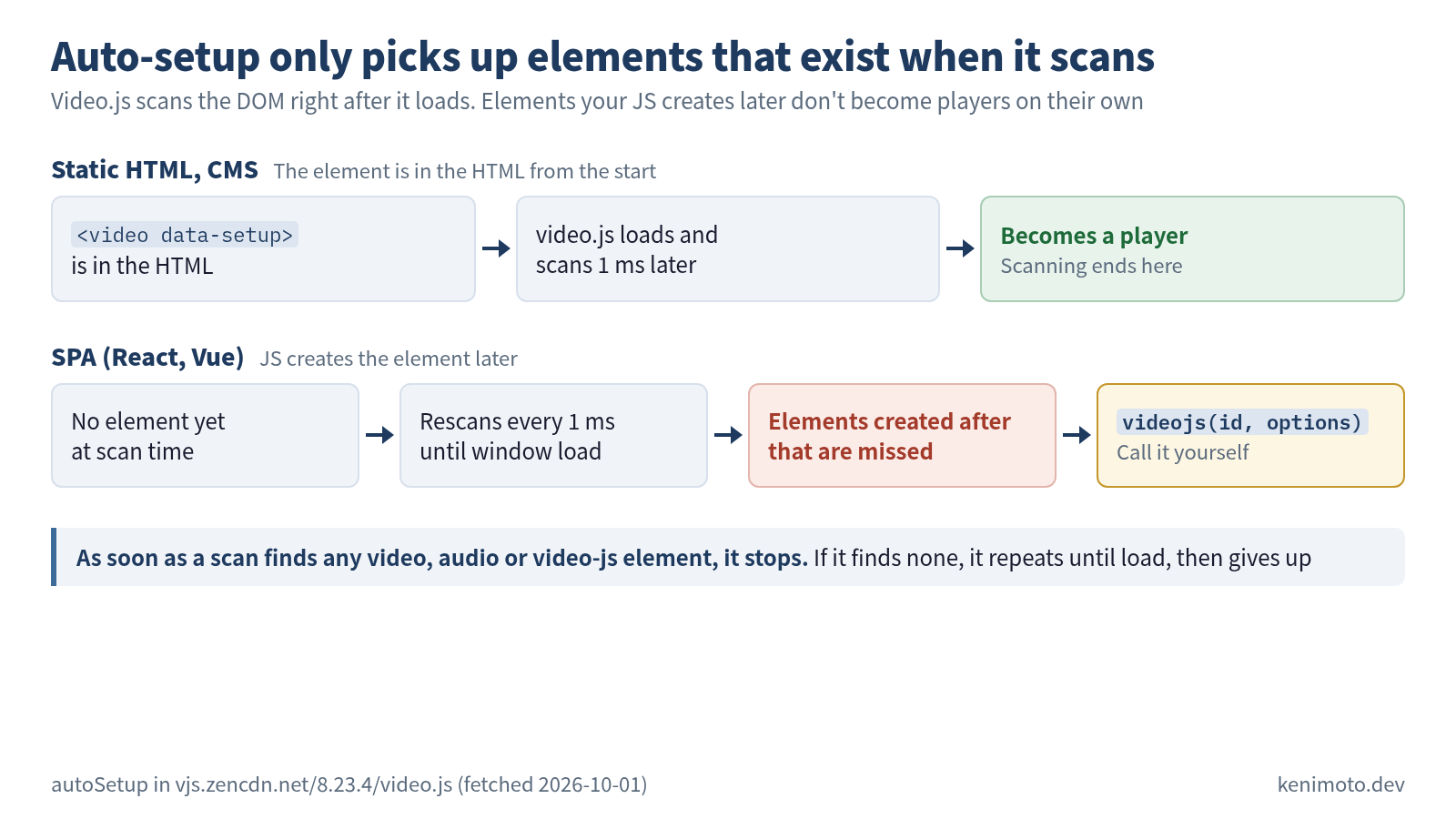
Because it scans the DOM automatically, it’s strong in environments where people don’t want to write JS, like a CMS (WordPress and the like) or a static site generator. On the other hand, in an SPA (React/Vue) the DOM is generated dynamically by JS, so there’s no guarantee the data attribute gets picked up, and you end up using the imperative videojs(id, options) API alongside it.
Web Components: the Mux Player style
Mux Player defines a large number of custom elements.
customElements.define("media-airplay-button", ...)
customElements.define("media-audio-track-menu", ...)
customElements.define("media-captions-button", ...)
customElements.define("media-cast-button", ...)
// and many more
The code the customer writes:
<mux-player
  playback-id="qxb01i6T202018GFS02vp9RIe01icTcDCjVzQpmaB00CUisJ4"
  metadata-video-title="Test"
></mux-player>
<script src="https://cdn.jsdelivr.net/npm/@mux/mux-player@3.7.0"></script>
Because these are Web Components, you can use them as “just an HTML tag” from React, Vue or Svelte. They fit SPAs well, which makes this a natural design for the 2020s, when component-oriented frameworks are the mainstream.
The trade-offs: old browsers that don’t understand Web Components (IE11 and the like) are out; customers need to understand the style boundary of the shadow DOM to use it; and search crawlers may not index what’s inside the shadow DOM. If you’re building a new SDK from scratch today, it’s the first choice, but depending on enterprise customers’ requirements you may also offer an imperative API.
The double-load problem
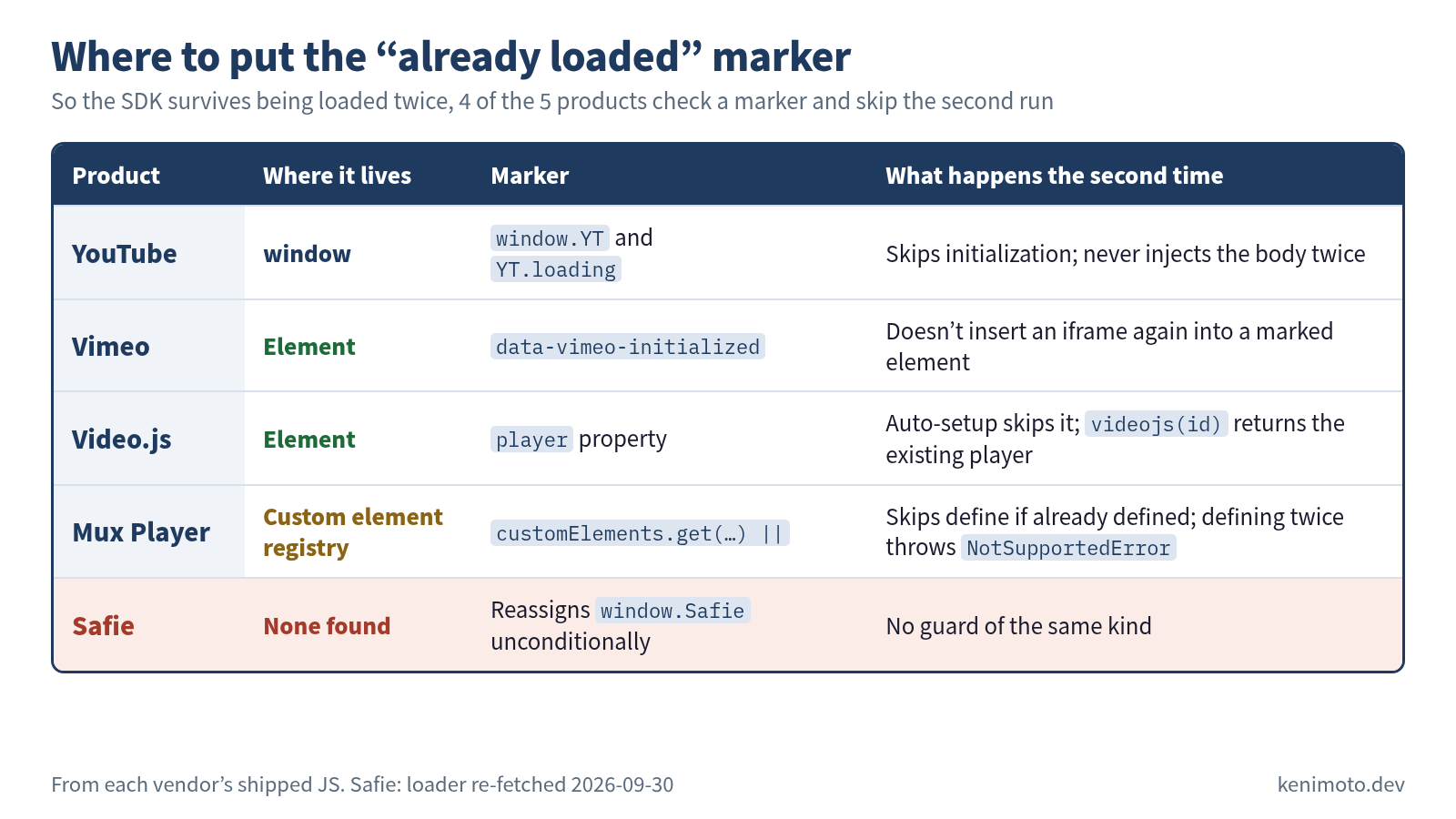
In four products, YouTube, Vimeo, Mux Player and Video.js, I could find code that guards against double loading. Safie’s loader reassigns window.Safie unconditionally, and I found no guard of the same kind (in the version re-fetched on 2026-09-30). Situations like “a customer accidentally writes the same <script> tag twice”, “an SPA loads it again on every route change” and “two CMS plugins each load the same SDK independently” really do happen.
Imperative API (YouTube):
if (!window["YT"]) YT = { loading: 0, loaded: 0 };
if (!YT.loading) {
  YT.loading = 1;
  // the actual loading
}
The window.YT existence check skips initialization from the second time on. The YT.loading flag also tells “loading” apart from “loaded”.
Web Components (Mux Player):
Call customElements.define("mux-player", ...) twice with the same name and the second call throws a NotSupportedError (DOMException). Mux Player’s bundle is written as customElements.get("mux-player") || customElements.define("mux-player", ...), so it skips define if the element is already defined. The media-* elements it uses inside follow the same shape. It’s essentially the same problem as flag management in an imperative API; the Web Components spec just enforces it.
Data attributes (Video.js):
If the DOM scan runs twice, the same video element gets turned into a player twice and breaks. Video.js puts a player property on each element it has turned into a player, and the auto-setup skips elements that have one. Call videojs(id) twice and the second call returns the existing player. The design keeps the side effect idempotent on the element. Vimeo also keeps its marker on the element: it adds data-vimeo-initialized to an element it has inserted an iframe into, and doesn’t insert again into a marked element (player.js as of 2026-09-30).
Choosing when you build your own
| Target customers | Initialization style that fits | Double-load guard |
|---|---|---|
| Static HTML / CMS users | Data attributes | Flag on the element (like player) |
| SPA (React/Vue) developers | Web Components | Check customElements.get() first |
| Many old existing embeds | Imperative (callback) | window.YOUR_SDK existence check |
| New build, varied customers | Web Components plus imperative | Both of the above |
Narrowing to one style keeps the API surface small and lowers the cost of docs, tests and compatibility maintenance. Every one of the five products narrows it to one or two. Few SDKs offer all of them. Decide your target customers’ workflow first and work backwards from there to choose.
Next: putting it all together and building your own
That completes the five spokes: the embedding shape (iframe / DOM injection), the loader/body split, CSP and iframe isolation, the postMessage contract, the cache-control strategy, and the initialization style. Next I build a minimal embeddable SDK end to end and make each of the six decisions again, explicitly, in code.
Measured 2026-08-08. Initialization APIs are hard to break, so they stay stable for a long time. Double-load guard implementations stay the same for years.
Was this article helpful?