Claude Code Diagrams: Excalidraw MCP + 3 Rules
Can Claude Code generate diagrams? Yes — but only if three specific conditions hold. Ask for a relationship map or an architecture sketch and something plausible comes back. But the moment you think “move that box a little to the right” or “just redraw this one arrow,” you stall. What you got is a picture, not a diagram you can keep editing together.
For a long time I read this as “AI is bad at diagrams.” It wasn’t. The weak part was not the output. It was how I was using it: trying to receive the diagram as a finished deliverable, in one shot.
A diagram is shared working memory, not a deliverable
With code, I can rewrite what the AI wrote, hand it back, and ask for the next step. The loop closes. With a diagram, that loop disappears. The AI hands me a picture, I redraw it in some slide tool, and my edits are invisible to the AI. Ask again and you get a different diagram that ignores everything you just changed.
The problem isn’t image quality. It’s that the diagram is one-way. It travels from AI to human once and stops there. Any diagram a human has touched drops out of the AI’s view. That is not “thinking together.”
So I flipped the goal. The value of a diagram is not that it renders cleanly. It is that a human and an AI can keep thinking on the same single surface. Stop treating the diagram as a final draft you clean up at the end, and treat it as shared working memory you keep open while you think. The goal moves from deliverable to interface.
The AI and I touch the same canvas
Concretely, I made one canvas the single source of truth and gave it several doors: Claude Code (over MCP), a command line, and a browser. All of them connect to the same live canvas in real time. The base is Excalidraw (MIT) and mcp_excalidraw, which wraps it as an MCP server.
Here is how a session goes. Claude generates a first pass. I open it in the browser, drag boxes around, add the relationships it missed, and scribble a note by hand. Then I ask Claude to read what changed, and it picks up the diff and proposes the next step. Generate, human edit, read-back: the three keep cycling on the same drawing.
As a test I built a character map for a drama I watched over the weekend. Claude laid out twelve characters and I arranged them by hand.
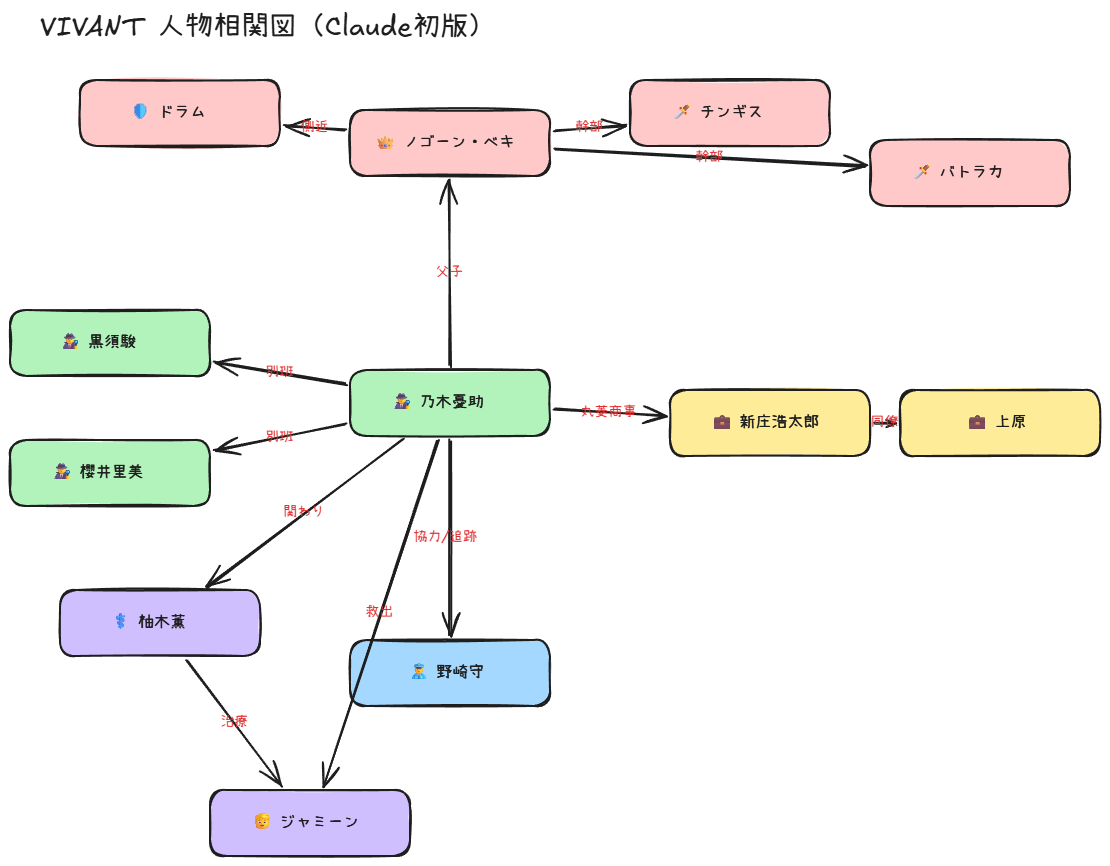
Then I drew my own setup: a single GPU being fought over by several local generation tools and a GPU-rental service.

Neither was made by the AI alone or by me alone. Both were finished by two of us on one surface. And the icons on the second one were printed on the very GPU the diagram is about, so the diagram, you could say, drew its own origin story.
Three conditions that make it work
Three conditions did the heavy lifting, and this is the part that matters as a direction.
First, it has to be bidirectional. Both the AI and the GUI touch the same single surface. If one side is for editing and the other only for viewing, the loop breaks. One canvas as the source of truth, with more doors added to it.
Second, human GUI edits have to be first-class. If the AI is primary and the GUI is an afterthought, human edits get treated as noise. I keep the canvas running on my own machine so I can edit it straight from the browser. When you own it, your one edit never disappears.
Third, the images come from my own machine too. If the icons on each node depend on an external generation API, copyright and cost tag along every time. The icons on that GPU diagram were generated on the very GPU the diagram is about, then embedded into the canvas. You build the contents of the diagram inside the environment the diagram describes. Lift that constraint and you try far more variations before settling.
One practical line while we are here. When you map out someone else’s work, don’t use photos of the actors. On top of the photo’s own copyright, likeness and publicity rights come along, and turning it black and white doesn’t get you around that. Put a role icon in instead and it is still obvious who belongs to which camp, with no rights problem. The character names and the relationships are facts, and that is enough to carry the diagram.
The longer you work with agents, the more this pays off
Once I could treat a diagram as shared memory, what changed was less the diagram and more my distance to Claude Code. A diagram used to be the thing I cleaned up at the very end, once my thinking had settled. Now it is a place I open while I am still thinking. The AI drafts, I move things, the AI reads again. The whole time, one drawing stays as working memory for both of us.
The longer you work with an agent, the more this “think on the same surface” design pays off. With text alone, the AI’s understanding and mine can drift apart a little without either of us noticing. When both of our hands are on one diagram, the drift shows up on the spot. Moving diagrams from deliverable to shared thinking interface is, I suspect, a small but load-bearing piece of how we will work with AI from here.
The concrete steps are written up separately as a hands-on piece: registering the MCP server, keeping the canvas running, a recipe for generating relationship diagrams in code, and embedding the images I made locally. The underlying code is in the GitHub links above. Start by handing your AI one diagram in your own environment and redrawing it together.
 Related book Practical Claude Code The field guide for engineers who use Claude Code every day — CLAUDE.md, Plan Mode, and team workflows from a year of real production use View the book page →
 Was this article helpful?