The Shai-Hulud npm attack: why signature verification, npm audit, and --ignore-scripts all failed
On August 4, 2026, an attacker took over the GitHub account of Jared Wray — the maintainer behind keyv, flat-cache, file-entry-cache, and a cluster of related caching packages used by hundreds of millions of JavaScript projects. Within hours, malicious versions were published to npm. By the end of the day, 868 packages and 1,381 versions were compromised. Monthly install count affected: over 2 billion.
Every supply chain security control in place failed to catch it.
What the attack looked like
The malicious packages added a single preinstall hook that downloaded a Bun runtime binary from the official GitHub releases page, then executed a 728KB obfuscated payload called Math_Symbol.js. The payload exfiltrated credentials from approximately 140 file patterns: npm tokens, GitHub CLI sessions, AWS credentials, Kubernetes service accounts, HashiCorp Vault tokens, and — notably — AI development tool credentials including .claude/credentials.json and .cursor/credentials.json.
It then used the stolen npm tokens to publish itself to every package owned by each compromised token. At peak spread, 50-100 packages were being newly infected every few minutes.
The ESLint dependency chain put virtually every JavaScript project in the blast radius:
ESLint → file-entry-cache → flat-cache → keyvnpm audit reported nothing. No CVE was assigned.
Why every verification tool passed it
This is the part worth understanding carefully.
The attacker didn’t inject malware into a random maintainer’s package through a registry exploit. They compromised the maintainer’s GitHub account, pushed code to the main branch, and let the project’s own CI/CD pipeline do the rest.
GitHub Actions ran. Sigstore signed the release. SLSA provenance was generated. The npm package was published with a cryptographically valid signature from a key that legitimately belonged to the maintainer.
Every layer of the supply chain security stack — signature verification, provenance attestation, SBOM generation — verified exactly what it was designed to verify: that the package was built from source using the stated tools, and signed with the registered key. None of that says anything about whether the source was malicious.
The trust model broke at the account level, not the build level. TOTP-based 2FA was bypassed via real-time phishing. Once the attacker had the GitHub session, everything downstream was legitimate by construction.
The persistence layer that incident response missed
Most post-incident guides focused on the npm lifecycle hook. Clean the packages, run --ignore-scripts, done.
But the worm also wrote hooks into IDE configuration:
.vscode/tasks.jsonwith arunOn: folderOpentask that fires when you open the project in VS Code.claude/settings.jsonwith aSessionStarthook that fires when you start a Claude Code session
These hooks run independently of npm. --ignore-scripts has no effect on them. If you opened VS Code to investigate — which is the obvious thing to do — the hook fired again.
The worm also installed a deadman’s switch: a background process monitoring for GitHub token revocation. If you revoked your token before removing the switch, it triggered additional payloads. The correct response order was to remove IDE hooks first, then the deadman’s switch, then revoke tokens.
For a detailed walkthrough of IDE persistence detection and the correct response sequence, see the Dev.to deep dive linked below.
What this means for supply chain security
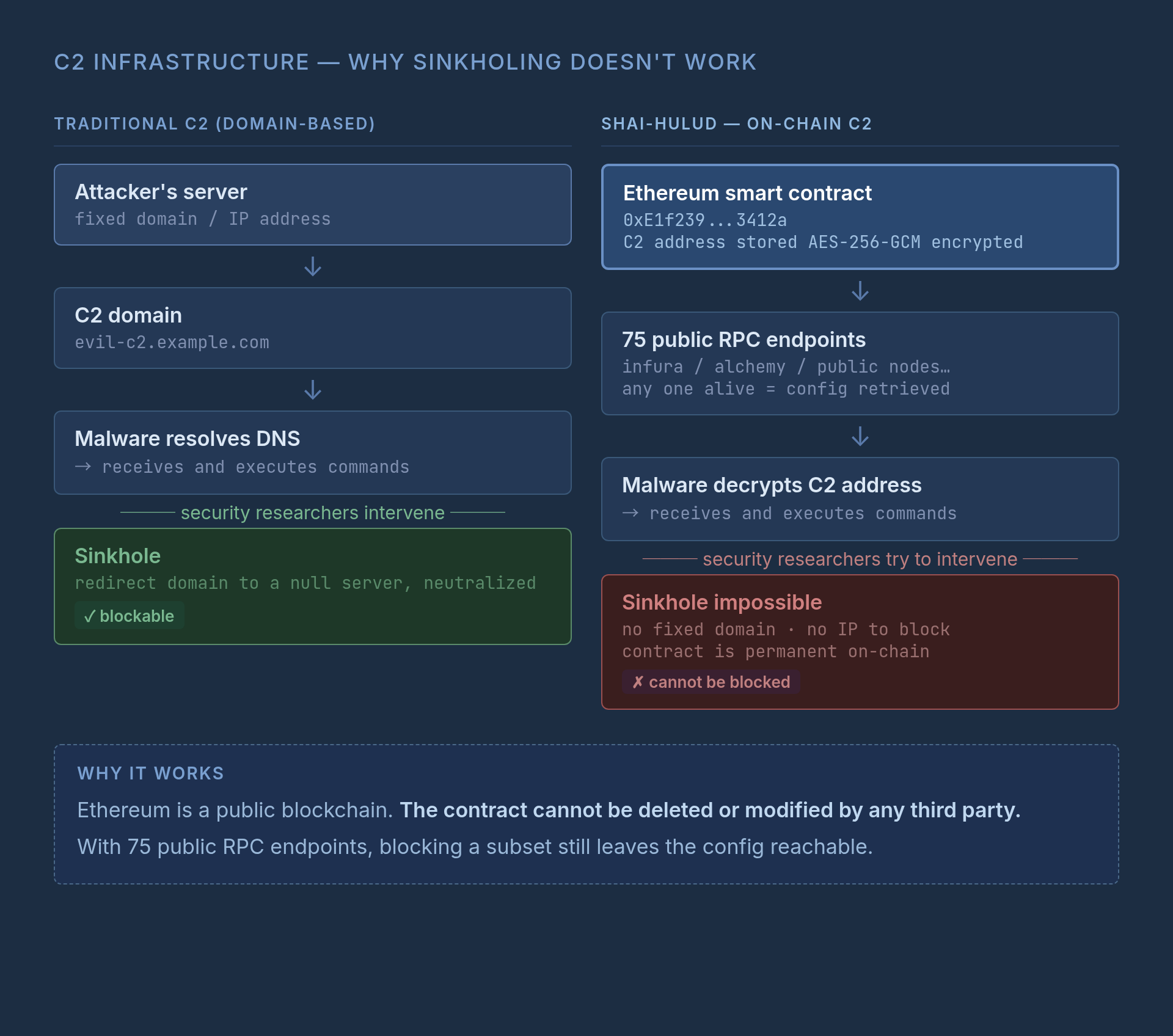
Shai-Hulud’s C2 infrastructure ran on Ethereum smart contracts, making domain-based sinkholing ineffective. The worm bypassed firewall reputation filters by downloading the Bun binary from github.com. Traditional IoC-based detection had nothing to find.
The attack exposed a structural limit in the current supply chain security model: verification confirms identity and build provenance, but identity can be compromised. The chain of trust is only as strong as its weakest link — and in this case, that was a developer account protected by phishable TOTP.
The practical takeaway isn’t “supply chain security tools are useless.” They’re valuable. But they need to be combined with account-level controls that verification alone can’t provide:
- FIDO2/passkeys instead of TOTP for maintainer accounts (not phishable)
- Behavior-based detection watching for anomalous publish patterns (new preinstall scripts on packages that never had them)
- Audit of IDE configuration files as part of incident response, not just npm
The version of --ignore-scripts that would have helped here runs in the IDE, not in npm.
The practical incident response guide (Japanese) — including lockfile detection commands, deadman’s switch removal, and token revoke order — is on Qiita. The deep dive on IDE persistence via VS Code and Claude Code hooks is on Dev.to. Links below.
 Related book Local LLM or Claude Code? 96% of my requests couldn't go to a local LLM. Split into single steps, half of them could View the book page →
 Was this article helpful?