Gemini CLI vs Claude Code: Login Blocked Day 1
I wanted to write the “Gemini CLI vs Claude Code, seven real tasks, side by side” article the internet keeps asking for. I got as far as gemini auth, watched it hand me IneligibleTierError, and closed the tab. My primary Google account is a Workspace account, and Google’s free tier of Gemini CLI does not want to hear from me.
The eligibility story turns out to be more useful than another table of task times. If you already run your work life on you@yourcompany.com and you were planning to try the free Google CLI this weekend, save yourself the tab.
What actually happens at gemini auth
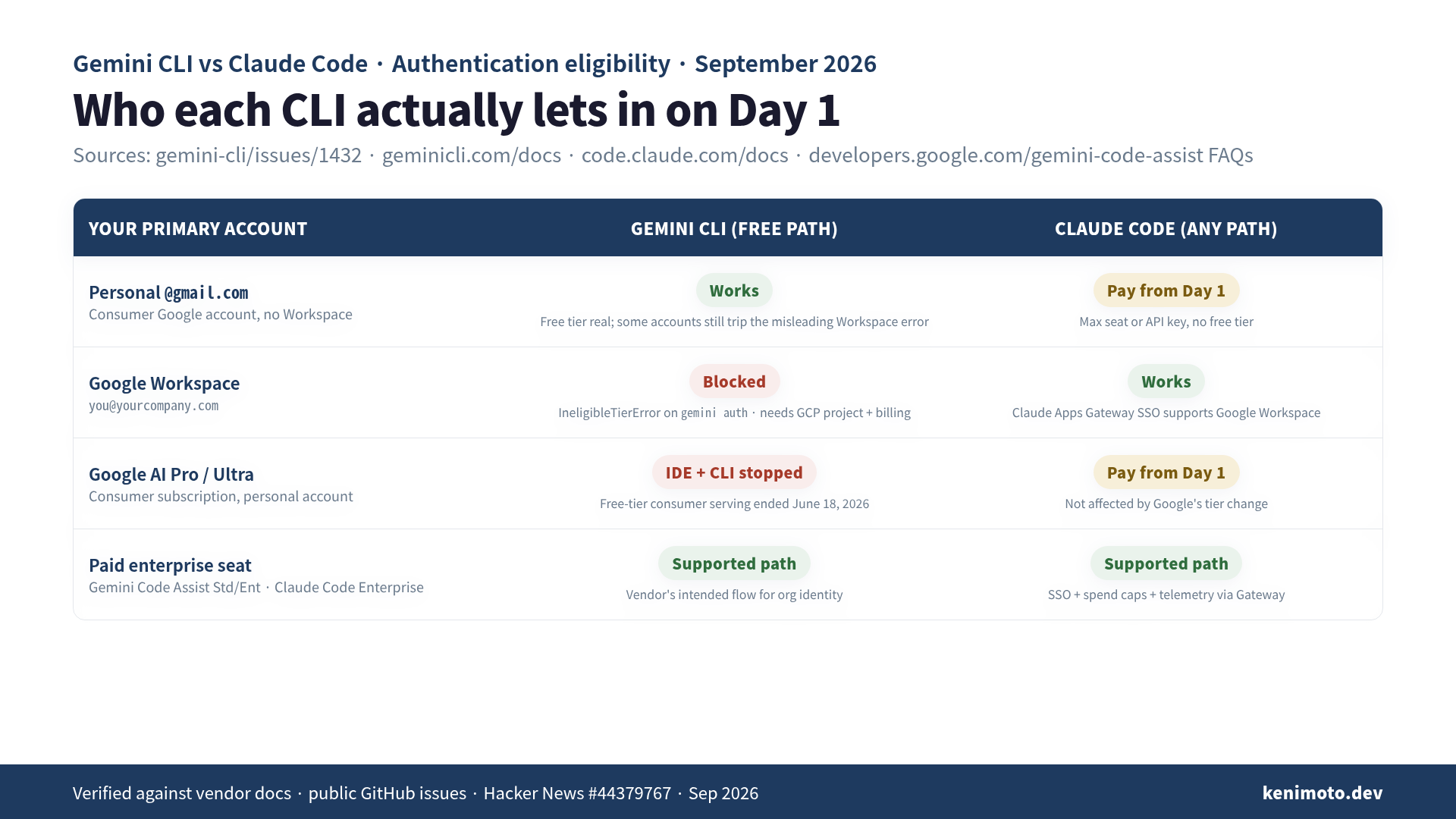
When Gemini CLI’s browser flow sees a Google Workspace identity, the free-tier path refuses to complete. The exact error string is documented on the project’s own issue tracker: “Failed to login. Ensure your Google account is not a Workspace account. Message: Request contains an invalid argument.” (issue #1432). The error text is misleading even for non-Workspace users; several people with plain @gmail.com accounts report the same wall. For Workspace users, this refusal is the design, not a bug.
The Gemini CLI docs put the same rule in nicer words: “Organization users with a company, school, or Google Workspace account” need to configure a Google Cloud project before the CLI will let them in (Gemini CLI authentication). A comment on the same Hacker News thread puts it more bluntly: “No, you cannot use neither Gemini CLI nor Code Assist via Workspace — at least not at the moment” (HN #44379767).
So the three real options for a Workspace user in September 2026 are:
- Sign in with a personal
@gmail.comaccount — which means splitting your identity across two Google logins for the sake of one CLI, and hoping your personal account is not one of the ones that also trips the misleading error. - Set
GEMINI_API_KEYfrom AI Studio — a separate credential, on a separate free tier, on a separate billing surface. - Set up Vertex AI — a Google Cloud project, ADC or a service-account key,
GOOGLE_CLOUD_PROJECT,GOOGLE_CLOUD_LOCATION, and a billing account.
None of those are technically hard. All of them are the kind of thing that turns “let me try it this weekend” into “I’ll get to it next month.”
The June 18 asterisk that makes the eligibility story worse
While we’re on the subject of things Google’s landing page does not lead with: on June 18, 2026, Gemini Code Assist stopped serving IDE-extension requests for the “Gemini Code Assist for individuals,” Google AI Pro, and Google AI Ultra tiers. The same restriction applies to Gemini CLI when it is authenticated through those consumer plans (Gemini Code Assist FAQs).
The paid Workspace-facing product (Gemini Code Assist Standard and Enterprise) was unaffected, and that is the tell. If you are on Workspace and want a first-party Google CLI experience, the intended path is the paid Code Assist seat, and the “free” CLI on your work identity was never on the roadmap for you. The free tier’s target user is the personal-account developer who’s kicking the tires, and the team already paying Google for productivity gets a different SKU.
That is a legitimate product choice. It just is not the story the “genuine 1,000-request-per-day free tier” headlines have been telling.
What Claude Code does on Day 1
I did not spend six days rage-comparing this, so I will not pretend I did. But the contrast at the login screen is real, and it is the actual reason I only run one of these CLIs on my work machine.
Claude Code’s authentication doc lists several ways in: a Claude Pro or Max subscription, an Anthropic Console API key, enterprise SSO through the Claude Apps Gateway, or cloud-provider credentials via Bedrock, Vertex AI, or Microsoft Foundry. The SSO gateway explicitly supports “Okta, Microsoft Entra ID, Google Workspace, Keycloak, Dex, or PingFederate”. Anthropic’s enterprise CLI is paradoxically easier to point at a Google Workspace directory than Google’s own CLI is.
Anthropic is not being saintly here. Their “sign in with Google” is basically an OAuth handshake with no free tier attached — you pay from the first token. The tradeoff is honest, though: pay from Day 1, and you don’t spend Day 1 reading GitHub issues about why your account type is wrong. My $100/month Max seat did not ask what my email domain was.
What the public benchmarks actually say
One thing worth clearing up before the email arrives.
In 2026, aggregated third-party summaries put Claude Opus 4.6 at about 80.8% and Gemini 3.1 Pro at about 80.6% on SWE-bench Verified (DataCamp comparison, 2026). That is a rounding error, not a moat. Neither CLI is going to be blocked from a real task by a 0.2 percentage point capability gap. If someone tells you Gemini CLI can’t do the work, or that Claude Code is capability-bound, they are selling you something.
Cost is a bigger story than capability. Claude Code out of the box assumes you have $20 or $100/month to spend; Gemini CLI wants to be free for individuals and is priced for scale on Vertex. What you cannot conclude from the benchmark numbers is which CLI will let you sit down and use it on Monday morning. That is the eligibility question, and for Workspace users in September 2026, only one of the two has a clean answer.
What I actually recommend, at the eligibility layer
- Workspace-primary developer, no personal Google account, no Cloud project set up: don’t fight it. Claude Code with a Max seat or an Anthropic API key is a one-command install and works from your work identity. If you want a Google-backed CLI, expect to pay for Gemini Code Assist Standard/Enterprise — that is the plan Google actually built for you.
- Personal Google account developer, kicking the tires: Gemini CLI’s free tier is real, and the ~1M-token context on Gemini 3 Pro is legitimate on the free path where you can reach it. Try it. If the login errors read like nonsense, check whether Google has silently decided your account looks like a Workspace one — that is the exact bug thread I linked above.
- Team lead choosing a CLI for the org: don’t pick the free tier of anything. Both vendors publish enterprise plans specifically because the free tier is not what an org buys — it is what an individual tries. Compare Claude Code Enterprise and Gemini Code Assist Enterprise on billing, SSO, telemetry, and data-boundary guarantees. That is a different post, and it is the one that actually matters at the team layer.
The pattern I keep coming back to (I have written a longer piece on how Claude Code and ChatGPT Codex position themselves as official agents that gets at the same shape) is that these CLIs are not one product. They are a bundle of a model, a billing surface, and an identity story, and the third one is where most of the “I tried it and it didn’t work” complaints actually live.
The uncomfortable takeaway
The free tier of a developer tool is a filter for who the vendor wants next. Google’s free Gemini CLI wants the personal-account hobbyist, because that is who converts into Google AI Pro in the consumer funnel. Anthropic’s paid-from-day-one Claude Code wants the developer whose company already gave them a corporate card, because that is who converts into a team seat.
If you are the Workspace-primary developer who thought “free” meant “for me”: I made the same read, and the CLI told me otherwise before I finished a coffee. This is who they built the login page for.
If you want the full playbook for turning Claude Code into a reliable teammate on your work identity (CLAUDE.md patterns, permissions, hooks, and the team-workflow bits that only show up after a year of daily use), that lives in Practical Claude Code.
 Related book Practical Claude Code The field guide for engineers who use Claude Code every day — CLAUDE.md, Plan Mode, and team workflows from a year of real production use View the book page →
 Was this article helpful?