2.8x Traffic Spike: How to Identify Bot Traffic
On September 1, sessions on kenimoto.dev came in at 2.8x the previous day.
The real increase was 1.2x. The rest was a magic trick, and the method was sitting in my own access log.
About 70% of that day’s sessions were footprints left by something that wasn’t a person. They weren’t all the same thing either: three separate operations with different goals landed on the same day. One I want to keep. One is hiding its name. One thinks my site runs WordPress.
GA4 can’t tell them apart. Here’s why, and what to read instead.
Almost all of the spike came from one country
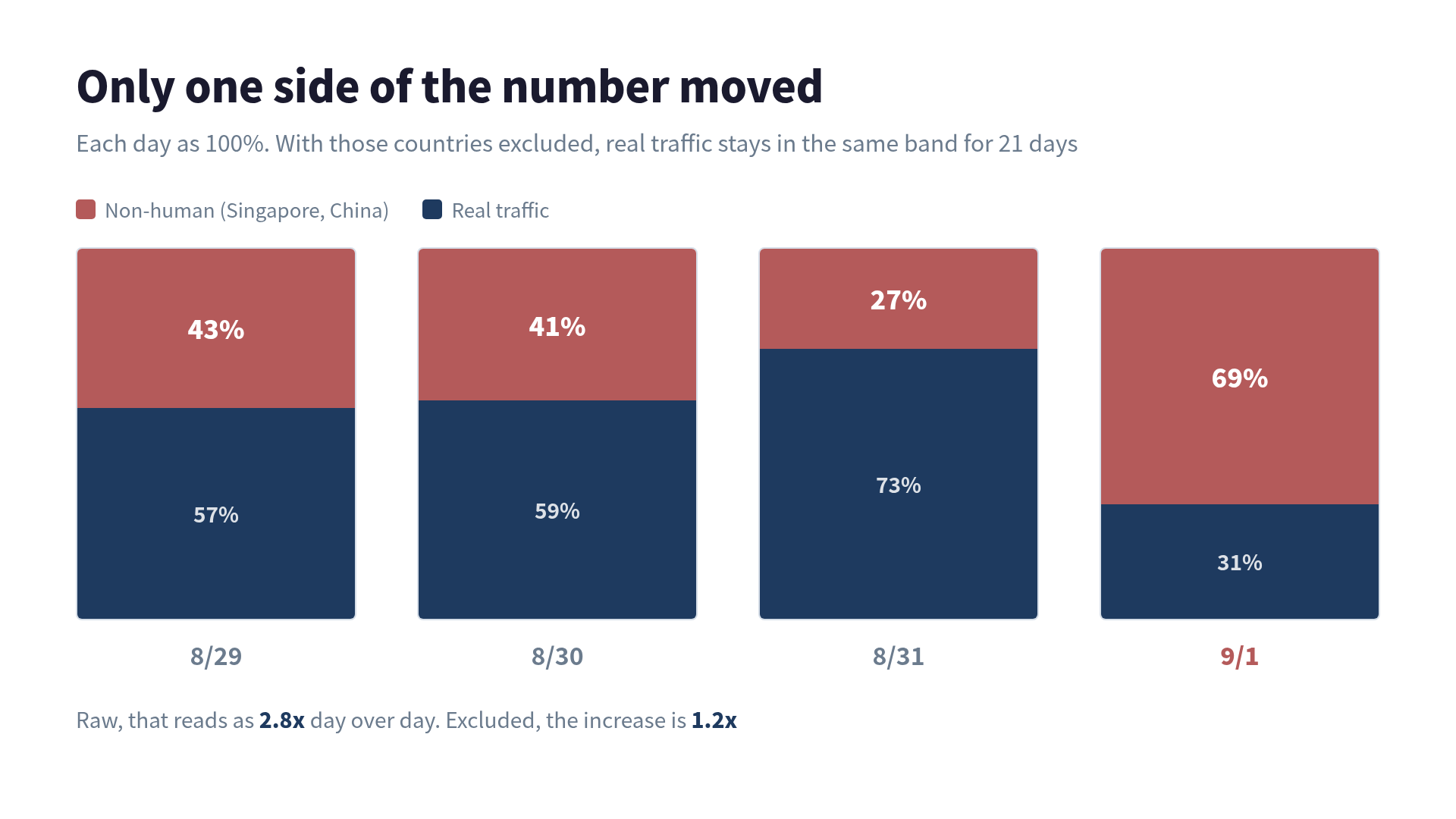
Here’s the daily split, with Singapore and China pulled out.
| Date | Share of raw sessions that were non-human |
|---|---|
| Aug 29 | 43% |
| Aug 30 | 41% |
| Aug 31 | 27% |
| Sep 1 | 69% |
Excluding those two countries, the day-over-day increase was under 20%, and the last 21 days all sit in the same band. Only one side of the number moved.
Singapore alone was 9x the previous day. The shape of it:
- Engagement rate 0.0%
- Average duration 0.5 seconds
- Exactly one pageview per session
- 99% on Chrome / Windows / desktop
- 98% on the same screen resolution,
1280x1200
Visitors who stay half a second, view one page, and leave, all on identical hardware. Human crowds don’t line up that way.
Breaking it down to the minute makes it clearer.
| Time (JST) | Share of that day’s Singapore sessions |
|---|---|
| 17:11 | 4% |
| 17:12 | 12% |
| 17:13 | 23% |
| 17:14 | 21% |
| 17:15 | 15% |
| 17:16 | 6% |
Six minutes hold 80% of the day’s Singapore traffic. That window lands right after I published a batch of English posts, which is also when the sitemap changed.
GA4 doesn’t have the User-Agent
This is where GA4 runs out. It gives you country, browser name, OS, and screen resolution. It does not give you the User-Agent string. All you get is “Chrome,” so a real browser and something impersonating one look identical.
There’s a second limit that matters more. GA4 only records hits that executed JavaScript. If gtag doesn’t run, the visit doesn’t exist as far as GA4 is concerned. Which means:
- Crawlers that don’t run JS (most search engine bots) never appear in GA4 at all
- Anything non-human that does appear in GA4 is a headless browser capable of running JS
Half the picture is missing before you start.
To see the rest you need logs from the serving layer. kenimoto.dev runs on Cloudflare Workers, so I queried the Cloudflare GraphQL Analytics API.
TOKEN=<Cloudflare API token>
ZONE=<zone id>

read -r -d '' Q <<'EOF'
query($zone:String!,$start:Time!,$end:Time!){
  viewer{ zones(filter:{zoneTag:$zone}){
    httpRequestsAdaptiveGroups(
      limit:20,
      filter:{datetime_geq:$start, datetime_lt:$end},
      orderBy:[count_DESC]
    ){ count dimensions{ userAgent clientCountryName } }
  }}}
EOF

curl -s -X POST https://api.cloudflare.com/client/v4/graphql \
  -H "Authorization: Bearer $TOKEN" \
  -H "Content-Type: application/json" \
  -d "$(jq -n --arg q "$Q" --arg z "$ZONE" \
        '{query:$q, variables:{zone:$z,
          start:"2026-09-01T08:10:00Z", end:"2026-09-01T08:20:00Z"}}')"
Timestamps go in as UTC. 17:11 JST is 08:11Z.
Not every field is available on the free plan. What I actually got:
| Field | Free | Use |
|---|---|---|
userAgent | ✓ | The main signal |
clientCountryName | ✓ | Origin |
clientRequestPath | ✓ | What they took |
edgeResponseStatus | ✓ | High 404 rate means probing |
clientRequestHTTPProtocol | ✓ | HTTP/1.1 vs HTTP/2 |
clientASNDescription | ✗ | Permission error |
clientRefererHost | ✗ | Permission error |
No ASN means I can’t name the hosting provider, but everything needed for the call is available for free.
Three different things, same day
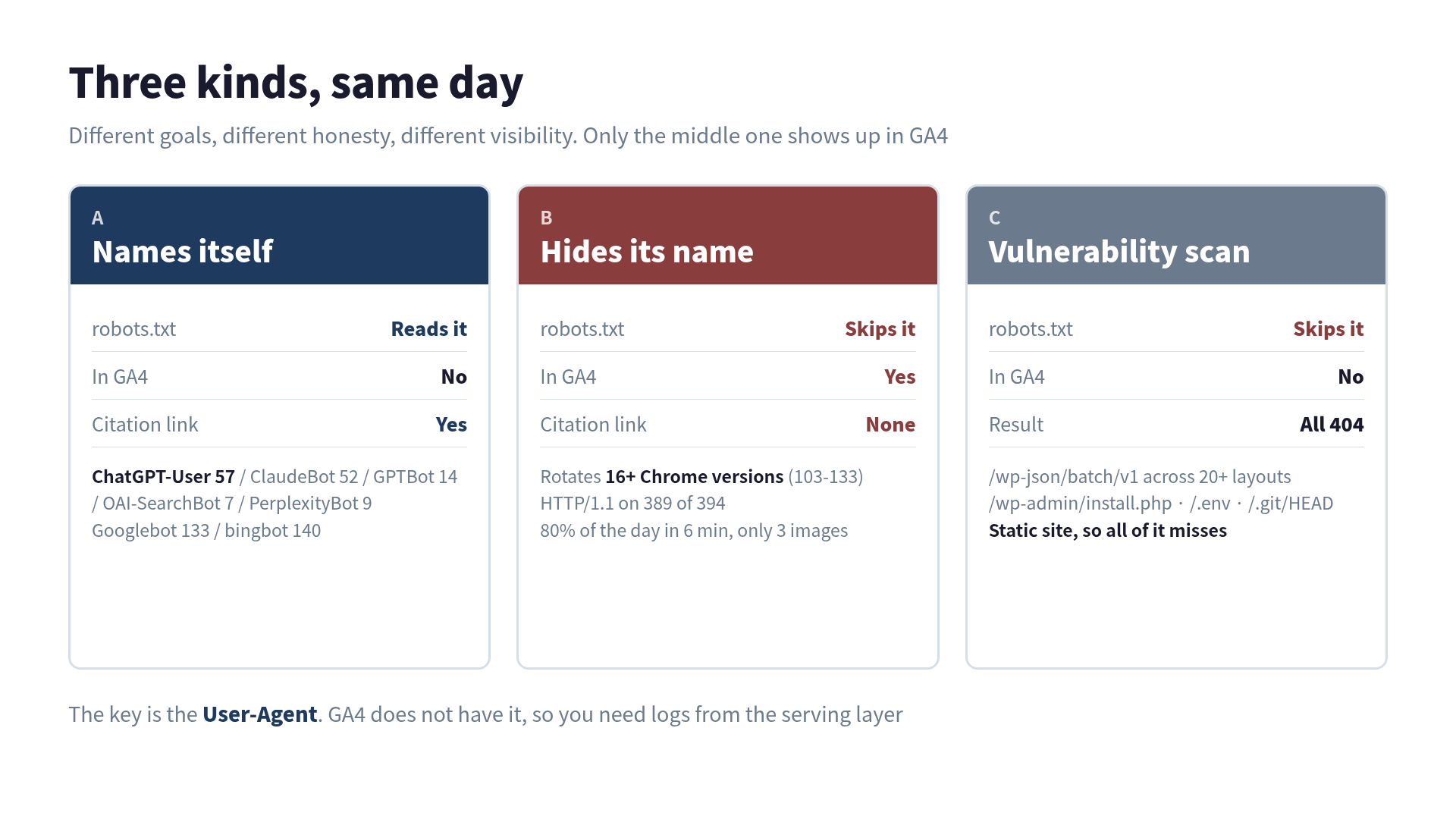
| What it is | robots.txt | In GA4? | |
|---|---|---|---|
| A | Crawlers that identify themselves | Reads it | No |
| B | Headless clients hiding their name | Skips it | Yes |
| C | Vulnerability scans | Skips it | No |
Only B was polluting GA4. A and C don’t run JS, so they were never in those numbers.
A: AI search crawlers all write their names
Here’s one day, filtered to the ones that identify themselves.
| Crawler | Requests | Who |
|---|---|---|
| Bytespider | 140 | ByteDance |
| bingbot | 140 | Microsoft |
| Googlebot | 133 | |
| PetalBot | 110 | Huawei (Petal Search) |
| Semrush | 102 | SEO tooling |
| Applebot | 64 | Apple |
| ChatGPT-User | 57 | ChatGPT fetching on a user’s request |
| ClaudeBot | 52 | Anthropic |
| Ahrefs | 48 | SEO tooling |
| Amazonbot | 37 | Amazon |
| Claude-User | 15 | |
| GPTBot | 14 | OpenAI (training) |
| PerplexityBot | 9 | Perplexity |
| OAI-SearchBot | 7 | ChatGPT search indexing |
| DuckAssistBot | 2 | DuckDuckGo |
The AI ones put their name and a URL in the UA. Bytespider even includes a contact address.
Mozilla/5.0 (Linux; Android 5.0) AppleWebKit/537.36 (KHTML, like Gecko)
Mobile Safari/537.36 (compatible; Bytespider; spider-feedback@bytedance.com)
The reason is practical: robots.txt works by name. Without a name there’s nothing for you to allow or deny. Publishing the name is how they stay addressable when someone says “don’t train on my site.”
Which also means robots.txt does nothing to anyone who won’t name themselves. Mine currently looks like this:
User-agent: *
Allow: /

User-agent: GPTBot
Allow: /

User-agent: ClaudeBot
Allow: /
...
Everything is allowed. The welcome mat is out.
Still, some of them don’t say who they are.
B: The ones hiding their name leave fingerprints
Back to that six-minute window. Every UA in it:
| Requests | Version claimed |
|---|---|
| 47 | Chrome/131 |
| 45 | Chrome/109 |
| 40 | Chrome/110 |
| 36 | Chrome/111 |
| 28 | Chrome/107 |
| 24 | Chrome/133 |
| 23 | Chrome/116 |
And on through 103, 104, 105, 106, 108, 112, 117, 120, 124. More than 16 versions in rotation.
Chrome 103 through 111 shipped in 2022 and 2023. No real user population looks like that in 2026. The spread exists because a single fixed UA gets blocked after enough consecutive hits.
The protocol sealed it.
| Requests | |
|---|---|
| HTTP/1.1 | 389 |
| HTTP/2 | 5 |
99% arriving over HTTP/1.1 while claiming to be Chrome. Real Chrome negotiates HTTP/2. The UA string was rewritten; the transport underneath wasn’t.
The usable signals:
| Signal | Identifies itself | Doesn’t |
|---|---|---|
| UA consistency | Fixed | Changes every hit |
| Protocol | Mostly HTTP/2 | Skews HTTP/1.1 |
| robots.txt | Reads it first | Never touches it |
| Request pacing | Smoothed out | Bursts |
Whether it read robots.txt is the cleanest of these. Across all 394 requests from group B, /robots.txt appears zero times.
What they took tells you why
The file types tell you a lot about intent. Here’s what group B pulled in those six minutes:
| Type | Requests |
|---|---|
| HTML | 290 |
| .json | 98 |
| .js | 3 |
| .png | 3 |
Almost no images. A site built to repost your content takes the images too, because the look has to be reproduced. Text pulled without images points at the text itself being the product.
Other things that fell out:
- Only 3 requests returned 404. They hit real URLs and nothing else, which means they were working from a sitemap or a URL list. This isn’t discovery
- Coverage spanned
/ja/,/pt/,/es/. Not one article, the whole site - It arrived right after an update. Something is watching for changes
Put together, that narrows to site-wide text collection: training data, or source material for rewrites.
One more thing. This site specifically was the target. Compare the same period across sites I run:
| Site (last 14 days) | Share of sessions from Singapore |
|---|---|
| kenimoto.dev | 34.5% |
| mypcrig.com | 2.3% |
| kaoriq.com | 4.4% |
| legacydram.com | 3.5% |
An indiscriminate sweep would produce similar ratios everywhere.
Four ways to check whether you’ve been reposted
If text is walking out the door, reposting is the next thing to rule out. I ran four checks.
1. Exact-phrase search
Pull a sentence only you would write and put it in quotes. Quoted queries are exact-match: only pages containing that exact string come back.
"I was snapshotting views and likes every single day"If someone copy-pasted the article, an unfamiliar domain shows up next to yours. I tried four phrases across Japanese, English, and Portuguese. Only my own site came back.
One warning: use more than one engine. I ran the same phrases through Bing and DuckDuckGo, and DuckDuckGo returned zero results for the Japanese exact-match queries. Not just no reposts, it couldn’t find the original either. Its Japanese index is thin, so that zero means “not measured,” not “not reposted.” Bing returned my site correctly.
Query one engine and you’ll read the second case as the first.
2. Read every referrer
Automated reposting tools sometimes leave a source link. I pulled every referral domain from 90 days of GA4 and visited the ones I didn’t recognize.
sunblog.asia→ 302 redirects toxtraffic.plus. This is referrer spam: the domain gets planted in your analytics so you’ll click it. Not a repostaleemuh.com→ a personal portfolio. Unrelated
3. Pull your backlinks
GetLinkCounts in Bing Webmaster Tools returned zero. Nothing Bing knows about links back from a repost.
4. Check whether they took the images (above)
All four came back clean. No trace of copy-paste reposting.
That doesn’t mean it hasn’t happened. These four only see copy-paste reposts that got indexed. Three things stay invisible:
- Reposts that were rewritten or translated (exact-match can’t reach them by definition)
- Reposts that were never indexed
- Anything absorbed as LLM training data, which has no external observable at all
I’d rather not treat absence of evidence as proof of safety. Given how this particular client behaves, the third one is the likely case.
If you want certainty, embed a unique string per article somewhere a human won’t see it and search for it on a schedule. A repost carries it along.
C: Vulnerability scans arrive daily and miss every time
The third group is a different animal. Same day, other countries.
| Origin | Paths hit | Count |
|---|---|---|
| Netherlands | /wp-json/batch/v1 across 20+ directory layouts | ~175 |
| Russia | /wp-admin/install.php?step=1 | 17 |
| Germany | /admin1, /ur-admin, /backup, /fileadmin (ffuf) | 4-5 each |
| Germany | /.env, /.git/HEAD | 4 each |
/wp-json/batch/v1 is the WordPress REST batch endpoint, probed for known auth weaknesses. Trying it under /wp/, /blog/, /wordpress/ and a dozen more prefixes covers wherever WordPress might be installed.
/.git/HEAD checks for an exposed repository, /.env for readable environment variables, and ffuf is a directory brute-forcer.
This site is static Astro. No PHP, no WordPress, no .env. Every one of those is a 404. Scans like this are permanent background noise on any public domain, and they need no response.
The separator here is the 404 rate. Group B produced 3. Group C 404s on nearly everything it touches. Precise retrieval of real URLs versus firing into the dark.
The cost isn’t bandwidth, it’s measurement
So where’s the actual damage?
Not bandwidth. A few hundred requests won’t strain anything.
It lands on measurement. In August I was running a canonical A/B test on Dev.to, and the inflation was sitting on one arm only. A/B tests are read as differences, so one side swelling flips the conclusion.
Read raw, September 1 says “2.8x day over day.” Evaluate a change against that number and you’ll certify something that did nothing. The real figure was 1.2x.
There’s a second cost tied to AI search. When a crawler that identifies itself cites you, a link comes back with the citation. Collection that hides its name returns nothing. It takes, and nothing comes back.
Excluding one country is a workable stopgap, but the more important habit is not reading a drop as a decline without checking how much you excluded. I always print the before and after side by side now.
The procedure
The order I’d use next time:
- Look at daily GA4 numbers and find the day that moved
- Split that day by country x engagement rate x average duration. 0.0%, under a second, and exactly one pageview per session together mean non-human
- Break it to the minute. Bursts mean automation
- Query User-Agent from Cloudflare or whatever serves your traffic. GA4 does not have it
- Check whether the UA names itself. Named ones are controllable through robots.txt
- For the unnamed, confirm with the HTTP/1.1 skew and whether robots.txt was ever fetched
- Look at which file types they took. HTML without images means the text is the target
- Use the 404 rate to separate collection from probing
Looking at GA4 alone, this day would have gone into the record as the day traffic went up 2.8x.
 Related book Why ChatGPT Ignores Your Website Google SEO won't get you cited by ChatGPT — this is the playbook for being seen by AI search, with measurement included View the book page →
 Was this article helpful?