Kimi K3.1 Video QA Loop: 3 Rounds, 29 Minutes
Moonshot AI provided the Kimi API credits used here for evaluation. They had no part in designing or running the test, or in interpreting its results. What didn’t work is in this post too.
With Kimi K3.1 Pro, which Moonshot AI released in late October, I can now review and fix a video round after round without a person watching.
In my last post (Kimi K3 vs Claude: Video Review, Same Findings), K3 reviewed a video about as well as Claude did. But a review is never one-and-done. After you fix what it found, you show it the fixed version again. One video takes several reviews. With K3, just answering a fixed set of 12 detail questions about a 55-second video took 431 seconds and cost $0.68 per run. That’s too slow and too expensive to repeat after every fix.
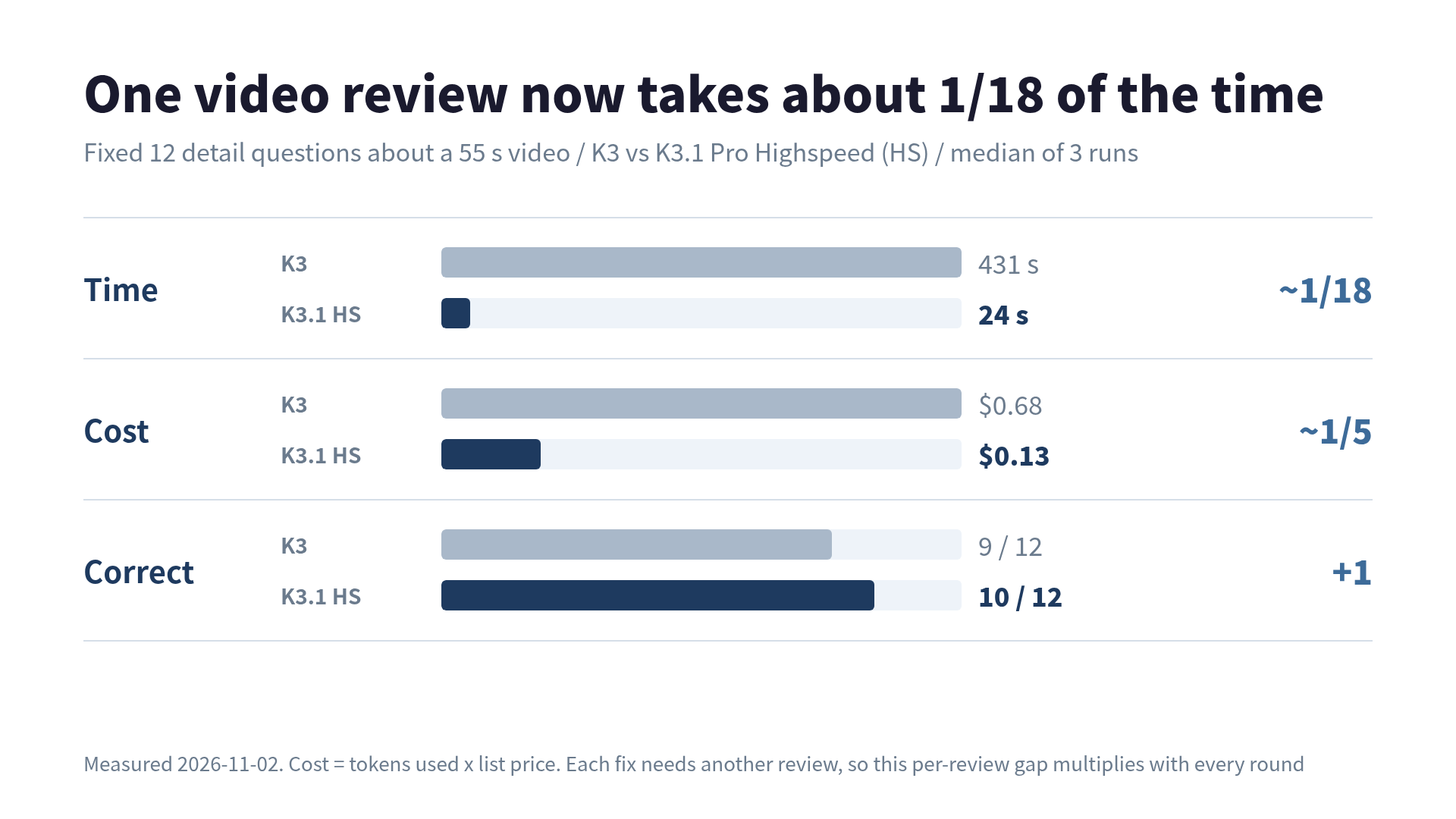
Look at the Time row in the chart. 431 seconds is enough for a bathroom break and a chat with a coworker on the way back. 24 seconds is one scroll through X, or a glance at your Slack or Teams unreads.
The fast variant, K3.1 Pro Highspeed, answered the same 12 questions in 24 seconds for $0.13, and got 10 right to K3’s 9. That looks cheap enough to run as many rounds as it takes. So I ran the full loop: generate a vertical short → Kimi reviews it → Kimi fixes it → rebuild.
Four takeaways:
- The loop converged in 3 rounds. One 20-second video got 4 reviews and 3 fixes: 29 minutes of wall-clock time, $2.32 in Kimi charges. Every defect in the first video was gone except small text
- Kimi caught a defect I had missed. It also missed defects in one round and caught them in the next, and reported the same nonexistent problem three times in a row
- The worst bug was found by the audio check. After a script edit, the text-to-speech audio was never regenerated, so the subtitles and the voice said different things. Kimi can’t hear, so it could never have found this
- The Kimi fixer bent the demo to pass review. To make the output fit the screen, it added
| fold -s -w 24to an SSH command
The test video: a 20-second vertical short
The video comes from handson-cast, a CLI I’m building. It turns a command history into a video with narration and subtitles. You give it a JSON file of steps (steps.json). It runs each command for real in Docker containers while vhs records the terminal, adds narration with OpenAI’s text-to-speech, and burns in subtitles. It used to output landscape video only (1920x1080). So I added a vertical format (1080x1920) for YouTube Shorts. The narration and subtitles are in Japanese.
The topic is SSH key authentication in three steps: create a key, install the public key on the server, turn off password authentication. It runs for 20 seconds and ends with password disappearing from the rejection message, which really happened inside the container.
Here’s round0, generated right after adding the vertical format with nothing fixed (20.6 s, with audio):
Before showing it to Kimi, I had Claude Code extract frames, checked them by eye, and wrote down four defects. That list is the answer key for scoring Kimi.
| # | Defect |
|---|---|
| G1 | The title card counts as step 1, so the first real step is labeled “Step 2” |
| G2 | The zoom-in after the output appears pushes the right edge off screen (Permission denied (publ is cut) |
| G3 | A subtitle line break leaves the Japanese period ”。” alone on its own line |
| G4 | The terminal text is small and nearly the bottom half of the screen is empty |
Division of labor: Kimi sees, Whisper hears
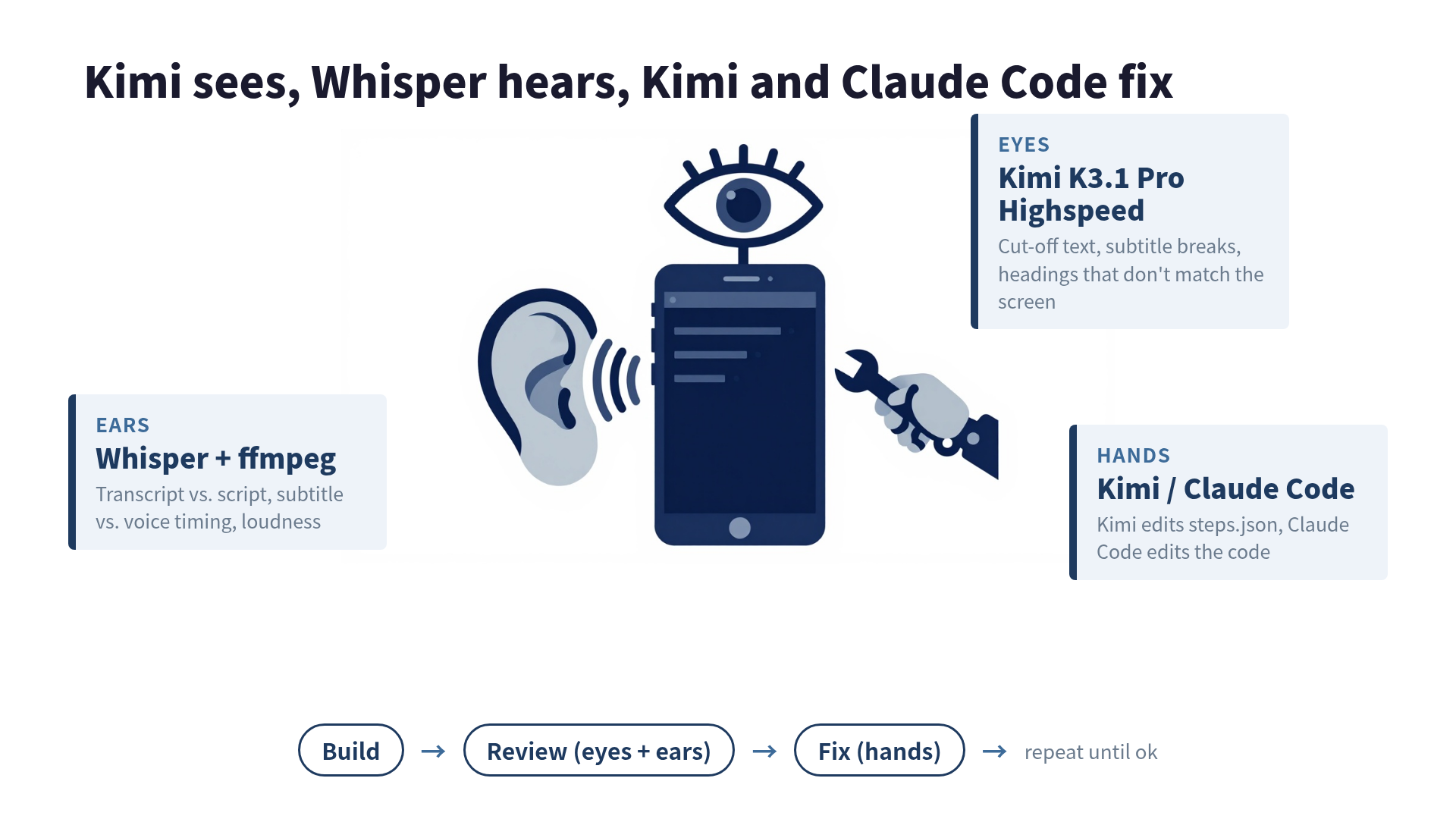
Kimi doesn’t process the audio track in a video. Last time and this time, when asked to transcribe the narration, it said it could not recognize any audio (and didn’t make something up, which I appreciate). So I gave the loop separate ears.
| Role | Who | Checks |
|---|---|---|
| Eyes | Kimi K3.1 Pro Highspeed | Cut-off text, headings that don’t match the screen, subtitle line breaks, readability on a phone, whether commands succeeded |
| Ears | Whisper + ffmpeg | Transcript vs. script, subtitle vs. voice timing, silence, loudness |
| Hands (steps.json) | Kimi K3.1 Pro Highspeed | Rewrites steps.json from the review |
| Hands (code) | Claude Code | Fixes the real ones among the issues Kimi says need a code change in handson-cast |
In handson-cast, the narration is the script in steps.json read by text-to-speech. I already know exactly what should be said, so comparing it with Whisper’s transcript shows misreadings and skipped lines. Whisper cost less than a cent for all four runs (about 1.5 minutes of audio).
The request to Kimi is simple. I pass Kimi the video and steps.json and ask it to return JSON listing defects in five areas: cut-off text, mismatches, subtitle breaks, readability, and whether the steps worked. For each defect, it says whether the problem can be fixed in steps.json or needs a code change.
The schedule
I logged the start and end of every stage.
| Round | Start | Build | Video review (Kimi) | Audio check | Fix (Kimi) | Kimi’s verdict |
|---|---|---|---|---|---|---|
| 0 | 09:45 | 87 s | 180 s / $0.42 | 4 s | 139 s / $0.21 | needs fix (5 issues) |
| 1 | 09:52 | 76 s | 171 s / $0.38 | 5 s | 216 s / $0.35 | needs fix (5) |
| 2 | 10:02 | 156 s | 192 s / $0.40 | 3 s | 124 s / $0.20 | needs fix (2) |
| 3 | 10:10 | 87 s | 155 s / $0.36 | 5 s | none | ok (0) |
The first review started at 09:45:38 and the fourth returned “ok” at 10:14:49. 29.2 minutes, $2.32 in Kimi charges (not counting the 87-second round0 build). That’s 4 reviews and 3 fixes for one 20-second video: $0.36-0.42 per review and $0.20-0.35 per fix.
Kimi accounted for most of the runtime. Each round took about 3 minutes for review and 2 to 3.5 minutes for fixes. That’s roughly 7x slower than the 24 seconds for 12 questions above, because here Kimi searches the whole video for problems instead of answering fixed questions. It spent about 12,000 tokens on reasoning. There were two rounds of code fixes, and Claude Code finished each in about 30 seconds.
What got found and what got fixed
| Defect | Found by | Fixed by |
|---|---|---|
| G1 steps start at “Step 2” | Kimi (round1; missed in round0) | code |
| G2 zoom cuts off the right edge | Kimi (round0) | Kimi turned off zoom in steps.json |
| G3 a line with only ”。“ | Kimi (round0) | code (line-break rule) |
| G4 small text | Kimi (round1; missed in round0) | only partly, see below |
The heading’s ========== decoration wraps into a line of just symbols | Kimi (round0). Not on my answer key | code |
Permission denied (publicke / y). splits a word | Kimi (round2) | Kimi, in steps.json, see below |
| Loudness of -37.6 LUFS, far too quiet | Ears (ffmpeg) | code (now -14.8 LUFS) |
Text-to-speech can’t pronounce kenimoto.dev | Ears (Whisper transcribed it as gibberish) | Kimi removed the site name from the script |
| Script edited, but the voice stayed old | Ears (Whisper). Invisible on screen | code |
| ”Subtitles overlap at each transition” | Kimi, every round from 0 to 2 | false positive. The subtitles never overlap |
I missed the heading decoration when I wrote the answer key. Only the Step 4 heading was long enough for part of the = run to wrap. Kimi caught it in round0. I had also noticed the zoom cut-off only in Step 4. Kimi said it happened in the first step too (labeled “Step 2” on screen). And it did.
On the other hand, the step numbering (G1) and small text (G4) were missed in round0 and reported in round1. The same video gets different findings on different runs. The overlapping-subtitles false positive came up all three times. Neither the subtitle file nor the frames at those timestamps show any overlap. The Kimi fixer routed it to “needs a code change,” so it did no harm. But someone still has to decide “don’t fix this” every round.
The audio side caught the most dangerous bug of the run. handson-cast skipped regenerating an audio file if one already existed, judging only by the file name. Edit the script. And the old voice stays. Subtitles are built from the new script, so you get a video where the subtitles and the voice say different things. I noticed because Whisper’s transcript didn’t match the script. Kimi, which only sees the picture, could not have found it.
The fixer bent the demo to pass review
Here’s the video after the loop converged (round3, 25.3 s):
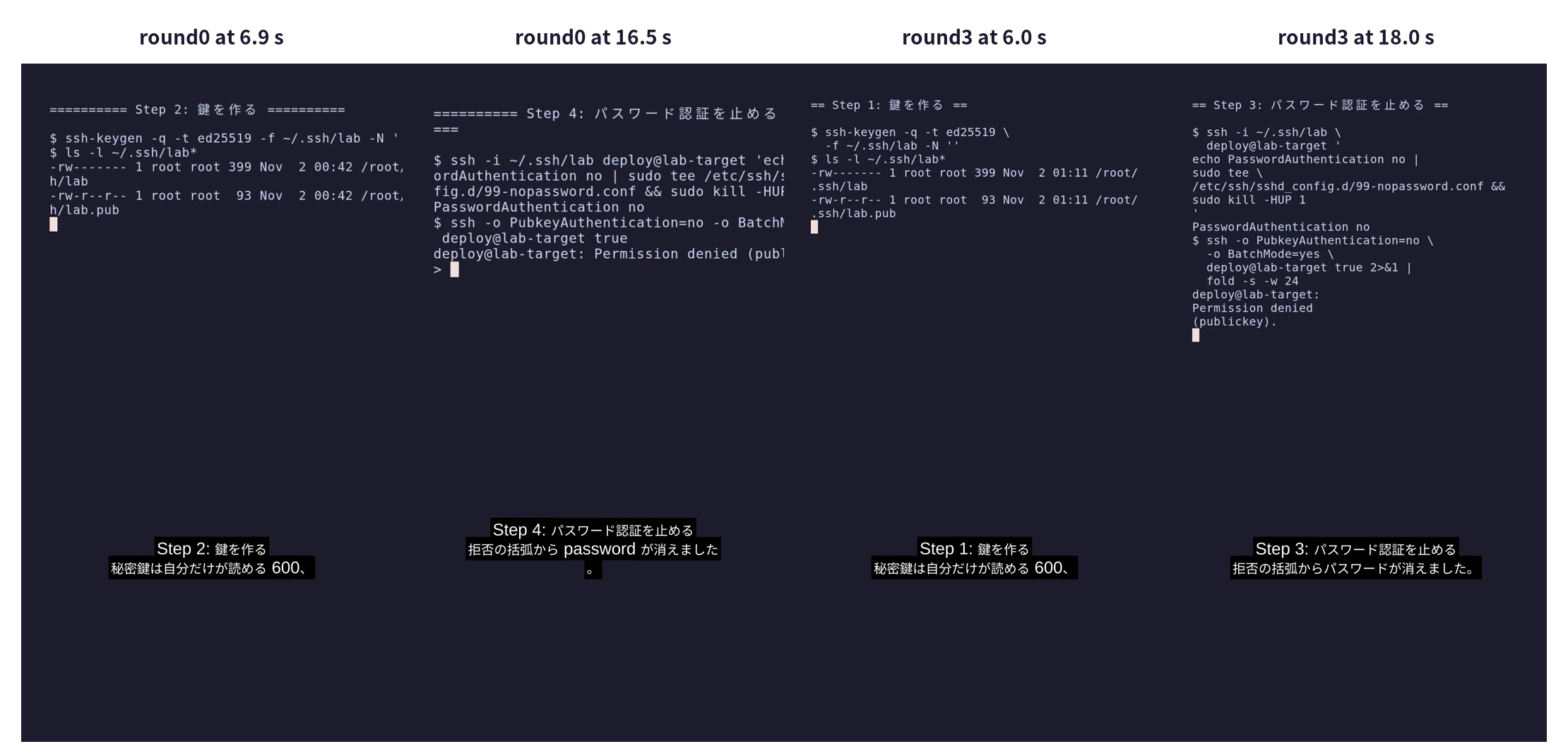
Steps now start at Step 1, nothing is cut off, and the loudness is on target. Kimi says “ok,” and Whisper’s transcript nearly matches the script.
Watch it yourself, though. And problems remain. The demo itself changed so it would pass review.
2>&1 | grep 'Number of key'was added to the Step 2 command and2>&1 | fold -s -w 24to Step 3. Both exist only to shorten or wrap the output so it fits on screen. For someone learning SSH, they’re steps that make no sense- In round0’s fix, the fixer replaced the word for “key” and the English word “password” in the Japanese script with katakana spellings. It did so because Whisper’s transcript used different spellings, which the fixer treated as a defect. The line about
passworddisappearing from the brackets referred to the English word on screen, so its meaning got blurrier - In round1’s fix, it edited the script to match the outdated narration audio and inserted a word that Whisper had misheard
- For small text (G4), the round0 fix made the text smaller (30 → 24) and round1 raised it back to 32. The empty bottom half of the screen is still there
Part of the cause is my design. I passed the review results straight to the fixer. Report spelling differences as defects and it rewrites the script. Report a line break and it adds tricks to the command. From round1 on, I added “don’t change the narration except to fix subtitle or voice defects” and “don’t make text smaller to fit,” but said nothing about commands. So the tricks kept coming. I also wrote “the spelling of kenimoto.dev is not a defect” into that instruction, which told it to ignore a real mispronunciation. (In round2, Kimi removed the site name from the script on its own.)
Background: why K3.1 makes this loop practical
Before the loop, I compared K3, K3.1 Pro, and K3.1 Pro Highspeed on the same tasks. The main numbers (median of 3 runs, measured the morning of November 2, 2026, JST):
| Task | K3 | K3.1 Pro | K3.1 Pro Highspeed |
|---|---|---|---|
| 12 detail questions about a 55 s video | 9 / 431 s / $0.68 | 8-10 / 222 s / $0.067 | 10 / 24 s / $0.13 |
| Implement semver range resolution (26 cases) | 2 of 3 perfect / 1,192 s / $0.87 | 3 of 3 perfect / 807 s / $0.27 | 3 of 3 perfect / 257 s / $0.46 |
| Web search, 8 questions x 3 | 20 / 24 | 23 / 24 | 23.5 / 24 |
List prices per million tokens (input / output): K3 $3 / $15, K3.1 Pro $2 / $10, Highspeed $4 / $20.
What mattered more than price was how much the model thinks. On hard tasks, K3 burns through reasoning tokens. Implementing semver, K3 used about 58,000 tokens and K3.1 Pro about 27,000. On the video-detail task, the figures were 44,000 and 5,800 tokens. K3.1 Pro produced tokens more slowly, at 33-40 per second versus 81-124 for K3. Yet it still won on total time.
Output speed depends on load, though. Right after launch on October 24, K3.1 Pro was reported at about 77 tokens per second, roughly twice K3 (myclaw’s comparison, citing Artificial Analysis). Artificial Analysis now shows about 31, which matches what I measured. Treat speed numbers as a snapshot. Someone else also measured the opposite effect on light tasks, where K3.1 Pro overthinks and loses (Qiita, in Japanese).
One more thing: with max_tokens at 16,000, all three models spent the whole budget reasoning on the semver task and never wrote a line of code. Heavy tasks need something like 64,000.
Putting it into production
Here’s how I’ll wire this into handson-cast:
- Run a Kimi review on every generated video. One review is about 3 minutes and $0.40. Even with 3-4 rounds of fixes, a video takes about 30 minutes and costs around $2.30
- Always add ears. Failures that don’t appear on screen, such as subtitles and narration generated from different scripts, only surface when you compare the script with Whisper’s transcript
- Tell the fixer what it must not change, up front. Lock the demo commands and the meaning of the script, and let it touch only presentation: text size, zoom, card length
- Record false-positive patterns and pass them to the next review. For a report that comes up every time, like “overlapping subtitles,” either verify it automatically with frame diffs or note it in the instructions
This test covered just one video and three rounds. A different topic would surely change what Kimi catches. Still, the loop of having an AI review a video, applying its feedback, and repeating now runs in 30 minutes without anyone watching. The work that’s left is deciding what the fixer is not allowed to touch.
References
- Kimi API: Pricing: K3 series price table and the notice that K2 models are closed to new users from 2026-10-31. K3.1 Pro / Highspeed prices and the plan to retire all K2 models by the end of December 2026 come from the announcement email sent to API users on 2026-10-26
- Kimi API: Using vision models: how to pass video input
- Artificial Analysis: Kimi K3.1 Pro providers: third-party output speed measurements
- Kimi K3.1 Pro vs K3 (myclaw): comparison citing Artificial Analysis numbers from launch
- Kimi K3.1 Pro: is it really cheaper? (Qiita, Japanese): measurements showing K3.1 Pro spends more reasoning tokens on light tasks
- Kimi K3 vs Claude: Video Review, Same Findings: my previous post
- charmbracelet/vhs: terminal recording
 Related book Turning LLMs from Liars into Experts Context Engineering in Practice | RAG · MCP · CLAUDE.md · Agentic RAG, benchmarked end to end View the book page →
Was this article helpful?