I Ran 3 Claude Code Sessions in Parallel for 8 Hours. They Overwrote Each Other's Context Twice.
I had three ideas in parallel and three terminal windows. The math seemed obvious: open three Claude Code sessions, one per worktree, let them work on independent branches, and pick up roughly 3x my throughput for the afternoon. The official docs even tell you to do exactly this. The desktop app auto-creates a worktree for every new session. It is presented as the safe pattern.
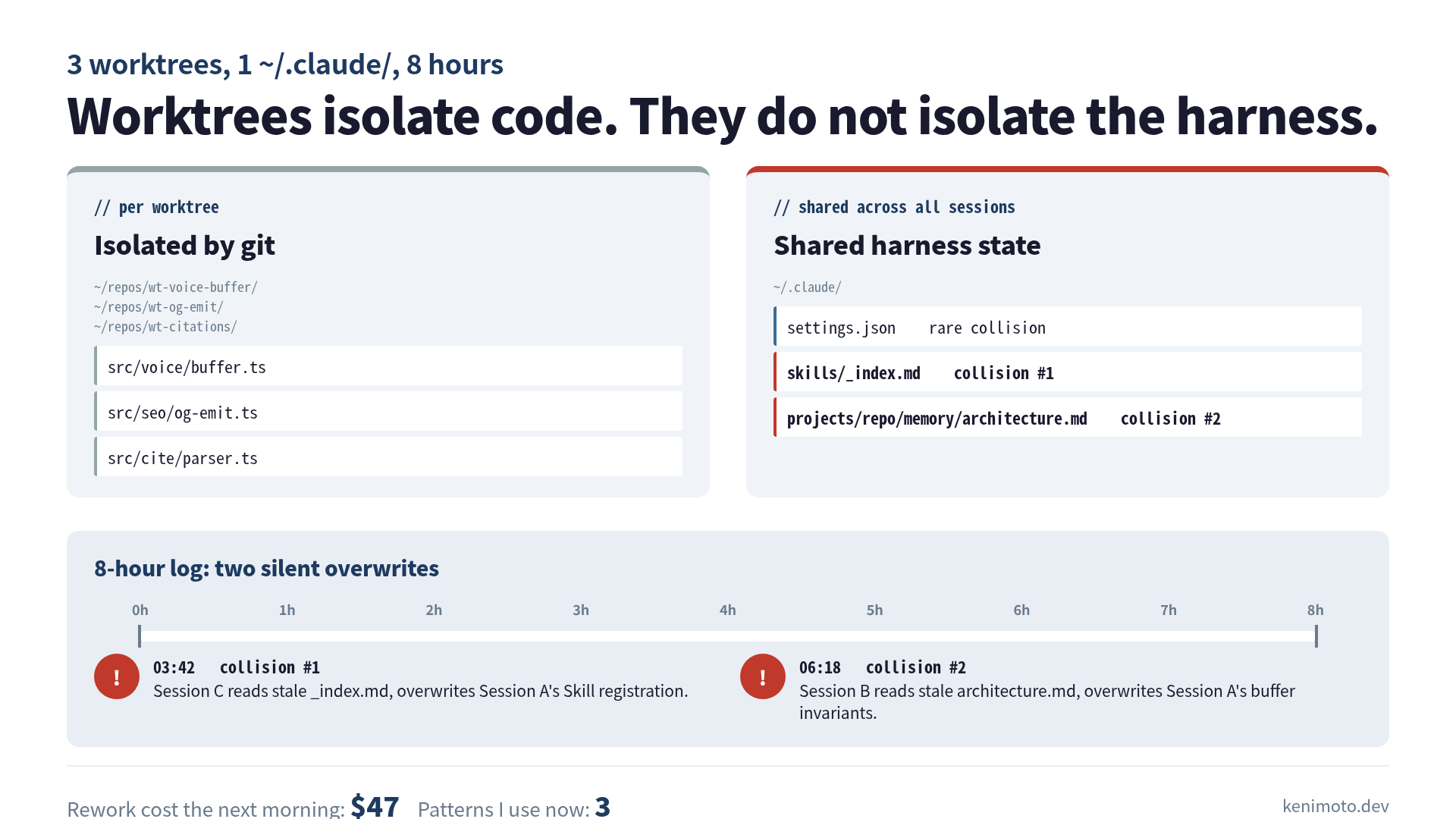
Eight hours later I had two corrupted memory files, one Skills file with a paragraph in it that I never wrote, and a bill for roughly $47 of token spend re-doing work that already existed in another worktree. The setup was safe. The shared state was not.
This post is the 8-hour log: what I set up, when the two collisions happened, what was actually being overwritten, and the three small patterns I use now to keep parallel sessions from eating each other.
The setup that looked safe
Three Claude Code sessions, each on a separate worktree of the same repo. Three branches: feat/voice-buffer, fix/og-emit, feat/citation-tracker. None of the branches touched the same source files. I had checked that twice before I started.
# Terminal A
git worktree add ../wt-voice-buffer feat/voice-buffer
cd ../wt-voice-buffer && claude

# Terminal B
git worktree add ../wt-og-emit fix/og-emit
cd ../wt-og-emit && claude

# Terminal C
git worktree add ../wt-citations feat/citation-tracker
cd ../wt-citations && claude
Each session got the same system context: my repo’s CLAUDE.md, my user-level ~/.claude/CLAUDE.md, my ~/.claude/skills/, and my ~/.claude/projects/<repo>/memory/ directory. The worktrees were independent at the git level. Everything else was shared.
I caught the implication later, sitting at hour eight with a corrupted memory file open. Worktrees isolate your source code. They do not isolate Claude’s brain.
Collision 1: hour 3:42, the Skills file
The first thing that snapped was a Skills file I had not touched all day.
Session A was building a voice-buffer fix and at some point asked itself “is there a Skill for streaming WebRTC buffers?” There was not. It wrote one to ~/.claude/skills/voice-buffer/SKILL.md and kept working. Around the same eight-minute window, Session C was building the citation tracker and asked itself “is there a Skill for parsing source attributions?” There was not. It wrote one to ~/.claude/skills/citation-source/SKILL.md.
So far, no conflict. Different files. Different topics. The official docs gave me no reason to worry.
The collision came from a third file: ~/.claude/skills/_index.md, which both sessions decided to update when registering their new Skill. Session A updated it first. Session C, reading the file thirty seconds later, saw the version before Session A’s write, appended its own Skill, and saved. The voice-buffer Skill registration disappeared from the index. Session A had no idea, because Session A had already moved on.
I noticed at hour five when I asked Session B (which had been quietly running the OG fix) “does our Skills index include voice-buffer yet?” It said no. I checked. It was right. Session A’s Skill file was on disk, but the index that pointed to it had been clobbered.
That is what shared state without locking looks like. Two writers, last-write-wins, no warning, no merge.
Collision 2: hour 6:18, the memory file
The second collision was uglier because it ate work I cared about.
I use ~/.claude/projects/<repo>/memory/ to store small persistent notes the agent should remember across sessions: an architecture.md with my system’s component map, a feedback.md with stylistic preferences, a project.md with current priorities. All three are written by Claude itself, occasionally, when the user asks “remember this” or when the agent itself decides something is worth keeping.
At hour 6:18, Session A finished its voice-buffer work and asked itself “should I save what I learned about the audio buffer’s invariants?” It read architecture.md, added a section, and saved. At hour 6:19, Session B finished the OG fix and asked itself “should I record the og:type double-emit bug as a known gotcha?” It read architecture.md (the pre-A version, still cached in its context), added its own section, and saved.
Session A’s voice-buffer notes vanished. Eight minutes of careful invariants, gone, replaced by a paragraph about meta tag emission that was correct but unrelated.
I only caught this because I happened to grep for “buffer invariant” the next morning and found nothing. If I had not gone looking, the notes would simply not exist in any future Claude Code session. The agent would not have known to ask. There is no error log for “memory file silently overwritten by sibling process.”
What was actually broken
Worktrees solve the file-system problem. Two sessions writing to the same src/voice/buffer.ts would have produced a git conflict, which is loud and recoverable. Two sessions writing to the same ~/.claude/skills/_index.md produce a silent overwrite, which is quiet and not.
Concretely, the broken assumption was this. The official guide says “edits in one session never touch files in another”, and that is true at the worktree level. It is not true at the harness level, because the harness (memory, skills, hooks, settings) lives one directory up from the worktree, in ~/.claude/, where every parallel session writes freely with no coordination.
Three classes of file are at risk, in roughly increasing order of how much they will hurt:
- Settings files (
~/.claude/settings.json). Rare collision because the agent rarely writes here. But when it does (e.g., a Skill asks to add a permission), you get last-write-wins. - Skills files (
~/.claude/skills/). Medium-frequency collision. Indices and shared catalogues are the actual flashpoint, not the individual SKILL.md files. - Memory files (
~/.claude/projects/<repo>/memory/). The most painful. The agent writes here exactly when it has just learned something it considers worth keeping, which is exactly the work you do not want to lose.
Anthropic’s parallel-worktree pattern was designed for code. The harness was designed for one session at a time. Running both at once is the user’s bug.
The 47-dollar lesson
The cash cost was the rework. After the memory file collision, Session A had no record of the voice-buffer invariants it had just figured out. When I started a fresh session the next morning and asked it to extend the buffer, it re-derived the same invariants from scratch, the same way, in about 40 minutes of token spend. I checked the dashboard: roughly $47 of Sonnet 4.6 tokens, plus a slightly grumpier morning.
I had also paid for the original derivation, of course. So really it was double-billed, not lost, but the second payment was the avoidable one. Brooks’s Law has a footnote nobody quotes: “and your concurrent processes will overwrite each other’s notes, so you will pay for some of the work twice.”
The 3 patterns I use now
After the collision day, I changed three things. Each is small. None of them required Anthropic to ship anything new.
Pattern 1: per-session memory namespaces. Instead of one shared ~/.claude/projects/<repo>/memory/, each parallel session writes into ~/.claude/projects/<repo>/memory/<branch-name>/. I do this with a per-worktree CLAUDE.md that points the agent at its own subdirectory. At session end, I merge the subdirectory back into the main memory/ by hand or with a small script. Conflicts surface as duplicate filenames, which is loud and recoverable.
<!-- per-worktree CLAUDE.md -->

## Memory write location

Write all memory files under
`~/.claude/projects/repo/memory/feat-voice-buffer/`.
Do not write to `~/.claude/projects/repo/memory/` directly.
Pattern 2: a write lock on shared indices. For files I cannot namespace (the Skills index, settings.json), I use a flock-style lock around any agent write. The agent runs writes through a small wrapper script that takes an exclusive lock on ~/.claude/locks/skills-index.lock before touching the file. Last-write still wins, but the writes are now serialized, and the agent’s pre-write read sees a consistent state. The wrapper is maybe twenty lines of shell.
#!/usr/bin/env bash
# ~/.claude/bin/locked-write.sh
target="$1"
lockfile="$HOME/.claude/locks/$(basename "$target").lock"
mkdir -p "$(dirname "$lockfile")"
exec 9>"$lockfile"
flock 9
cat > "$target"
Pattern 3: coordination via .claude/sessions/. Each running session writes a heartbeat file at ~/.claude/sessions/<pid>.json with its branch, start time, and the files it expects to touch in the harness layer. Before any session writes to a shared index or memory file, it greps the sessions/ directory for sibling claims on the same path. If it finds one, it waits or skips. This is the heaviest of the three patterns and the one I use least, because Patterns 1 and 2 catch most of the actual collisions.
If you have used Claude Code sub-agents for parallel review, you will recognize the shape: the problem is not the model. It is the integration layer the user did not realize was there. Sub-agents collide on opinions inside one session; parallel sessions collide on state across the harness.
What I actually believe now
Parallel Claude Code sessions are not free, the same way multi-agent code review is not free, the same way letting one agent run autonomously for 24 hours is not free. The cost moves around, but it never goes to zero. With parallel sessions, the cost shows up as silent overwrites in your harness directory, eight hours after you started, in a file you did not think about when you opened the second terminal.
The official guide’s framing is right at the source-code layer: “edits in one session never touch files in another.” It just stops one directory short. Edits inside ~/.claude/ are perfectly happy to touch each other, and they will, on the schedule of last-write-wins, with no error log to grep later.
If you take one thing from this post: when you open the second Claude Code session in a second worktree, take ten seconds to decide whether the two sessions share Skills, memory, or settings, and whether you mind if either silently eats the other’s writes. If you do mind, add Pattern 1 today and Pattern 2 the first time you actually hit a collision. Pattern 3 can wait until you find yourself running five at once, which is the point at which the official docs gently advise you not to.
I am still running parallel sessions. I just stopped pretending the worktree boundary was the whole boundary.
Want the deeper version of this? I cover the harness layer, the 6 modules of a Claude Code setup, and the failure modes of shared state in Harness Engineering — the field guide for engineers who want to run Claude Code seriously, not just open three terminals.
Related on this blog:
 Related book Harness Engineering Five interpretations from OpenAI, Anthropic, LangChain, Martin Fowler, and academia — merged into one system for engineers running AI agents in production View the book page →
 Was this article helpful?