
Practical Claude Code
Context Engineering for Modern Development
The field guide for engineers who use Claude Code every day — CLAUDE.md, Plan Mode, and team workflows from a year of real production use
30+ technical books across 4 languages · Sold on Kindle in 6 countries · From a year of real production use

📖 Read for free
Read three full chapters right here before you buy. Liked it? Continue on Kindle.
01 Preface
“This isn’t just a tool. It’s a redefinition of development itself.”
My Encounter with Claude Code
In the spring of 2025, I typed a single command into my terminal.
claude
Just one word. I had no idea at the time that it would fundamentally change my career as an engineer.
Back then, I was running MCP through Cursor and getting excited about how convenient it was. Honestly, I was more captivated by the evolution of peripheral tools than by LLMs themselves. I even mistakenly believed that the key to Claude Code was making it work with GitHub Actions in one shot. I completely misunderstood the essence of AI coding tools.
When I first used Claude Code, I felt something was off within the first few minutes. This was fundamentally different from every AI tool I’d used before. It didn’t just suggest code. It understood the entire project, grasped design intent, and sometimes pointed out problems I hadn’t even noticed. It felt like having a brilliant pair programmer on the other side of the terminal.
Why I Wrote This Book
After using Claude Code for a while, I became convinced of something. The true value of this tool isn’t in its ability to generate code. It’s in its ability to understand context.
And to fully draw out that ability, the user needs a skill of their own: “designing context.” I call this Context Engineering.
There are plenty of articles out there introducing how to use Claude Code. But no book had yet systematically covered the essentials: the design philosophy, why CLAUDE.md matters, how to maximize collaboration with AI, and how to apply it in team development.
So I decided to write one myself.
This book is a comprehensive record of everything I’ve learned from using Claude Code intensively in production. I’ve tried to be as honest as possible, including not just successful techniques but also lessons learned from failure.
How to Read This Book
This book is organized into four main parts.
Part 1: Foundations (Chapters 1–3) Covers the origin story of Claude Code, the meaning behind its terminal-based design philosophy, and why AI-native development is needed now. If you’re new to Claude Code, start here.
Part 2: CLAUDE.md in Practice (Chapters 4–7) The core of this book. Detailed coverage of CLAUDE.md’s design philosophy, document-first development, practical patterns, and team development strategies. Even experienced Claude Code users will find new insights here.
Part 3: Real-World Applications (Chapters 8–14) From daily workflows to design integration, test automation, multi-tool orchestration, collaboration with non-engineers, knowledge automation, and business applications. Concrete guidance on how to use Claude Code in actual development.
Part 4: The Future (Chapters 15–19) Explores the essence of the productivity revolution, the evolution of AI agents, security and policy considerations, the transformation of the engineering profession, and what lies ahead.
You don’t have to read from start to finish. Feel free to browse the table of contents and jump to whatever chapter interests you. That said, I recommend reading Chapters 4 and 5 early on, as they lay the conceptual foundation for the rest of the book.
Welcome to the world of Context Engineering.
Continue this chapter on Kindle →02 The Birth of Claude Code: The Accidental Beginning, as Told by Boris Cherny
“So, what music are you listening to right now?” That single question started it all.
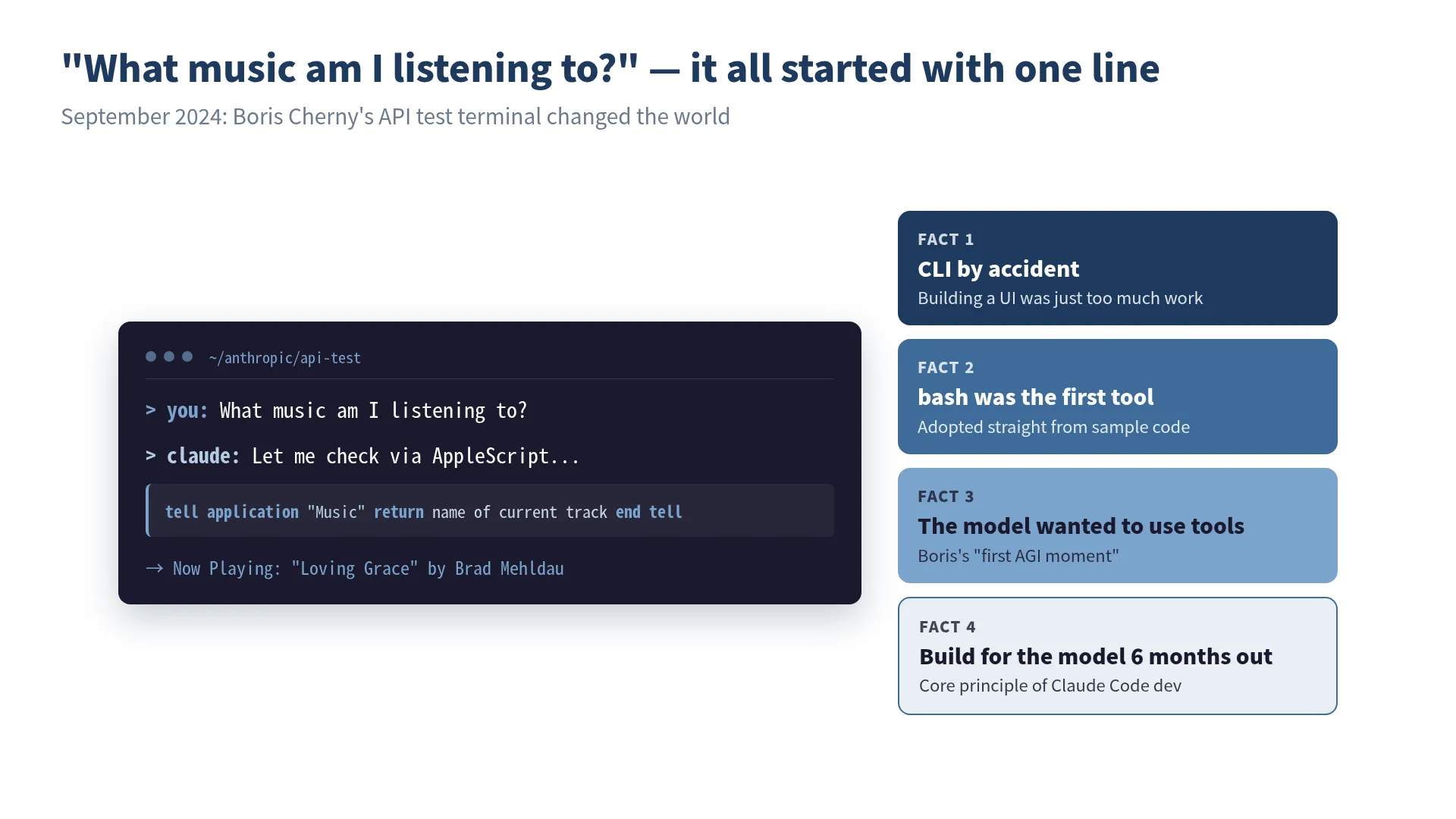 The iconic moment Claude Code was born — an accidental prototype that crystallized four design decisions.
”What Music Am I Listening To?”
One evening in September 2024, Anthropic engineer Boris Cherny was writing a simple terminal chat app to test the behavior of the company’s API.
The first tool was just bash: a single tool. It was an unremarkable prototype, built almost entirely from sample code in the official documentation. To verify it worked, he typed:
What music am I listening to?The model spontaneously wrote an AppleScript, controlled the Mac’s music player, and returned the name of the song currently playing.
Boris has said that this was the moment he “first felt AGI.” Despite never being instructed to do so, the model wanted to use tools. “The model wants to use tools. That’s all it is.” This discovery was the very beginning of Claude Code.
Who Is Boris Cherny?
To tell the story of Claude Code’s birth, we first need to know its creator, Boris Cherny.
He is known as the author of Programming TypeScript, published by O’Reilly, and is an expert in type systems and programming language design. TypeScript embodies a philosophy of “adapting the type system to fit how programmers write, rather than forcing programmers to change their habits.” This philosophy would later directly inform the design principles of Claude Code.
When Boris joined Anthropic, he had no plans to build a product like Claude Code. What he wanted was to gain a deeper understanding of the company’s own API. The small terminal app he built for that purpose ended up becoming one of the most widely used AI coding agents in the world, something even he couldn’t have predicted.
I’m drawn to this story because it resonates with my own experience. During my time in robotics development, I once built a small prototype with a French engineer that grew in unexpected directions. Rather than drawing up a grand design from the start, there’s a sense that discovery comes from getting your hands dirty, something I think every engineer has felt at some point.
Born from a Company Hackathon, by Chance
Claude Code was not the result of a planned product development effort. The terminal app Boris built to test API behavior was purely a personal experiment tool.
However, two fortunate coincidences came together.
Coincidence #1: Choosing a CLI
Boris chose a CLI for an extremely practical reason: he didn’t have to build a UI. He picked the terminal as the cheapest possible prototype. No web UI, no desktop app. Just text in, text out: the simplest form possible.
This “shortcut” turned out to be the best design decision. The terminal was the environment developers were most familiar with, and also the most natural environment for models to use tools.
Coincidence #2: Making bash the first tool
By using the bash tool straight from the documentation’s sample code, the model gained an environment where it could freely execute commands. This wasn’t an intentional design choice. It just happened that way. But this degree of freedom perfectly matched the model’s tendency to “want to use tools.”
When Boris shared this prototype internally, the reaction was unexpected. Engineers at Anthropic started using the tool in their daily work.
”Nobody Asked for It, but Everyone Needed It”
By late 2024, the AI coding tool market already had strong players like Cursor and GitHub Copilot. IDE-integrated AI assistants were the mainstream, and there was virtually no demand for “writing code by chatting with AI in the terminal.”
Yet the rapid internal adoption of Claude Code revealed an important truth: people don’t know what they need until they have it.
Boris explains this using the concept of “Latent Demand.” Engineers were already working in the terminal. Claude Code was a tool that naturally blended into their existing workflow. You just use your usual terminal, work as you always have, except now Claude is right there beside you.
This idea of “placing the product on the extension of existing behavior patterns” is one of the most important factors behind Claude Code’s success. I’ll cover this in detail in Chapter 3.
What Anthropic’s Culture Produced
You can’t tell the story of Claude Code’s birth without considering the culture of Anthropic as a company.
Anthropic is unique in the industry for placing “AI safety” at the core of its corporate mission. It pursues the seemingly contradictory goals of maximizing AI capability while simultaneously ensuring its safety.
How this culture influenced Claude Code is evident in several design decisions.
Permission Management for Tool Execution
Claude Code has a built-in mechanism that asks for user approval when the model modifies files or executes commands. Rather than “letting AI do whatever it wants,” the design philosophy is to let humans retain control.
Claude wants to run: rm -rf node_modules && npm install

Allow? (y/n)
This prompt might seem tedious at first glance. But it’s the technical implementation of Anthropic’s emphasis on “human oversight.”
Designed Not to Send Code Externally
Claude Code doesn’t store your codebase in a vector DB or build indexes on external servers. The architecture where the model directly searches local files via grep/glob is also an excellent choice from a security perspective.
This decision was initially made for technical reasons (Agentic Search was more accurate than RAG), but it aligned beautifully with Anthropic’s safety-first culture.
Awareness of ASL (AI Safety Level)
Boris himself has openly discussed risks including ASL4 (the risk level for recursively self-improving models), bioweapon misuse, and zero-day exploits in interviews. The very fact that an AI coding tool developer publicly discusses these risks reflects Anthropic’s culture.
When I first started using Claude Code, the first thing I noticed was this “care for safety.” Compared to other AI coding tools, Claude Code intentionally restricts what it can do in certain areas. That restriction is a design choice, not a limitation. Rather than letting it run free, it’s designed to collaborate with humans. This philosophy is what ultimately creates trustworthiness in real-world use.
Twenty Pull Requests a Day
The most compelling evidence of Claude Code’s effectiveness comes from Anthropic’s own internal results.
Boris’s own work style changed dramatically before and after adopting Claude Code:
- Since Opus 4.5, he writes 100% of his code with Claude Code
- He has uninstalled his IDE
- He submits 20 pull requests per day
The team as a whole has reported results like:
- 150% increase in productivity per engineer
- CEO Dario’s prediction that “90% of code will be written by Claude” has come true
- Depending on the team, 70–90% of code is AI-generated
Former Google engineer Steve Yegge has said that “Anthropic engineers are 1000x more productive than Google engineers in Google’s heyday.” That may be an exaggeration, but the sense that productivity has shifted to an entirely different dimension is something I’ve experienced myself through extensive use of Claude Code.
In my case, I run five projects in parallel at a small company while simultaneously taking open college courses and preparing new business ventures. This kind of “wearing many hats” work style has become possible in large part thanks to Claude Code. The dramatic reduction in time spent writing code has allowed me to focus on decision-making and review.
Not a Single Line of Code from Six Months Ago Remains
The Claude Code development team itself practices an interesting development methodology.
According to Boris, not a single line of code from six months ago remains in the Claude Code codebase. They add and remove tools every few weeks; code has a lifespan of a few months. They constantly rewrite code to keep pace with model evolution.
This reflects his philosophy that “scaffolding = technical debt.”
You can get 10–20% performance improvements with code around the model (scaffolding). But the next model wipes out those improvements. It’s always a tradeoff between building and waiting.
Boris reportedly has Rich Sutton’s essay “The Bitter Lesson” framed on his office wall. The core thesis of this essay is that “in the long run, scaling computation outperforms human ingenuity.” In other words, rather than building complex systems around the model, it’s better to bet on the evolution of the model itself.
This thinking leads to the core principle of Claude Code development:
Build not for today’s model, but for the model six months from now.
Even if you find PMF (Product Market Fit) by optimizing for today’s model, the next model will let competitors overtake you. So you sense the boundaries of model capability and bet on the frontier that will be resolved in six months.
This principle holds important implications for us as Claude Code users. Whether it’s how we write CLAUDE.md or how we design workflows, the key is to keep things simple, assuming the model will evolve, rather than hacking around the current model’s weaknesses.
From Coincidence to Inevitability
Claude Code’s birth was coincidental. A terminal app for API testing, the bash tool from sample code, choosing a CLI because “building a UI was too much trouble.” None of it was intentional.
But what unfolded beyond those coincidences was inevitable:
- Engineers were already working in the terminal → CLI
- Models wanted to use tools → bash
- Security and simplicity were needed → Agentic Search
- Human control was necessary → approval-based permission management
Everything was a response to demand that was already there.
What I want to convey in this book isn’t just how to use Claude Code. By understanding the philosophy behind its creation (“don’t fight the model,” “uncover latent demand,” “build for six months from now”), you’ll discover principles for developing alongside AI that go beyond mere tool usage.
In the next chapter, we’ll dig deeper into the question “Why the terminal?” and get to the heart of Claude Code’s design philosophy.
✅ Key Takeaways
- Claude Code wasn’t a planned product. It was born accidentally from an API testing tool
- The discovery that “models want to use tools” was the beginning of everything
- The choices of terminal, bash, and Agentic Search were all responses to “existing demand”
- Anthropic’s safety culture led to a design philosophy that keeps humans in control
- “Build not for today’s model, but for the model six months from now” is the core development principle of Claude Code
References
- Boris Cherny, “Inside Claude Code With Its Creator” — Y Combinator The Light Cone (2026-02-17)
03 The Essence of CLAUDE.md: The Creator Writes 2 Lines, Practitioners Write 100
CLAUDE.md is not a “command sheet for the model.” It’s a “knowledge base for the project.”
Boris Cherny’s Two Lines
Let’s revisit a fact from Chapter 1. Boris Cherny, the creator of Claude Code, has a CLAUDE.md that is just two lines long.
# CLAUDE.md
- Enable automerge when opening a PR
- Post to the internal Slack channel when opening a PR
That’s it. No coding conventions, no architecture descriptions, no testing guidelines.
Meanwhile, Claude Code practitioners write CLAUDE.md files exceeding 100 lines. They pack in everything: the project’s tech stack, coding conventions, file structure, testing strategy, deployment procedures, all in a massive CLAUDE.md stuffed with every imaginable piece of information.
What does this gap mean?
Why Boris Can Get Away with Two Lines
The answer is simple. Boris’s CLAUDE.md is two lines because the rest of the information is consolidated in the team-wide CLAUDE.md.
In the Claude Code project, there is a shared CLAUDE.md at the repository root, separate from individual CLAUDE.md files, and it is updated multiple times a week. Boris’s personal file is just two lines because the shared CLAUDE.md covers the team’s context.
In other words, it’s dangerous to casually conclude that “CLAUDE.md should be short.” More precisely, your personal CLAUDE.md can be short, but the project’s context must exist somewhere.
The Pros and Cons of CLAUDE.md
CLAUDE.md is one of Claude Code’s most innovative features, but it is also the most easily misunderstood. Shingo Yoshida, author of the book Claude Code in Practice, analyzes the pros and cons of CLAUDE.md in the context of Spec-Driven Development (SDD).
Pro: Persisting Project Knowledge
The greatest advantage of CLAUDE.md is that it is the only context that survives /clear.
Claude Code sessions are temporary. When the context window fills up or you reset with /clear, all prior conversation is lost. But information written in CLAUDE.md persists permanently in the project and is automatically loaded in the next session.
Session 1: Instruct "write tests with Vitest" → Done
  ↓ /clear
Session 2: "Add tests" → Doesn't remember Vitest ❌

With CLAUDE.md:
Session 2: "Add tests" → Knows to use Vitest from CLAUDE.md ✅
This means CLAUDE.md functions as long-term memory.
Con: The Bloat Problem
However, CLAUDE.md functioning as long-term memory is simultaneously a cause of bloat.
Every time Claude makes a mistake during a session, you add a rule: “do this from now on.” Every time the project grows, you add new context. Before you know it, CLAUDE.md has ballooned to 300, 500, 1000 lines.
A bloated CLAUDE.md has the following problems:
Problem 1: The model starts ignoring instructions
LLMs have a tendency to “weight the beginning and end of input more heavily.” Instructions buried in the middle of a massive CLAUDE.md are more likely to be ignored by the model.
Problem 2: Contradictory instructions accumulate
When you keep appending over a long period, old instructions and new instructions can contradict each other. An old instruction saying “write tests with Jest” coexists with a new one saying “tests have been migrated to Vitest.”
Problem 3: Wasting the context window
CLAUDE.md is loaded in its entirety at session start. A 1000-line CLAUDE.md significantly eats into the context window available for actual tasks.
Boris himself has given clear advice on this problem:
If CLAUDE.md gets too long, delete it and start over. If the model goes off track, nudge it back gradually. As models improve, you’ll need to add less.
Seven Principles for CLAUDE.md
With the pros and cons in mind, here are practical operating principles. These seven principles are synthesized from knowledge accumulated in the community.
Principle 1: Keep It Small and Focused
# ✅ Good: Minimal essentials
This project is Next.js 14 App Router + TypeScript + Prisma.
Tests use Vitest. Run all tests with `npm test`.
Japanese comments preferred.

# ❌ Bad: Information overload
This project is an e-commerce site built with Next.js 14
App Router + TypeScript + Prisma. Development started in
March 2024, the team has 3 members... (goes on and on)
Aim for under 300 lines, with no more than 150–200 instructions. Auto-generation via /init tends to be verbose, so always curate manually after generation.
Principle 2: Leave Code Style to Linters/Formatters
# ❌ Things that shouldn't be in CLAUDE.md
Use 2-space indentation.
Omit semicolons.
Use single quotes for strings.

# ✅ What to do instead
Configure .prettierrc and .eslintrc
→ A single line in CLAUDE.md: "Follow Lint/Formatter rules for code style"
This is the practice of “Don’t fight the model” explained in Chapter 2. Delegate formatting control to tools, and write in CLAUDE.md only what you want the model to exercise judgment on.
Principle 3: The Three Essential Elements
There are three things CLAUDE.md should contain at minimum:
# CLAUDE.md

## Project Overview
Next.js 14 e-commerce site with product management, orders, and payment features.

## Common Commands
- `npm run dev` — Start dev server
- `npm test` — Run tests
- `npm run build` — Build
- `npx prisma migrate dev` — DB migration

## Project-Specific Gotchas
- If: Prisma schema changed → Then: Always run `npx prisma generate`
- If: Environment variable added → Then: Update `.env.example` too
- If: API route added → Then: Update type definitions in `src/lib/api-client.ts`
The third element, “Project-specific gotchas,” is particularly important. Write gotchas not just as prohibitions but in “If X, then Y” (trigger + action) format. This makes it easier for the model to understand precisely.
Principle 4: Progressive Disclosure
You don’t need to put everything in CLAUDE.md. Separate details into dedicated files in subdirectories, and include only references in CLAUDE.md.
# CLAUDE.md (root)
See docs/api-spec.md for detailed API specifications.
See docs/testing-strategy.md for testing strategy.
See docs/deploy.md for deployment procedures.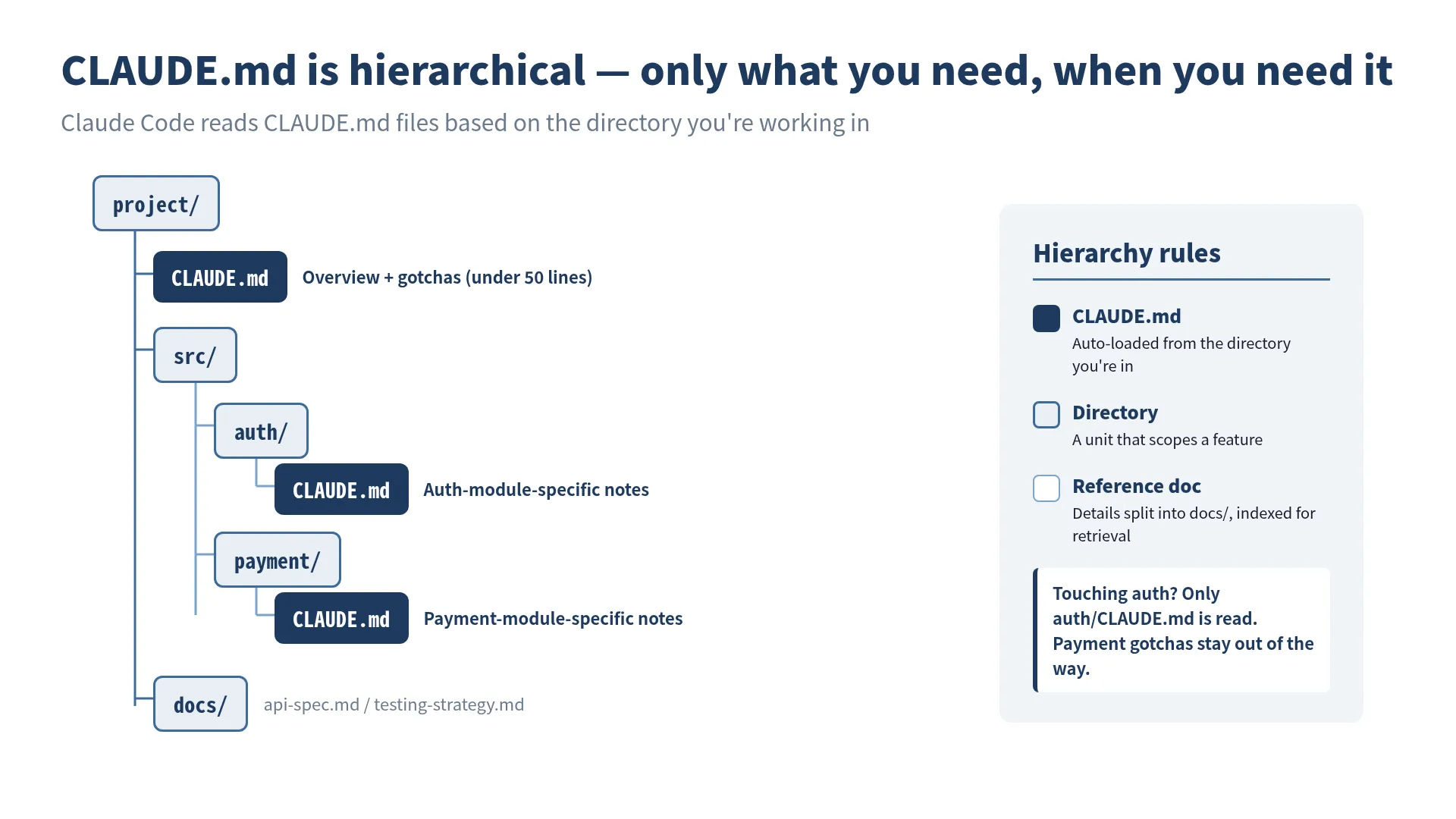 CLAUDE.md is placed hierarchically — Claude Code automatically reads only the files relevant to the directory it is working in.
Claude Code automatically loads the CLAUDE.md in the directory it’s working in. When working on auth, src/auth/CLAUDE.md is loaded; when working on payments, src/payment/CLAUDE.md is loaded. A design that provides the right information at the right time.
Principle 5: Put Critical Rules at the Top
LLMs tend to weight the beginning and end of input more heavily. Place your most important rules at the top of CLAUDE.md.
# CLAUDE.md

<!-- Most critical rules: place here -->
⚠️ Never connect directly to the production DB. Always use staging.
⚠️ Never commit .env files.

## Project Overview
...
Principle 6: Grow It as a Living Document
CLAUDE.md isn’t something you write once and forget. When Claude repeats the same mistake, add a one-line lesson. When the project’s situation changes, update it. It’s a document that requires continuous maintenance.
However, if you only ever add, it bloats. Review periodically and delete rules that are no longer relevant. As Boris says, sometimes you need the courage to “delete it and start over.”
Principle 7: Be Mindful of Scope
The placement of CLAUDE.md determines its scope.
~/.claude/CLAUDE.md          # Global (shared across all projects)
~/project/CLAUDE.md           # Project root
~/project/src/auth/CLAUDE.md  # Module-specific
~/project/claude.local.md     # Personal settings (.gitignore recommended)
Put team-shared rules in the project root CLAUDE.md, and personal preferences in claude.local.md, to clearly separate shared knowledge from personal settings.
The Essential Question: “What Is Context?”
When you think deeply about CLAUDE.md design, you arrive at the fundamental question: “What is context?”
Context is the information the model needs to make correct decisions. But “needed information” changes depending on the situation:
- When grasping the project’s big picture → architecture description
- When fixing a specific bug → that module’s specific gotchas
- When writing tests → testing strategy and test tool configuration
- When deploying → deployment procedures and environment settings
Providing all information at once overwhelms the context window and buries important information. Providing only the needed information at the needed time: that is the essence of context engineering.
CLAUDE.md is merely a mechanism for practicing this context engineering.
The Connection to Spec-Driven Development (SDD)
Spec-Driven Development (SDD), advocated by Shingo Yoshida, is an approach that takes the philosophy of CLAUDE.md even further.
The difference from vibe coding (“just make something nice”) is clear:
Vibe Coding:
  "Make a login feature" → AI implements freely → Not what you expected

Spec-Driven Development:
  1. Write the spec (clarify what to build)
  2. Set steering policies in CLAUDE.md (clarify how to build it)
  3. Have AI implement → Implementation follows the spec
  4. Verify results → Update the spec
The core of SDD is concentrating human effort not on “instructions to AI” but on “defining the specification.” With a good spec, AI can arrive at the correct implementation.
This is also the approach I practice daily. Before writing code, I write the spec first. I set the project context in CLAUDE.md. Then I delegate implementation to Claude Code. What you should write is not code, but specifications.
This idea connects deeply with the “Document-First Development” discussed in the next chapter.
A Practical CLAUDE.md Template
Finally, here’s the CLAUDE.md template I actually use.
# CLAUDE.md

## ⚠️ Critical Rules
- Do not access production environment directly
- Do not commit .env files
- Always ask for confirmation before destructive migrations

## Project Overview
[Project name]: [One-line description]

## Tech Stack
- Framework: Next.js 14 (App Router)
- Language: TypeScript (strict mode)
- DB: PostgreSQL + Prisma
- Testing: Vitest + Testing Library
- CI: GitHub Actions

## Commands
- `npm run dev` — Dev server
- `npm test` — Run tests
- `npm run test:watch` — Test watch
- `npm run build` — Build

## Gotchas (If → Then)
- If: New API route added → Then: Update types in `src/types/api.ts`
- If: Prisma schema changed → Then: Run `npx prisma generate`
- If: Environment variable added → Then: Update `.env.example` + document in README

## References
- API spec: docs/api-spec.md
- Testing strategy: docs/testing.md
It fits within 50 lines. Detailed information is separated into referenced documents, and CLAUDE.md serves as an index.
Boris’s 2-line CLAUDE.md might be extreme, but the direction is right. Don’t write what doesn’t need to be written. Place the necessary information in the right place at the right granularity. That is the essence of CLAUDE.md management.
✅ Key Takeaways
- Boris Cherny’s 2-line CLAUDE.md works because the team-shared CLAUDE.md provides coverage
- CLAUDE.md bloat causes three problems: ignored instructions, accumulated contradictions, and wasted context
- The core of the seven principles: “keep it small and focused,” “leave it to linters,” and “If-Then gotchas”
- Progressive disclosure provides the right information only when needed
- Design CLAUDE.md not as “orders to the model” but as “the project’s knowledge base”
🎯 Try It Yourself
- Write a CLAUDE.md for your project: Following the seven principles in this chapter, write a CLAUDE.md of 50 lines or less for a project you’re currently working on. Be sure to include the three essential elements: project overview, commands, and gotchas (in If→Then format).
- Put a bloated CLAUDE.md on a diet: If you already have a CLAUDE.md, review it against this chapter’s principles and remove unnecessary content. Identify items that should be left to linters/formatters, duplicate instructions, and outdated rules. Compare the line count before and after.
References
- Boris Cherny, “Inside Claude Code With Its Creator” — Y Combinator The Light Cone (2026-02-17)
- Shingo Yoshida, “Introduction to Spec-Driven Development with Claude Code” — SpeakerDeck
Overview
A practitioner's field guide to Claude Code from a year of production use: CLAUDE.md patterns from 2 to 100+ lines, Plan Mode workflows, team operations, MCP integration, and supply-chain security. 19 chapters for engineers past 'hello world'.
What you will be able to do
- Write CLAUDE.md effectively at any scale, from 2 lines to 100+ lines
- Design a daily Claude Code workflow rooted in Plan Mode
- Manage CLAUDE.md across personal/project/team layers without drift
- Integrate Claude Code with MCP, GitHub Actions, and the broader ecosystem
- Apply Claude Code to non-coding work like tax filing, slide decks, contract review
Who is this book for
- [Beginner] Just got started with Claude Code, unsure where to focus first
- [Intermediate] Can build with Claude Code but want to level up beyond basics
- [Team Lead] Struggling with inconsistent CLAUDE.md practices across team members
- [AI Agent Developer] Want to use Claude Code in agent design context, not as a standalone tool
- [Tool Comparison] Need to understand how Claude Code differs from Cursor or GitHub Copilot
- [Non-Engineer Adopter] Considering AI for non-coding work like taxes, presentations, contract review
Problems this book solves
- Claude Code's output is inconsistent no matter what I prompt
- Don't know what to put in CLAUDE.md — every project feels like a fresh guess
- Started using it on a team but everyone runs it differently
- The line between prompt engineering and context engineering feels blurry
- Hand off to AI but quality drops, so I end up rewriting it myself
- Too many AI coding tools — is Claude Code the right bet?
Where this book stands
- Practitioner-driven (built on a year of real production use, not theory)
- Claude Code-focused (deep dive on a single tool, not a Cursor/Copilot mix)
- Intermediate level (for those past 'hello world' but not yet using the full stack)
- Cross-cutting (solo dev → team workflows → AI agent design)
Why this book
- Built on 1+ year of real production implementation, not theory
- Covers both surface (CLAUDE.md syntax) and depth (Boris Cherny's design philosophy, the bloat problem)
- Honest about failures, not just success stories
- 19 chapters spanning solo dev, team workflows, and non-coder use
- Frames AI agent era engineering and predicts the road ahead
How this differs from other AI books
| Compared to | This book's difference |
|---|---|
| Claude Code official documentation | Official docs cover features. This book covers how it actually works in production — failure patterns, team rollout, non-trivial workflows. |
| Prompt engineering books | Not about prompt tricks. This is about designing project-wide context — the methodology I call Context Engineering. |
| Cursor / GitHub Copilot guides | Starts from Claude Code's terminal-native design philosophy and builds a documentation-first development discipline around CLAUDE.md. |
Table of contents
Part 1: Foundations
Philosophy, Claude Code's birth, and the essence of CLAUDE.md
- 01 Preface Free preview
- 1-1 My Encounter with Claude Code
- 1-2 Why I Wrote This Book
- 1-3 How to Read This Book
- 02 The Birth of Claude Code: Boris Cherny on its accidental beginnings Free preview
- 2-1 "What Music Am I Listening To?"
- 2-2 Who Is Boris Cherny?
- 2-3 Born from a Company Hackathon, by Chance
- 2-4 "Nobody Asked for It, but Everyone Needed It"
- 2-5 What Anthropic's Culture Produced
- 2-6 Twenty Pull Requests a Day
- 2-7 Not a Single Line of Code from Six Months Ago Remains
- 2-8 From Coincidence to Inevitability
- 03 The Terminal-Native Choice: beyond the CLI vs IDE debate
- 04 The Latent Demand for AI-Native Development: why Claude Code, why now
- 05 The Essence of CLAUDE.md: 2 lines for users, 100 lines for practitioners Free preview
- 5-1 Boris Cherny's Two Lines
- 5-2 Why Boris Can Get Away with Two Lines
- 5-3 The Pros and Cons of CLAUDE.md
- 5-4 Seven Principles for CLAUDE.md
- 5-5 The Essential Question: "What Is Context?"
- 5-6 The Connection to Spec-Driven Development (SDD)
- 5-7 Practical CLAUDE.md templates
- 06 Documentation-First Development: write context before specs
Part 2: Practice & Team
Daily patterns, team workflows, multi-tool integration
- 07 10 CLAUDE.md Practical Patterns
- 08 Team CLAUDE.md: operational design for multi-person development
- 09 A Day in the Life: from morning Plan Mode to evening review
- 10 Design Integration: drawing architecture with Claude Code
- 11 Test Automation: AI writes, AI reviews
- 12 Multi-Tool Integration: MCP, GitHub Actions, external APIs
- 13 Working with Non-Engineers: specs, slides, data wrangling
Part 3: Frontier & Reference
Advanced applications, future, and references
- 14 Knowledge Automation: growing internal docs with AI
- 15 Business and Finance: from contract review to executive decisions
- 16 The Personal Productivity Revolution: from tax filing to presentations
- 17 The Shai-Hulud Attack: dependency-chain intrusion risk
- 18 Policy and Risk: confidential data, licensing, internal rules
- 19 The Day the Job Title 'Engineer' Disappears
- 20 The Future: Claude Code and engineering ahead
- 21 Afterword
- 22 References
- 23 About the Author
- 24 Colophon
I wrote this book for one reason. After running Claude Code in production for over a year, the deciding factor turned out not to be how to use the tool, but how to collaborate with it.
Boris Cherny (Anthropic) famously published a 2-line CLAUDE.md. Behind those two lines sits a way of thinking about context. This book takes that thinking, runs it through my own year of production use, and rebuilds it as a repeatable system.
If you treat Claude Code as just another AI helper, you’ll get limited mileage. The moment you shift to designing the project’s context as a first-class engineering activity, working with AI becomes a different game. I call that design work Context Engineering.
By the end of the book, you should be able to articulate, in your own words, how to write CLAUDE.md, how to operate it on a team, and how to apply it to non-coding work.
“This isn’t just a tool. It’s a different way of working.”
Related books
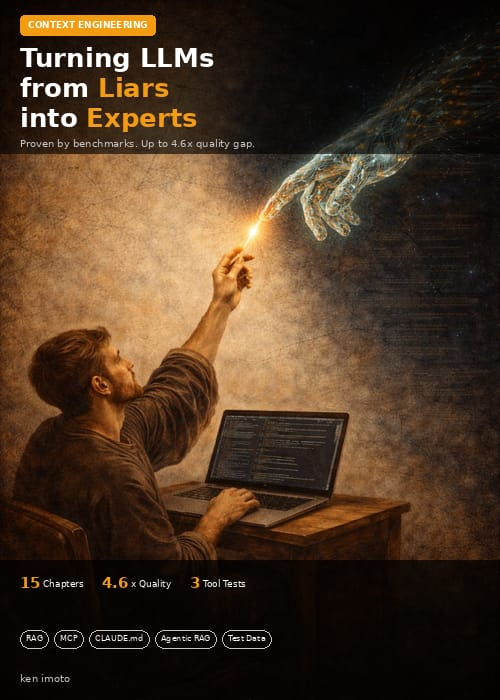
Dive deeper with related articles
FAQ
- What does the Practical Claude Code book cover?
- 19 chapters from a year of production use: CLAUDE.md patterns from 2 lines to 100+, Plan Mode workflows, team rollout, MCP integration, and supply-chain security.
- Who is this Claude Code book for?
- Engineers already past hello-world with Claude Code who want a repeatable system instead of ad-hoc prompting, including teams standardizing CLAUDE.md across projects.
- Where can I buy it?
- The English edition is on Amazon Kindle ($9.99). Japanese, Portuguese, and Spanish editions are also available.
Read on Kindle
Included in Kindle Unlimited
Read on Kindle ($9.99)* This page contains Amazon Associates links. Purchases may earn the author a referral fee.