Build your own embed SDK: a chat widget in 6 decisions
Across this series I took five products apart. Here I put one back together. The target is a minimal SDK: the customer pastes one <script> line into their site and a chat widget floats in the bottom-right corner. I’ll make each of the six decisions the teardowns surfaced, explicitly, in code.
![Design sketch of the minimal embeddable chat SDK. Three zones: the customer site (example.com), the SDK iframe (sdk.myapp.com, ours) and our backend (api.myapp.com). The customer pastes one line, <script src="…/v1/latest/">, about 5 KB and no-cache. The loader blocks a double load with __MyAppChatLoaded, creates the iframe and passes the origin in the hash, and buffers push([...]) calls to send after ready. It checks every message: origin is https://sdk.myapp.com and event.source === iframe.contentWindow. postMessage carries cmd {type, method, params, id} from the loader to the iframe, and ready / res / event back. Inside the iframe, iframe.html is no-cache with a fresh-nonce CSP on every request, and main-<hash>.js is the body (all UI), immutable for 1 year. The CSP is script-src 'self' 'nonce-…' and connect-src allows only api.myapp.com. The iframe checks every message: origin equals the customer site received in the hash, and event.source === window.parent. HTTPS / WSS goes only to hosts allowed by connect-src. The backend has an HTTPS API (REST and auth) and a WebSocket (wss://, pushes new chat messages). What this shape buys: the customer's CSS and JS never collide with our UI, and even after an XSS, fetch and WebSocket can reach only api.myapp.com. Along the bottom, the six decisions and where each applies: 1 iframe, stays out of the customer's DOM (the three zones); 2 loader / body, split into 5 KB and about 300 KB (the script line and main.js); 3 CSP, nonce plus connect-src (inside the iframe); 4 postMessage, 4 message types with origin and source checks (the arrows on the left); 5 caching, loader no-cache and body immutable (no version choice); 6 init, push queue and double-load guard (inside the loader). A design sketch; nothing in it was run or measured](/images/learn/js-sdk-design/sdk-architecture-en.png)
Requirements
- It works when the customer site (
example.com) pastes one line:<script src="https://sdk.myapp.com/v1/latest/"> - A chat button floats in the bottom-right corner; clicking it opens a conversation window
- It doesn’t interfere with the customer site’s CSS, JS or cookies
- It sends and receives the conversation log with our own server (
api.myapp.com) - Encrypting chat history is out of scope (about as sensitive as video metadata)
Decision 1: iframe or DOM injection
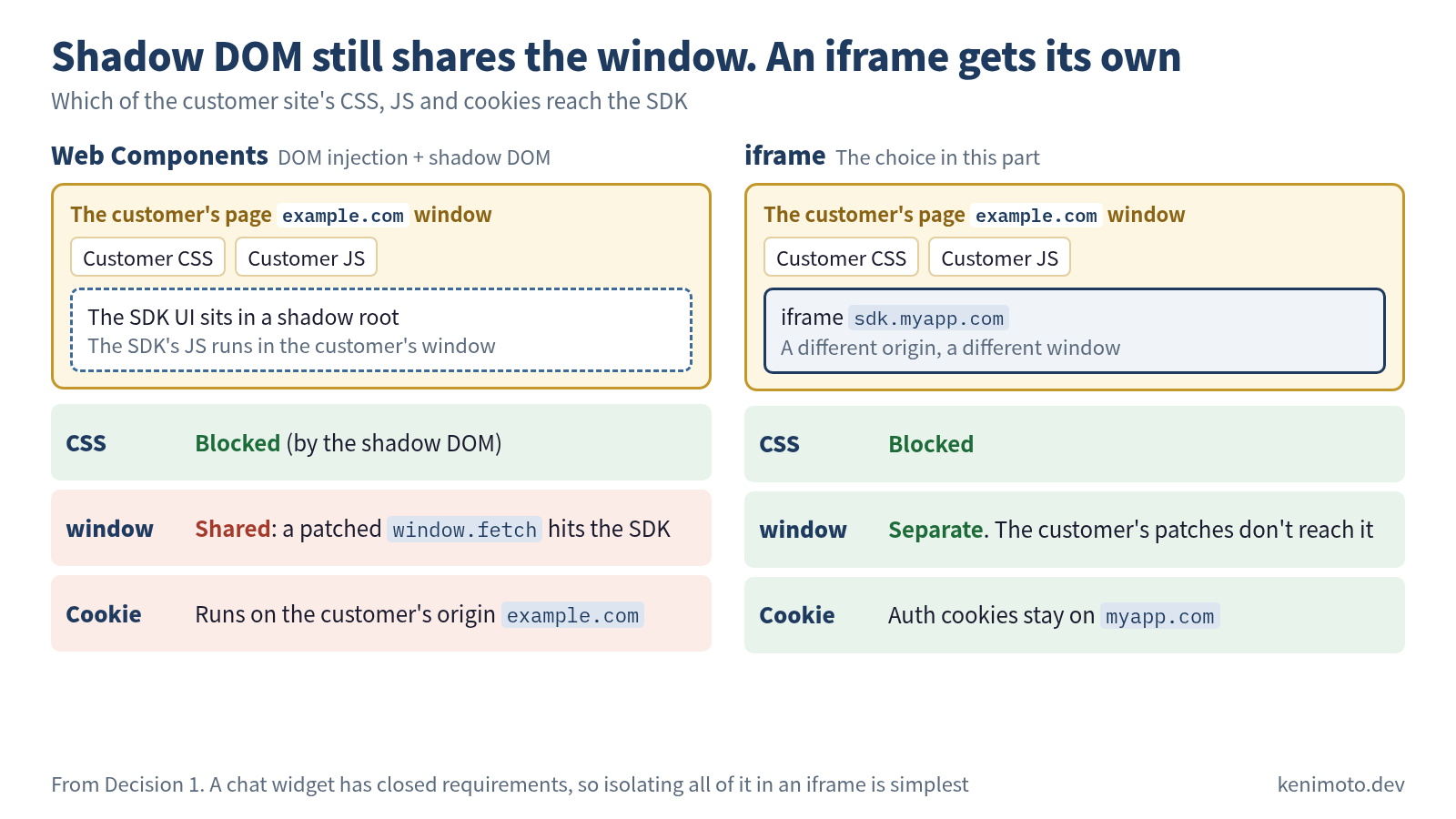
The requirement not to interfere with the customer’s CSS and JS points to an iframe. Even if the customer mixes Tailwind and Bootstrap, our UI is unaffected. As a side benefit, the auth cookie stays confined to the myapp.com origin. The alternative, injecting into the DOM (Web Components), isolates CSS through shadow DOM but still shares window on the JS side. If the customer site has rewritten window.fetch, the side effects are hard to predict. A chat widget has a closed set of requirements, so the simple move is to pick an iframe and isolate the whole thing.
Decision 2: split the loader from the body
Do you keep the loader small to start fast, or ship a single file? I’ll split them this time.
- Loader (
https://sdk.myapp.com/v1/latest/): around 5 KB; it creates the iframe and bridges postMessage, nothing more - Body (the real code the loader pulls in, starting from
https://sdk.myapp.com/v1/lib/iframe.html): the whole UI, ~300 KB
The main reason to split is the cache-control strategy (Decision 5). The loader is refetched every time so the version can be switched; the body lives at a hash URL and is cached for a long time. A single file can’t be split that way.
Decision 3: CSP and isolation inside the iframe
Response headers for iframe.html:
content-security-policy:
  default-src 'self';
  script-src 'self' 'nonce-<per-request-random>';
  style-src  'self' 'nonce-<per-request-random>';
  connect-src 'self' https://api.myapp.com wss://api.myapp.com;
  img-src    'self' data: blob:;
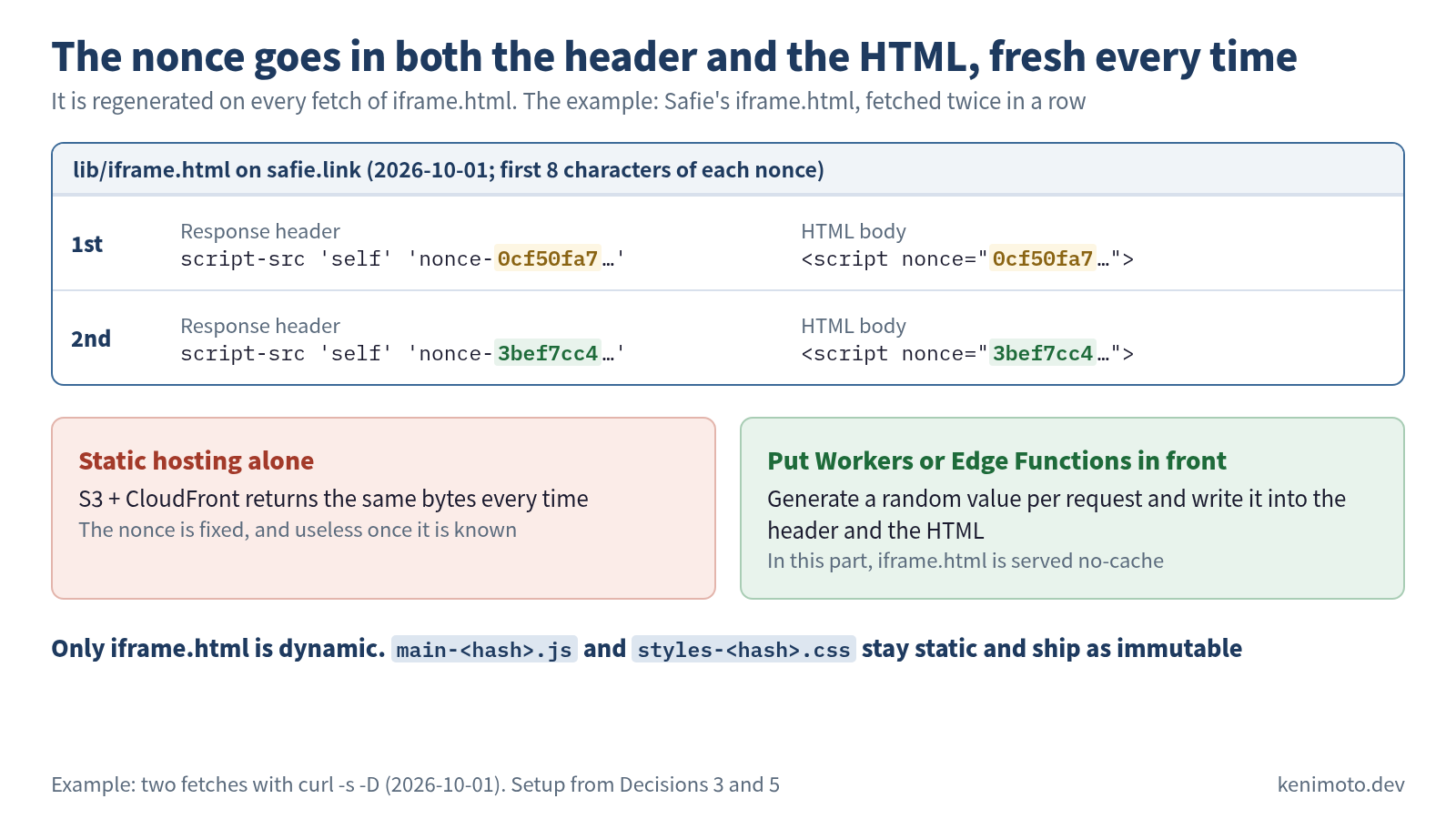
script-src 'self' 'nonce-...': the server that delivers iframe.html issues a per-request nonce, and only<script nonce="...">tags inside the iframe that match it executeconnect-srclimited toapi.myapp.com: even if an XSS lands, data can’t be carried off to another domain- No
frame-ancestors(the whole point is to be embedded by customer sites)
A per-request nonce needs a server that delivers iframe.html dynamically with that header. Static hosting alone (S3 + CloudFront) can’t do it. You end up putting Cloudflare Workers or a CDN’s edge functions in front.
Decision 4: the postMessage contract
Parent and child share no state (the loader only creates the iframe and sets up the postMessage bridge; state lives in the iframe). A one-sided “ready” notification is enough of a handshake.
Protocol:
// child → parent (iframe finished loading)
{ type: "ready" }

// parent → child (the customer calls an SDK method)
{ type: "cmd", method: "open", params: {}, id: <number> }

// child → parent (method result)
{ type: "res", id: <number>, result: any, error: string | null }

// child → parent (state change notification)
{ type: "event", name: "message-received", data: {...} }
Check origin by exact match, and the sender with event.source:
// iframe side
window.addEventListener("message", (event) => {
  if (event.origin !== "https://example.com") return; // the customer site's origin (passed in by the loader)
  if (event.source !== window.parent) return;         // is the sender the parent that embedded us?
  // handle the payload
});
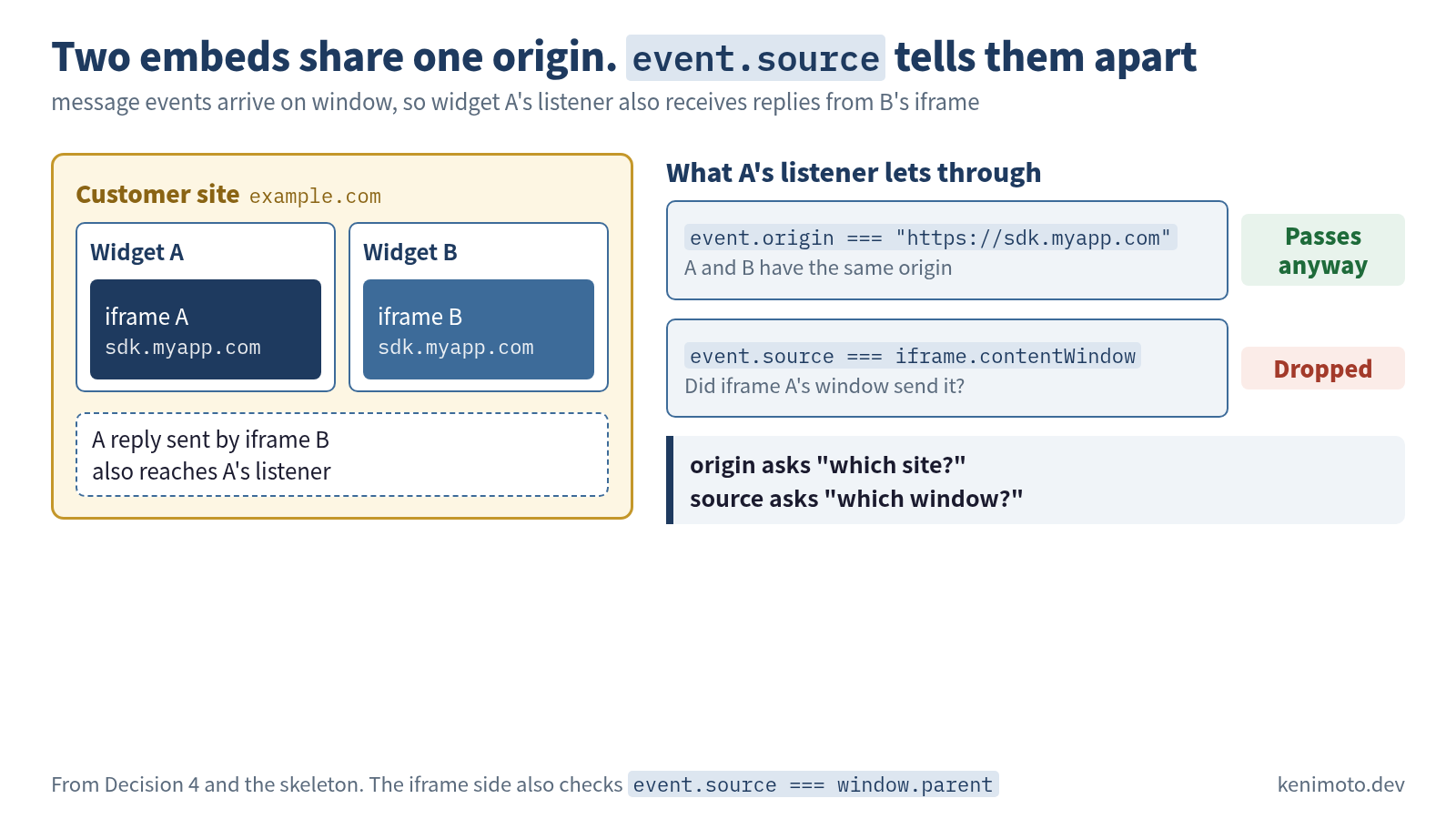
When two widgets are embedded on the same page, both iframes have the origin https://sdk.myapp.com, and origin alone can’t tell whether a reply came from your own iframe. So the loader side also checks event.source === iframe.contentWindow on top of the origin.
The loader tells the iframe the customer site’s origin. Concretely, it embeds the origin in the hash as iframe.src = ".../iframe.html#" + encodeURIComponent(location.origin), and the iframe’s JS parses location.hash on startup.
I don’t choose first-message trust. It leaves room for an attacker’s iframe to speak first, so while the implementation is young I’ll stay with the stricter exact-match design.
No encryption needed: the loader sends straight to the iframe’s window with a targetOrigin, so messages don’t reach sibling iframes or other tabs. They could be read if another script running on the customer’s page added a listener to the parent’s window, but that script could also rewrite postMessage or crypto.subtle itself, so I think in-page encryption would struggle to hold that line (this is reasoning; I haven’t tried it). I judged chat history to be about as sensitive as a video player’s data and left encryption out.
Decision 5: cache-control strategy
The loader is the “versioning contract”, so it is refetched every time. The body lives at a hash URL and is cached for a year.
| Resource | URL | cache-control |
|---|---|---|
| loader | https://sdk.myapp.com/v1/latest/ | no-cache |
| iframe.html | https://sdk.myapp.com/v1/lib/iframe.html | no-cache (served dynamically with the nonce header) |
| iframe body JS | https://sdk.myapp.com/v1/lib/main-<hash>.js | public, max-age=31536000, immutable |
| iframe body CSS | https://sdk.myapp.com/v1/lib/styles-<hash>.css | public, max-age=31536000, immutable |
Customers don’t choose a version. The loader is refetched every time, and on our side it always emits the latest body hash. Part 4 covers why this strategy follows naturally once you’ve chosen an iframe.
Decision 6: initialization style
I’ll make it imperative.
<!-- the code the customer writes -->
<script src="https://sdk.myapp.com/v1/latest/" async></script>
<script>
  window.MyAppChat = window.MyAppChat || [];
  window.MyAppChat.push(["init", { apiKey: "..." }]);
  window.MyAppChat.push(["setUser", { id: "user123" }]);
</script>
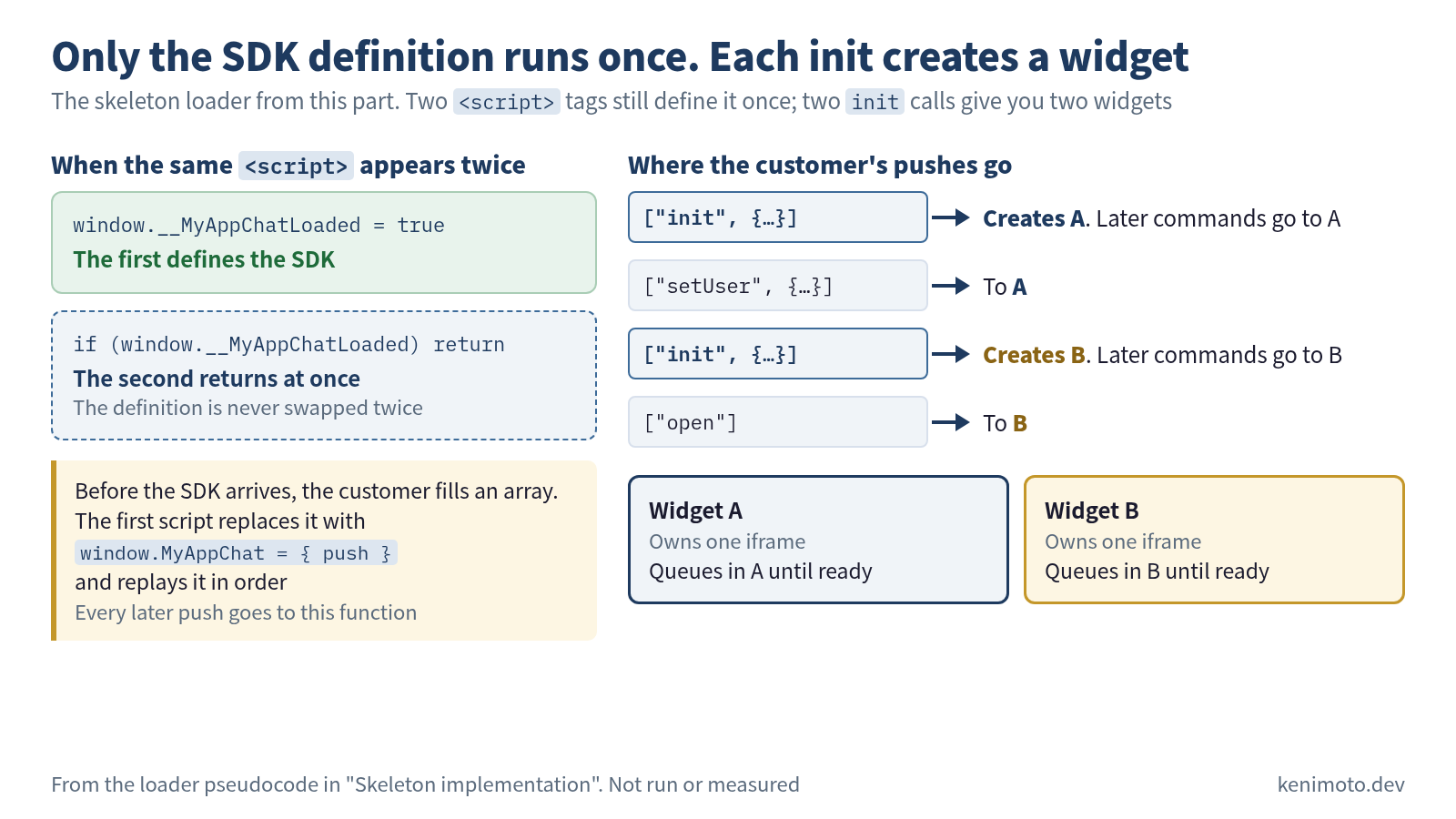
This is the deferred command queue pattern. Commands called before the SDK finishes loading are stored in an array (MyAppChat), and once the SDK has loaded it replays the array in order. Since customers don’t have to write callbacks, their code reads synchronously. Google Analytics’ gtag and others use this pattern, and it works in single-page apps and static HTML alike.
![Sequence diagram of the messages in the minimal chat SDK built in this part, from startup to the first command. Two lifelines, the loader (parent, example.com) and the iframe (child, sdk.myapp.com), with the customer's code on the left. 1 The customer can call MyAppChat.push(["init", …]) before the SDK arrives, and the command is held in the loader's array. 2 The loader passes the customer's origin in the hash as iframe.html#https%3A%2F%2Fexample.com, and the child checks messages against it (this is the iframe URL, not a postMessage). 3 The child sends {type: "ready"} to the parent. 4 The parent sends the queued commands in order as {type: "cmd", method, params, id}. 5 A push after ready is sent at once as {type: "cmd", method, params, id} instead of being queued. 6 The result comes back from the child with the same id as {type: "res", id, result, error}. 7 Notifications such as new messages arrive from the child as {type: "event", name, data}. Types as defined in Decision 4](/images/learn/js-sdk-design/byo-message-flow-en.png)
I’m not choosing Web Components (<my-chat>) here. With an iframe already in place, stacking Web Components’ isolation benefit (shadow DOM) on top adds little, and there’s no need to cut off environments that lack Web Components support.
Guarding against double load:
// at the top of the loader (put it inside an IIFE as in the skeleton below; a return outside a function is a syntax error)
if (window.__MyAppChatLoaded) return;
window.__MyAppChatLoaded = true;
Now if a customer accidentally writes the <script> twice, the second copy returns immediately. What this stops is only the SDK definition (replacing window.MyAppChat) running twice; the loader still creates one widget per init. To put two on the same page, write init twice (see the skeleton below).
Skeleton implementation
Loader (pseudocode):
(function() {
  // Only the SDK definition runs once. A widget is created per init
  if (window.__MyAppChatLoaded) return;
  window.__MyAppChatLoaded = true;

  const parentOrigin = location.origin;
  const targetOrigin = "https://sdk.myapp.com";
  let nextId = 0; // res comes back with the same id, so we can match it to its cmd

  // One widget: its iframe, its ready state, and the commands queued before ready
  function createWidget() {
    const iframe = document.createElement("iframe");
    iframe.src = "https://sdk.myapp.com/v1/lib/iframe.html#" +
      encodeURIComponent(parentOrigin);
    iframe.style.cssText = "position:fixed;bottom:20px;right:20px;" +
      "border:none;width:60px;height:60px;z-index:2147483647";
    // A visible iframe goes in body. If the loader runs in <head> before body exists, wait
    const mount = () => document.body.appendChild(iframe);
    if (document.body) mount();
    else document.addEventListener("DOMContentLoaded", mount);

    let ready = false;
    const queue = [];
    const send = (cmd) => iframe.contentWindow.postMessage(
      { type: "cmd", method: cmd[0], params: cmd[1], id: ++nextId },
      targetOrigin
    );

    window.addEventListener("message", (event) => {
      if (event.origin !== targetOrigin) return;
      if (event.source !== iframe.contentWindow) return; // tell it apart from other widgets on the same page
      if (event.data.type === "ready") {
        ready = true;
        queue.forEach(send); // replay the queued commands
      }
      // res / event handling omitted
    });

    return { push: (cmd) => (ready ? send(cmd) : queue.push(cmd)) };
  }

  // init creates a widget; later commands go to the most recently initialized widget
  let current = null;
  const push = (cmd) => {
    if (cmd[0] === "init") current = createWidget();
    if (current) current.push(cmd);
  };

  // Flush commands queued before the SDK arrived, then intercept window.MyAppChat.push
  const early = window.MyAppChat || [];
  window.MyAppChat = { push };
  early.forEach(push);
})();
iframe body (pseudocode):
const parentOrigin = decodeURIComponent(location.hash.slice(1));

window.addEventListener("message", (event) => {
  if (event.origin !== parentOrigin) return;
  if (event.source !== window.parent) return;
  const { type, method, params, id } = event.data;
  if (type !== "cmd") return;
  handleCommand(method, params).then(
    (result) => event.source.postMessage(
      { type: "res", id, result, error: null }, parentOrigin
    ),
    (error) => event.source.postMessage(
      { type: "res", id, result: null, error: String(error) }, parentOrigin
    )
  );
});

// signal that loading has finished
window.parent.postMessage({ type: "ready" }, parentOrigin);
That gives you the skeleton of the minimal build. On top of it you’ll need documentation for the imperative API, error handling, retries, accessibility (ARIA), internationalization, telemetry, CI/CD and CDN configuration. What’s written here is only the bones of the decisions; a production SDK puts flesh on them.
The six decisions at a glance
| Decision | What I chose | Main reason |
|---|---|---|
| Embedding shape | iframe | Full isolation from the customer’s CSS/JS/cookies |
| Loader/body split | Split | For the cache-control strategy |
| CSP isolation | Per-request nonce + restricted connect-src | Stop data being carried off if an XSS ever lands |
| postMessage contract | {type, method, params, id} + exact origin match + event.source check | Strict and simple, with no crossed wires even with two embeds |
| cache-control | Loader no-cache, body immutable | With an iframe, customers don’t choose a version |
| Initialization API | Imperative (deferred command queue) | Works in both static HTML and single-page apps |
Mapped onto the five products covered across the series, this minimal SDK is a hybrid: Safie’s isolation approach, YouTube-style origin checks and a Google Analytics-style initialization queue. Each of those designs came out of its product’s economic and technical constraints. Recombining them to fit your own requirements is how I’d suggest using this series once you’ve read it.
Which one would you choose
The chat widget in this part falls into four of the situations in the table below: “must not interfere”, “may be embedded two or more times on the same page”, “customers split between static HTML and single-page apps” and “any shape”. When requirements change, so do the choices, so here is how to choose by situation. It’s the same table as on the series landing page.
| Situation | What to choose | Why it works |
|---|---|---|
| The customer site’s CSS, JS and cookies must not interfere with yours | An iframe. Split the loader from the body, and don’t let customers choose a version | The customer’s styles and window.fetch rewrites can’t reach you. A loader refetched every time keeps parent and child on the same version |
| Customers build their own UI or want it to blend into their framework | DOM injection (Web Components). Let customers choose a URL that can name an exact version | Once customers write a version, they choose when to upgrade even if the API changes (Video.js requires a version; Mux Player, if you write one, is cached immutable for a year) |
| You handle things that would hurt to leak, such as auth tokens or recorded footage | Set a per-request nonce CSP inside the iframe and lock connect-src to your own hosts | Even a hijacked frame can’t carry data out (Safie). Static hosting alone can’t build it |
| Parent and child share state | Wait for the child’s ready signal, then push the initial state | YouTube’s listening → initialDelivery |
| You may be embedded two or more times on the same page | Check event.source in addition to an exact origin match | Both iframes have the same origin, so origin alone can’t tell whether it’s your iframe |
| Customers use static HTML or a CMS and write no JS | Initialize from data attributes | Like Video.js’s data-setup, it works just by pasting |
| Customers are split between static HTML and single-page apps | Initialize imperatively, with a deferred command queue | Calls made before load are queued in an array and replayed after load, so the same code works in both |
| Any shape | Add a double-load guard from the first commit | Tag managers fire snippets twice. Four of the five products ship one |
Once the top two rows settle the shape, the versioning policy is settled with it.
I put a per-request nonce CSP in Decision 3 because, while the conversation log isn’t as sensitive as the “would hurt to leak” row, I still didn’t want it carried off. If you’re handling auth tokens or recorded footage and considering encryption, then as I wrote in Decision 4, in-page scripts can’t be fully kept out, so I expect you’d start from a design that at least never puts the key on the same postMessage channel (this is reasoning; I haven’t tried it).
Wrap-up and where to go next
An SDK where pasting one script line makes something work has quietly settled all six decisions behind the scenes. Actually reading the five products’ bundles showed that their answers branch cleanly, each worked backward from economic and technical constraints. When you build your own, get the requirements clear first, then choose decision by decision. That is the series’ argument as a whole.
Directions to go deeper:
- Observability: a design that catches errors inside the iframe and sends them to your own server, so
window.onerroron the customer site stays clean - A/B testing: switching the variant shown inside the iframe from your own side
- Privacy: using the fact that the iframe can’t access the customer site’s cookies to simplify GDPR/CCPA compliance
- Binary transport: carrying Protocol Buffers or Cap’n Proto over postMessage to cut JSON serialization cost
Your own SDK will need these one by one as it gets closer to production. Once the skeleton is built, I hope this series serves as a reference point as you extend it in each direction.
Measured 2026-08-08. The five products’ bundle IDs, keys and URLs will change, but these six decision axes won’t. Tear them apart again a year from now and the same framework should still read them.
Was this article helpful?