I Checked What GPTBot Actually Sees on My JS-Rendered Pages. It Was an Empty `<div>`.
I’ve written a few posts about why AI doesn’t cite your page. The .md twin one was about serving AI a clean alternate copy. The JSON-LD one was about how many schemas actually get used. The Brave one was about indexes. All of those assume the crawler at least read your content and then decided what to do with it.
This post is about the step before all of that: the crawler reading your content. Because for a lot of sites, it doesn’t. Not “reads it and ignores it.” Doesn’t read it. Gets a blank page and leaves.
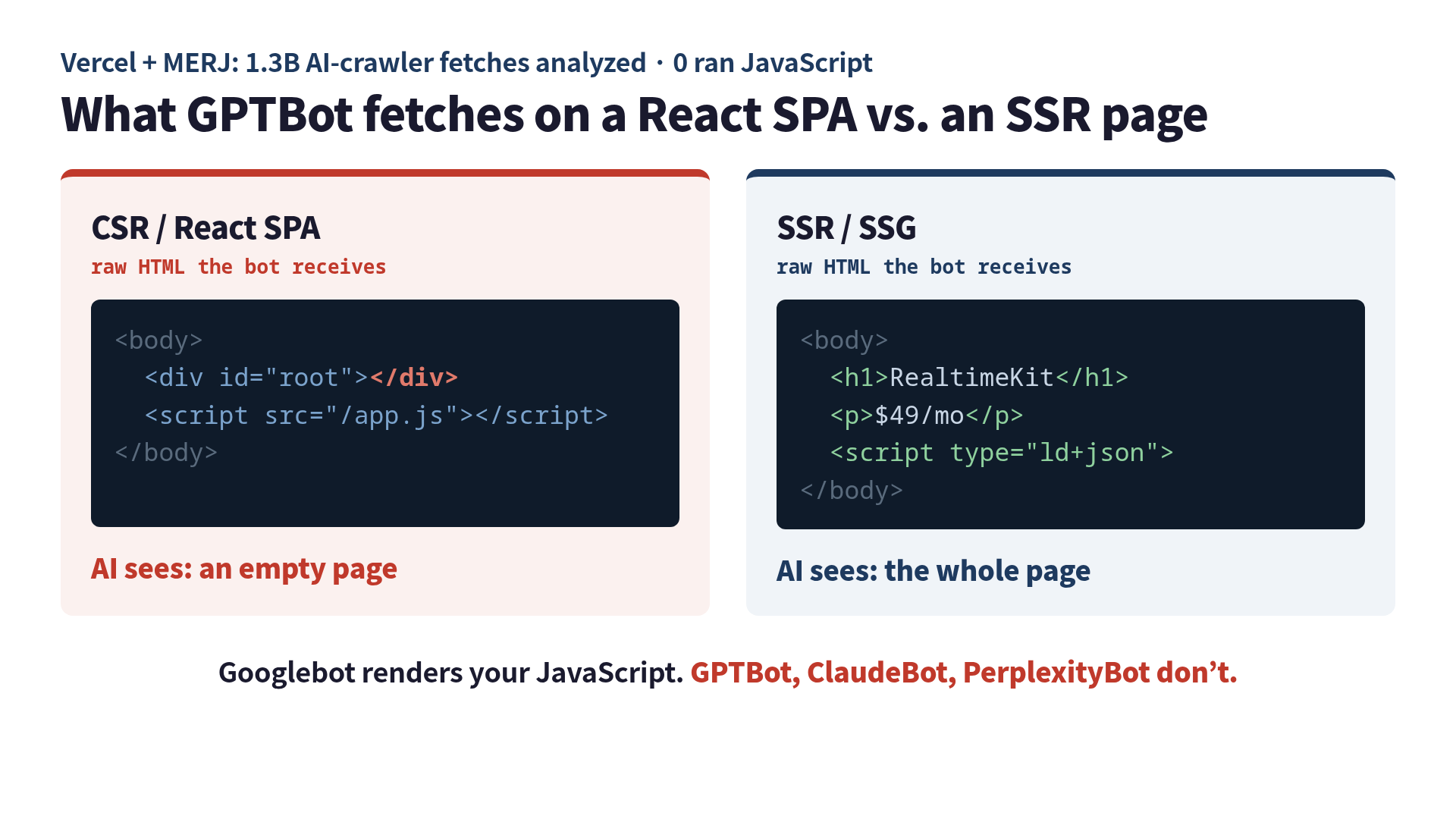
I found this out the embarrassing way, by being smug. I’d built a clean little single-page app, wired up react-helmet to inject all the right meta tags and JSON-LD, validated everything in Google’s Rich Results Test, watched it pass, and felt like a responsible adult. Then on a whim I fetched my own page the way an AI crawler fetches it. The page came back, and the part where my content was supposed to be looked like this:
<body>
  <div id="root"></div>
  <script src="/app.js"></script>
</body>
That’s it. That’s the whole page, as far as GPTBot is concerned. An empty <div> and a promise.
The one fact that explains it
AI crawlers don’t run JavaScript.
That’s the whole thing. Googlebot does: it loads your page in a headless Chromium, waits for the JS to run, and indexes whatever the browser paints. We’ve spent a decade assuming that’s just how crawlers work, because for SEO it is. The AI crawlers skipped that step. GPTBot, OAI-SearchBot, ChatGPT-User, ClaudeBot, PerplexityBot: they fetch the raw HTML your server sends, read the text that’s already in it, and move on. No browser. No render. No second pass.
This isn’t a hunch. Vercel and MERJ instrumented over 1.3 billion AI-crawler fetches across their network and found zero evidence of JavaScript execution (Vercel). The bots do download JS files sometimes (GPTBot pulled JavaScript on 11.5% of requests, ClaudeBot on 23.84%) but downloading isn’t running. They grab the file and never execute it, like buying a cookbook and eating the cover.
The reason is boring and economic: rendering JavaScript at crawl scale is expensive, and these bots run on tight timeouts. So they don’t. Googlebot eats the rendering cost because search is Google’s entire business. For an AI company, your page is one of a billion, and the cheap path wins.
The test you can run in thirty seconds
You don’t have to trust me or Vercel. Pretend to be the bot. curl with no JavaScript engine is a decent stand-in for exactly what these crawlers do: pull the raw HTML and look at it.
curl -A "Mozilla/5.0 (compatible; GPTBot/1.2; +https://openai.com/gptbot)" https://your-site.com/ \
  | grep -o '<div id="root">.*</div>'
If that prints <div id="root"></div> with nothing inside, your content lives in JavaScript, and the AI crawler sees the same emptiness. I ran the equivalent against a few sites to calibrate. A well-known client-rendered web app came back with 79 characters of actual text in the raw HTML, basically a <title> and an empty root. My own site, which is built with Astro and rendered at build time, came back with 6,098 characters of text plus its JSON-LD sitting right there in the markup. Same curl, same user-agent, two different realities.
Here’s the part that makes it sneaky. Open that same client-rendered page in your browser and it’s gorgeous: headings, pricing, FAQs, all of it. Open Google’s Rich Results Test and it passes, because Google runs the JavaScript. Everything you use to check your work runs JavaScript. The one audience that doesn’t is the one you were trying to reach.
Why your JSON-LD trick specifically backfires
This is the bit I want every engineer to internalize, because it’s the most common own-goal. The standard advice is “add JSON-LD so AI understands your content.” Good advice. But how you add it decides whether it exists at all.
If you inject your structured data client-side, you’ve written schema that only appears after the JavaScript runs:
// The AI crawler never sees this. It runs in a browser; the bot isn't one.
useEffect(() => {
  const script = document.createElement('script')
  script.type = 'application/ld+json'
  script.text = JSON.stringify(jsonLd)
  document.head.appendChild(script)
}, [])react-helmet, dynamic <Head> injection, anything that builds the tag at runtime: to GPTBot, none of it exists. You did the homework and left it in your locker. The fix is to emit the same JSON-LD in the HTML the server sends:
// Rendered on the server, present in the raw HTML, visible to everyone.
export default function Page({ jsonLd }) {
  return (
    <script
      type="application/ld+json"
      dangerouslySetInnerHTML={{ __html: JSON.stringify(jsonLd) }}
    />
  )
}
Identical schema. The only difference is when it gets created, and “when” is the whole ballgame when your reader never starts a JavaScript runtime.
SEO and LLMO finally disagree about something
For years the honest answer to “does my SPA hurt SEO?” was “not really, Google renders it.” That answer is still true for Google. It is now false for AI search, and that split is the actual news here. You can have a page that ranks fine in Google and is completely invisible to ChatGPT, Perplexity, and Claude, for the single reason that Google brought a browser and they didn’t.
So the rendering decision you made for SEO reasons (or for no reason, because create-react-app was the default) is now an LLMO decision too, and it’s the one that gates everything else. There’s no point optimizing your llms.txt, your headings, or your citations if the crawler is staring at an empty <div>.
The fix, in order of effort
- Static sites (SSG). Astro, Next with
output: 'export', Hugo, plain HTML. Content is in the markup at build time. This is the easy win and it’s why my own site passed thecurltest without my doing anything clever. - Server-side rendering (SSR). Next App Router server components, Nuxt, Remix, SvelteKit. The server runs the render and ships real HTML. Same end result for the crawler.
- Prerendering / dynamic rendering. If you’re stuck with a big CSR app you can’t rewrite this quarter, a prerender layer (Prerender.io, or your own headless-Chrome cache) detects bot user-agents and serves them a pre-rendered snapshot. It’s a patch, not a cure, but it un-blanks the page.
The check is the same in all three cases: curl it as the bot and look at the bytes. If your content is in there, you’re done. If it’s an empty div, no amount of schema saves you. If you want the full crawler-readability checklist (and the per-path rendering rules for each major bot), that’s what I keep at llmoframework.com.
The takeaway
I spent a week being proud of structured data that no AI would ever load. The lesson wasn’t “JSON-LD is useless” or “React is bad.” It’s narrower and dumber than that: the AI crawler reads what your server sends, not what your browser builds. If the content shows up only after JavaScript runs, then for the readers you most want, it never shows up at all.
Go curl your own homepage as GPTBot. Worst case, you confirm it’s fine and you’ve lost thirty seconds. Best case, you find an empty <div> where your best content was supposed to be, and you fix it before anyone important asks ChatGPT about you.
If you want the whole playbook (which bots render what, the minimal JSON-LD that actually survives, llms.txt, and how to measure your AI citation rate), I wrote it up as a short book: LLMO Quickstart.
Sources:
 Related book Why ChatGPT Ignores Your Website Google SEO won't get you cited by ChatGPT — this is the playbook for being seen by AI search, with measurement included View the book page →
 Was this article helpful?