Voice AI Verification: 300ms Myth, Half True
I posted about voice AI latency on an overseas technical community site, and a reader pushed back with a sharp technical point in the comments. The point stuck with me, so I posted on X that I’d look into it.
Digging through four directions of primary sources, I found a company that had already run into the same issue — and had already failed at the obvious fix.
Is Streaming Parcial Really Just “Talking Without Verification”?
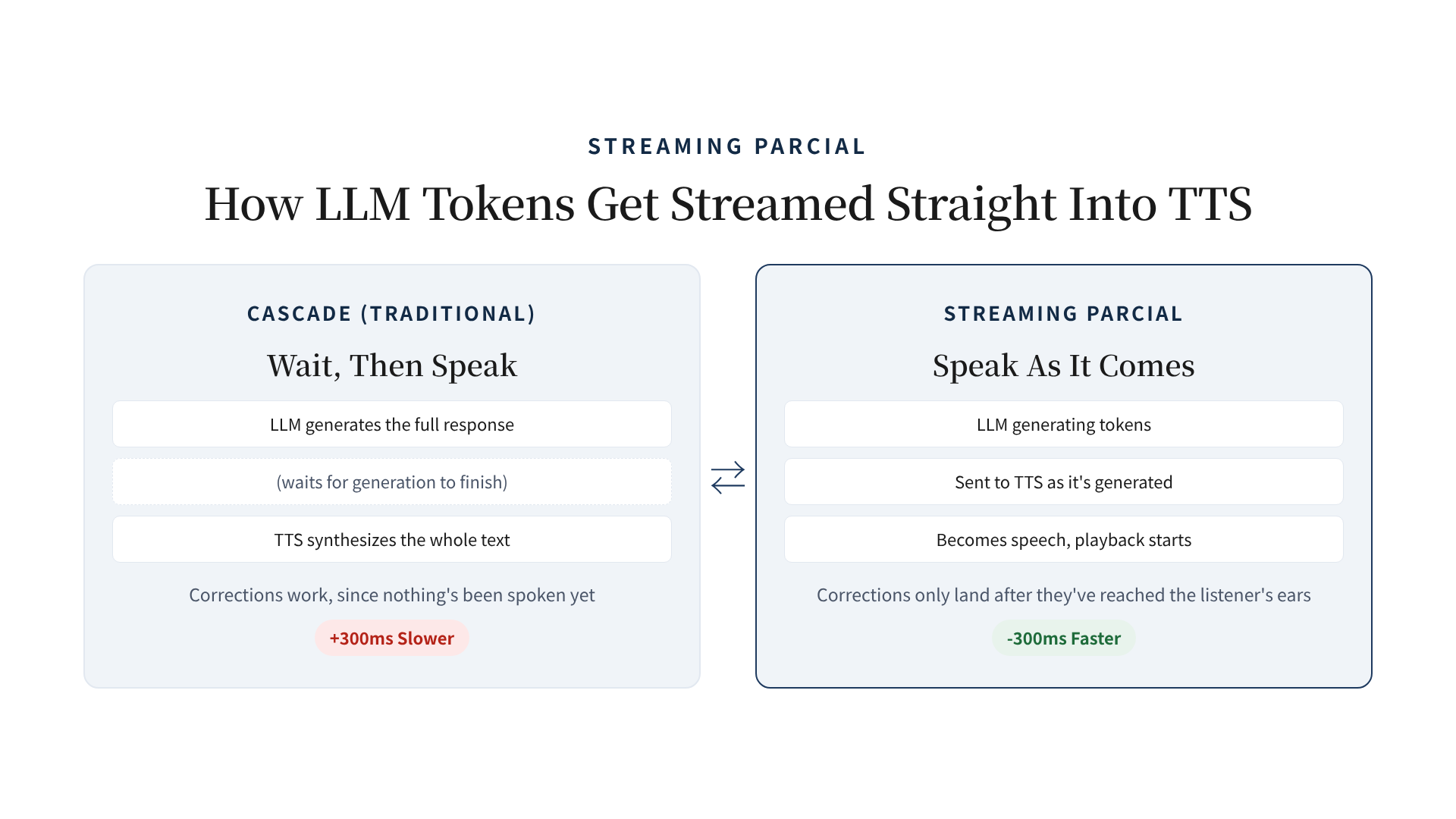
The dominant technique for cutting voice AI latency is “streaming parcial”: feeding LLM tokens straight into TTS (text-to-speech) as they’re generated. Instead of waiting for the full response, you start converting tokens to speech the moment they appear. This shaves off roughly 300ms.
But the technique has an obvious weakness: it can’t handle the LLM correcting itself mid-generation.
People do this constantly in conversation — say something, then catch themselves: “wait, no, I meant—”. That’s not unnatural. What’s unnatural is that streaming parcial’s design never accounts for this kind of correction in the first place. Tokens the LLM is still generating get handed straight to TTS and turned into sound. Any correction only happens after it’s already reached the listener’s ears.
So it’s more accurate to say this technique doesn’t skip verification to go faster — it never built a verification step into the design at all.
What Do ElevenLabs and Deepgram’s Official Docs Say About This?
So how do the major voice AI vendors handle this? I read four official blog posts, from ElevenLabs and Deepgram.
Their latency breakdowns are impressively precise. ElevenLabs publishes P50/P95 numbers in milliseconds for every stage: capture+endpointing, STT finalization, LLM TTFT (Time To First Token), TTS TTFA (Time To First Audio), network, player buffering. Deepgram’s technical writeup similarly compares model-by-model latency across STT, LLM, and TTS.
But none of the four posts mention the LLM correcting itself mid-generation. None mention the latency cost of adding a verification step, either. They break down latency down to the millisecond, yet this specific question never comes up.
Do Pipecat and LiveKit Solve This Problem?
If the vendors aren’t addressing it, what about the implementation frameworks? I read the official docs for Pipecat and LiveKit Agents, the two frameworks most commonly used to build voice AI agents.
Both frameworks have solid built-in support for barge-in — the user interrupting mid-response. Pipecat has dedicated frames like StartInterruptionFrame and BotInterruptedFrame; LiveKit Agents has settings like false_interruption_timeout to guard against false triggers.
But neither documents a dedicated mechanism for “the LLM correcting itself mid-generation.” As things stand, handling that is left to the developer.
Has Research Already Solved This?
If the frameworks haven’t addressed it, maybe academic research has gone further. I read two papers that looked relevant.
The first is Sherlock, which proposes speculatively executing downstream tasks while running verification in the background, then rolling back to the last verified checkpoint if something fails. It reports up to a 48.7% reduction in workflow execution time versus non-speculative execution. But this is research on agent workflows with chained tool calls — not something built for real-time voice conversation.
The second is “Speak While You Think,” which proposes a model called LLM2Speech: generating text and reading it aloud simultaneously. But its accuracy comes not from a verifier-style check, but from mimicking a non-streaming teacher model’s output. That’s a different approach from detecting a mid-generation correction and swapping it in.
Both papers sit close to this question — where should verification live? — without quite reaching voice conversation implementations.
Is Anyone Actually Tackling This Problem?
If vendors, frameworks, and research all sidestep this, is anyone actually solving it? Digging further, two companies had published real numbers.
The first is Giga (VoiceGuard / AsyncVoiceGuard). This was the most central finding of the whole investigation.
Giga’s team also started with “let’s just confirm it’s correct before speaking.” They tried routing LLM output through a verifier first, only sending it to TTS once it passed. The result: +3 to 4 seconds of added latency. Users thought the AI had frozen and went silent.
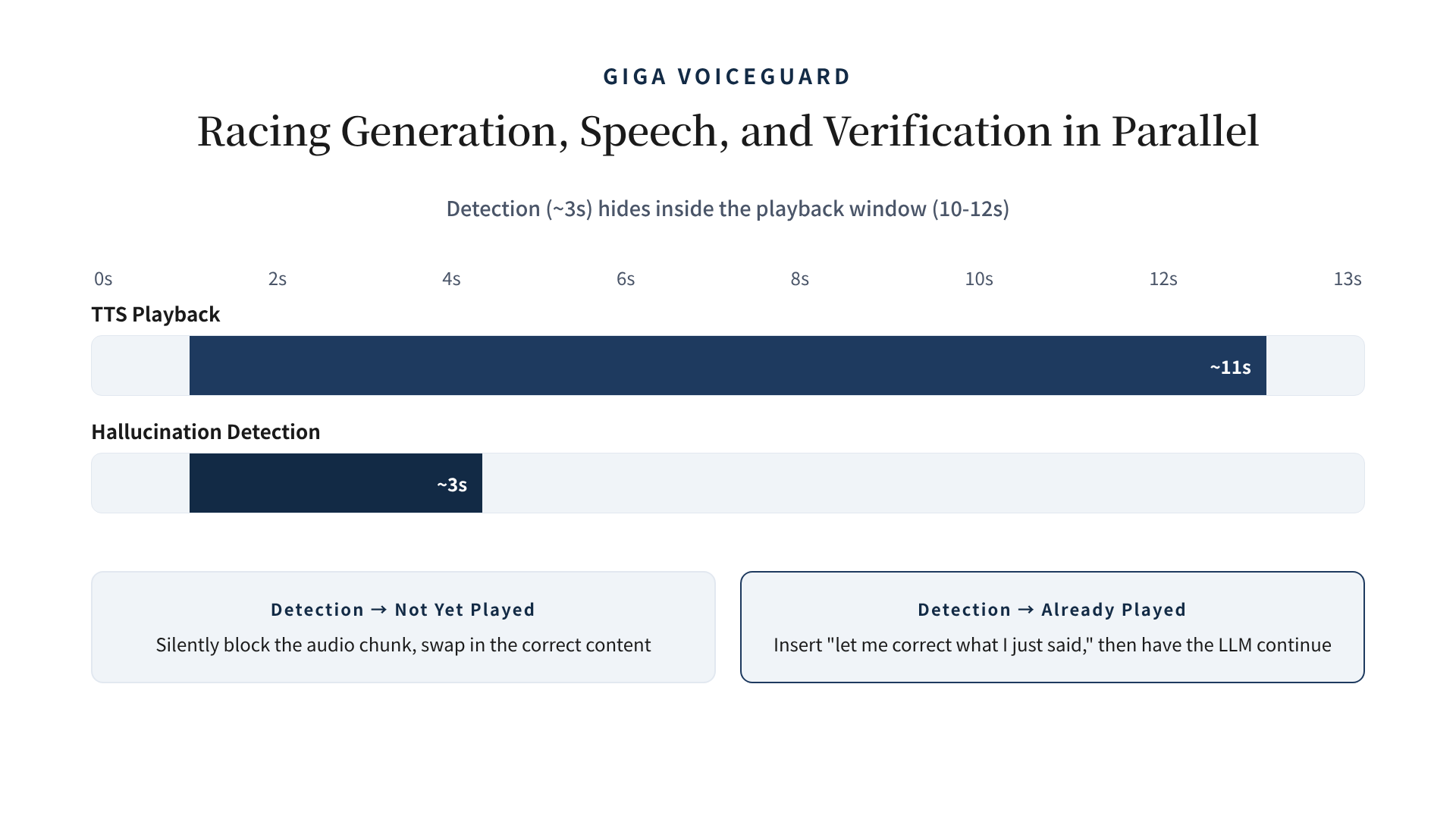
That failure pushed Giga to a different design: “race the generation, speech, and verification in parallel.” Sentence by sentence, audio playback and hallucination detection by a reasoning model run at the same time.
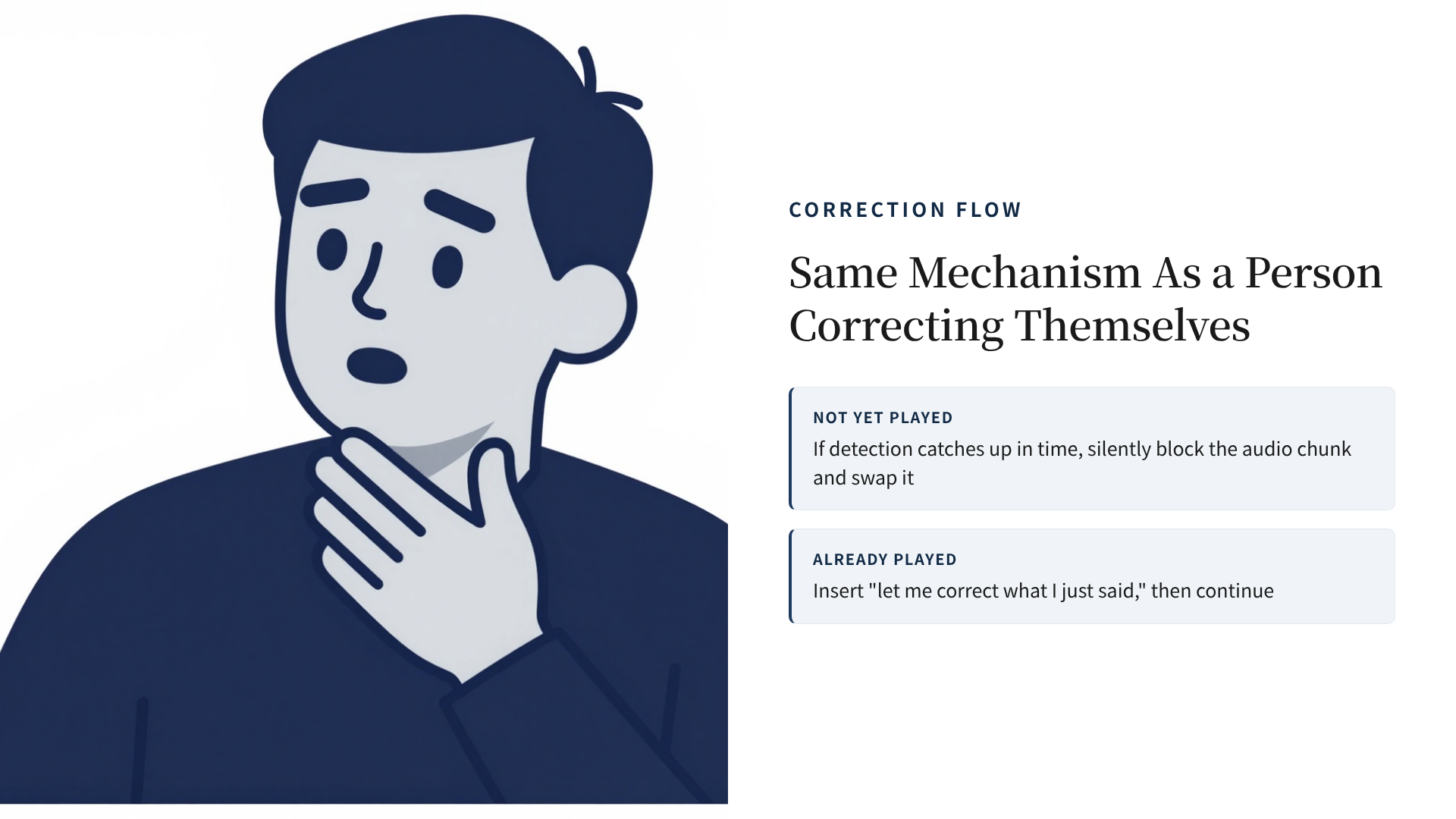
The correction mechanism splits into two cases depending on timing. If detection catches up before a chunk has played, it silently blocks that audio and swaps in the correct version — the listener never knows anything was wrong. If the bad audio has already played, the system inserts a brief phrase like “let me correct what I just said,” then has the LLM generate the correction and continue. That “I just corrected myself” context doesn’t carry over into the next conversation turn, to keep the model from getting overly cautious.
Generating the text takes about a second; reading it aloud takes another 10 to 12 seconds. Detection takes about 3 seconds, which fits comfortably inside that read-aloud window — so the reported added latency is effectively zero. In production (1.2 million utterances), the hallucination rate dropped from 4-5% to under 1%, with a false-positive rate under 0.3%.
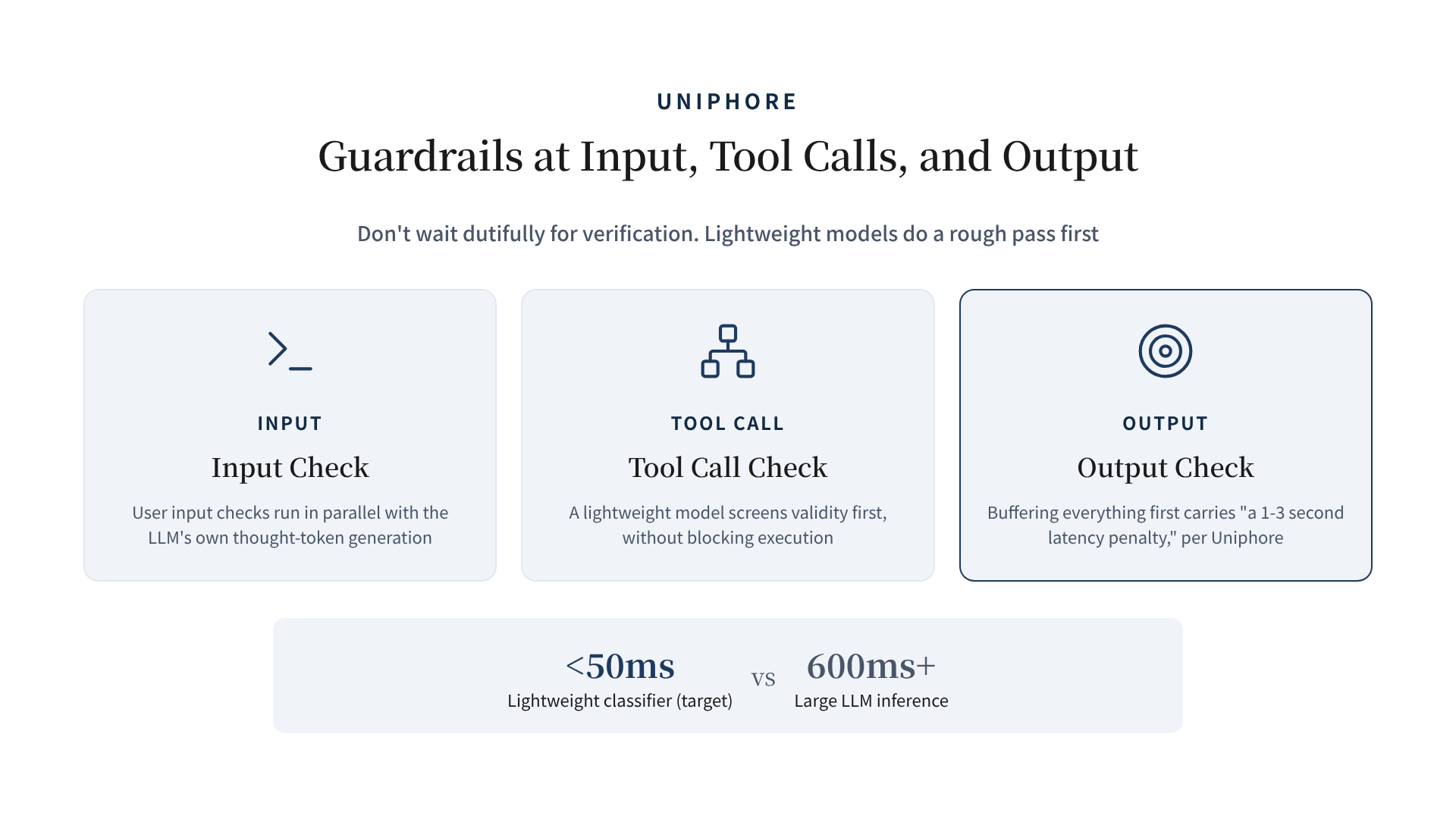
The second is Uniphore, which publishes a design with guardrails at three points: input, tool calls, and output. The key point, again, is not waiting dutifully for verification. A lightweight classifier targets under 50ms, while a large LLM inference pass takes 600ms or more — so a lightweight model does a rough first pass, and the input check runs in parallel with the LLM’s own token generation. Uniphore explicitly states that buffering everything and verifying afterward carries “a 1-3 second latency penalty.”
So Does Adding a Verifier Bring the Latency Back?
Back to the original claim: “adding a verifier to streaming parcial brings all the saved latency back.” Turns out that’s only half right.
It’s correct if the verification is placed in series. As Giga found out the hard way, dutifully waiting through “generate → verify → speak” brings back exactly the latency you cut.
But what the industry is actually doing isn’t dropping verification altogether. Run generation, speech, and verification in parallel (Giga). Have a lightweight model do a first pass and only invoke the heavy verifier when it’s genuinely needed (Uniphore). Both share one thing in common: neither one waits for verification to finish on the critical path — the path the user actually has to wait through before hearing anything.
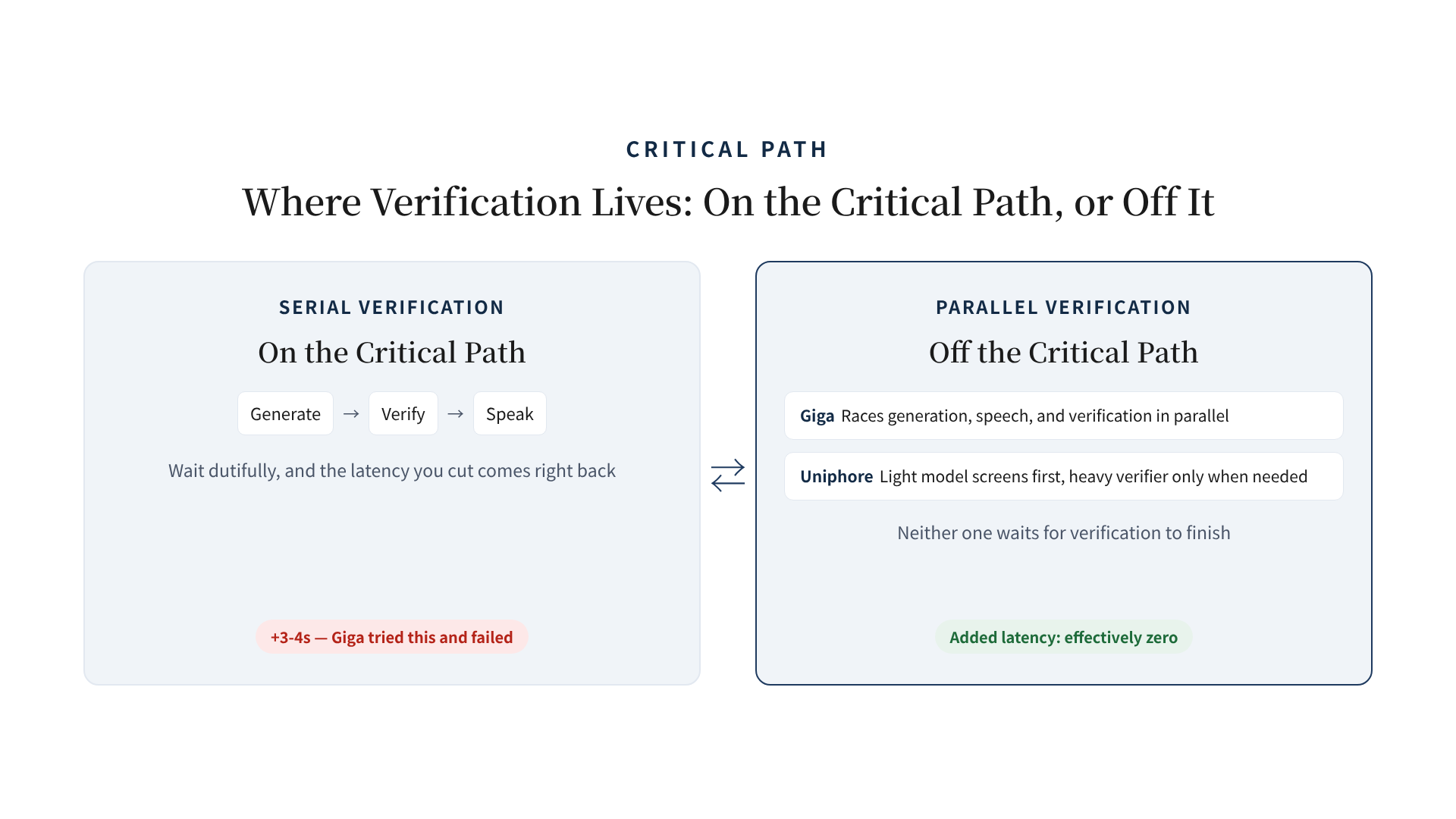
Verification wasn’t abandoned. It just wasn’t allowed to hold up the line.
Summary
- Streaming parcial trades 300ms of latency for never building in a way to handle the LLM correcting itself mid-generation
- ElevenLabs and Deepgram’s official docs are precise about latency breakdowns but never touch this specific question
- Pipecat and LiveKit Agents handle user barge-in well, but leave the LLM’s own self-correction to the developer
- Research (Sherlock, LLM2Speech) sits adjacent to this problem but hasn’t reached voice conversation implementations yet
- Giga VoiceGuard tried serial verification, failed, and switched to a parallel race — cutting hallucination rate from 4-5% to under 1%
- “Adding a verifier slows things down” is only true when verification sits on the critical path
If you want the latency budget behind the 300ms figures referenced throughout this piece, I broke down five published voice AI stacks in Voice AI Stack 300ms: 5 Published Setups, 2 Fit — only two architectures actually clear the bar.
The cascaded pipeline design covered in this piece is explored in more depth in The 300ms Threshold, in the chapter “Breaking Down the Cascaded Pipeline — STT / LLM / TTS.”
 Related book The 300ms Threshold Voice AI latency design | Shrink the time from end of speech to first sound View the book page →
Was this article helpful?